Custom Project Management Application for Bridge Builders
Custom construction project management system for displaying a scope of works for bridge-related projects of a structural research organization and managing the processes and research. The bridge construction software combines all required functionality in one place and simplifies the overall work process.
Business Challenge
A U.S.-based academic and research company, specializing in bridge construction and modification projects across the country, engaged us to develop a centralized custom construction project management software that will help to streamline the management of multiple research projects and track multiple parameters from the many devices installed at bridges. So, there were a number of bridges, hundreds of devices, thousands of incoming parameters, and no suitable all-in-one bridge design and construction system integrated to collect, track, and process all this data.
The customer and their researchers relied on various separate tools for task tracking and construction management, scheduling, and reporting. This inefficiency limited the number of bridge-related projects that could be effectively managed.
The main claim was to operate with all bridge construction projects and all the data in one place and make it visible for multiple users with different access roles at once. Challenges the customer and their researchers faced included:
Fragmented workflows
Bridge construction researchers used multiple disconnected tools, making collaboration and project tracking cumbersome.
Lack of a unified platform
There was no single bridge construction management software solution to track progress with and where to integrate To-do lists, Calendars, and Gantt charts.
Scalability concerns
The existing workflow limited the number of research projects handled simultaneously.
Need for controlled access
The bridge monitoring system required distinct roles, including administrators, project creators, and general users.
Project in Facts
Industry
Construction
Region
USA
Business
Middle-sized
Key technologies
Amazon / Amazon Web Services (AWS)
DHTMLX
GraphQL
React JS
Solution
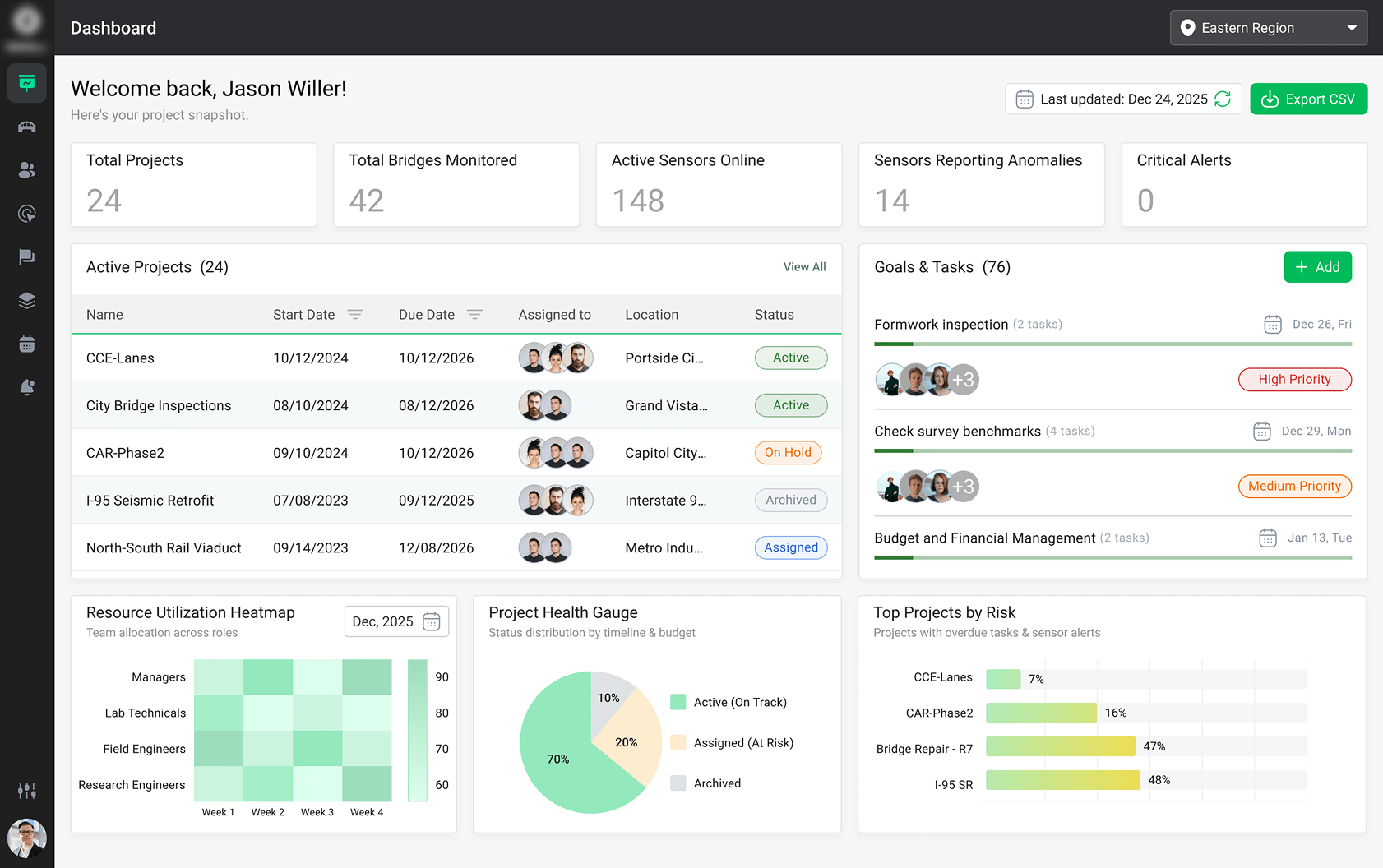
To satisfy the client’s requirements, we offered to develop a custom web-based project management application that would meet the specific needs of construction research teams working in infrastructure monitoring. The Bridge Management System (BMS) aimed to bring together core project management features with specialized construction management tools for data visualization and device tracking.
After defining functional and non-functional requirements, we started from the first basic node, which would be each single separate project (bridge), and planned out to add the features in the app according to the priorities in visual performance for the users. The custom project management app for bridge builders was intended to be used internally within the company, but would be available for other users via guest access without any possibility to edit the information.
The key goal of the construction project tracking solution was to enable streamlined coordination, visual task planning, real-time device data tracking, and customizable reporting within a single platform.
Create blank projects or use templates with predefined assignments and milestones for efficient bridge project management and categorization (Active, Archived, On Hold, Planning or Assigned status).
Streamlined task assignment and transparent progress tracking with integrated to-do lists, check-in/check-out workflows, and meeting planning features for better coordination of construction team responsibilities.
Dynamic timeline with Gantt Charts to manage task dependencies, allocate resources, and adjust project timelines as needed for each specific bridge-related project.
Outlook sync and implementation of a scalable calendar view (weekly, monthly, quarterly) for strategic planning, task management, and efficient coordination of personal and department schedules.
Role-based access control to ensure secure and structured collaboration for multiple user roles (Super Admin, Creator, User, and Guest) each with tailored access rights for project management leads, project researchers, field engineers, and auditors.
Automated project reporting and archiving for automated assignment progress that allows scheduled reports and real-time alerts for device issues or parameter anomalies.
We focused on streamlining scattered workflows into one intuitive system to give engineering researchers a clear, unified space to ensure bridge safety research. By unifying project timelines, sensor data, and team workflows, we gave lead PMs, project researchers, field engineers, and auditors a real-time command center for infrastructure monitoring. Every decision, from user roles to UI components, was shaped by how the platform would be used in real-world, high-stakes scenarios.
Sergey Filatov
Project Manager at XB Software
User Management
Project Creation & Management
Task & Workflow Management
Sensor Signal Configuration & Monitoring
User Management
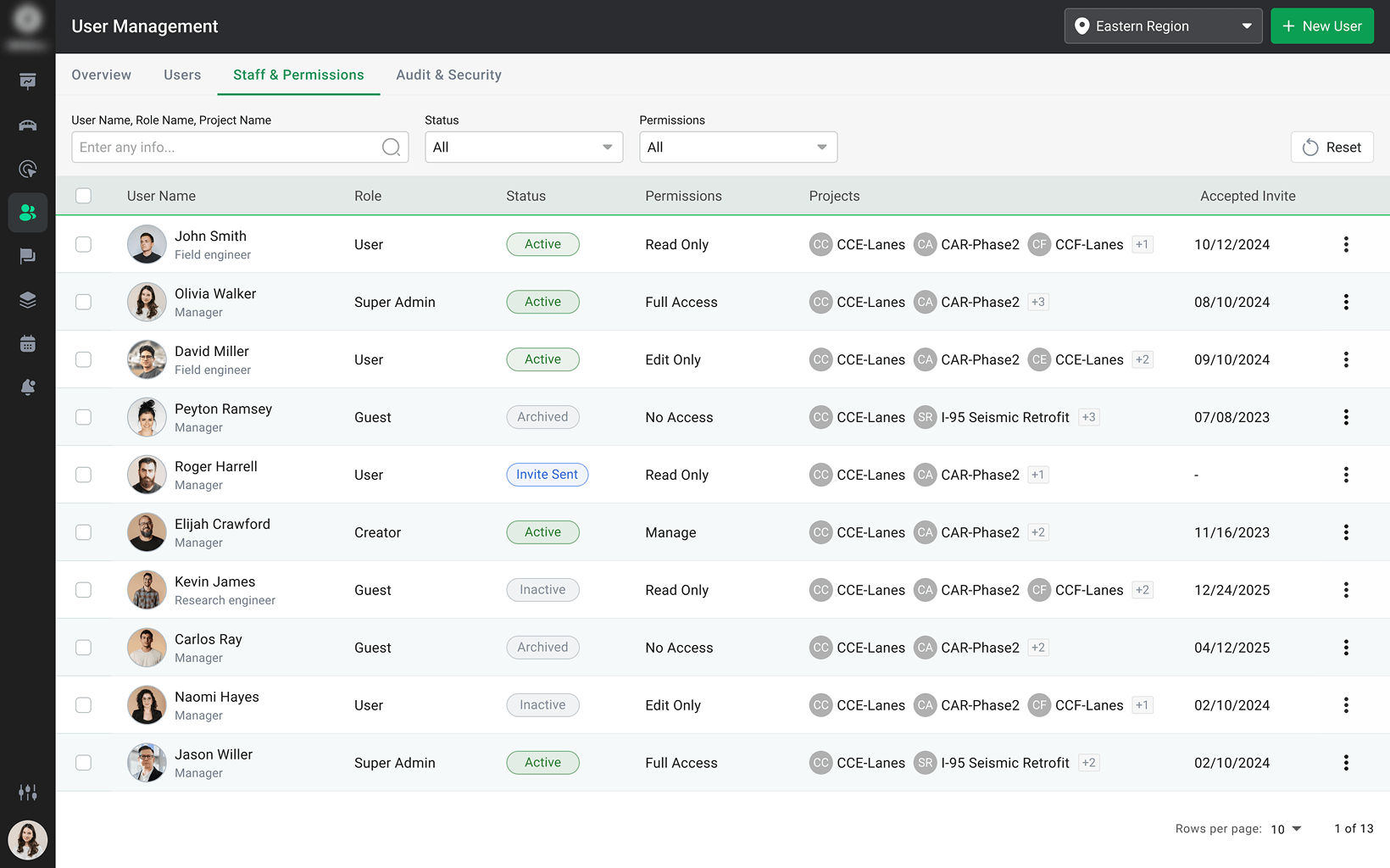
We included a comprehensive user management feature that shows a list of all registered project participants along with their usernames and email addresses. From this interface, administrators can easily select required research engineers, field engineers, or data analysts to add them to specific construction projects. In addition to user assignment, we implemented essential functions to update user profiles, including the ability to change usernames, passwords, and other personal information.
Role-Based Access Control
- Super admin has full control over system settings, user management, and project access permissions.
- The staff with a Creator role — such as construction project managers — can initiate projects, define workflows, and assign tasks but with limited administrative privileges.
- A User (field engineer or research engineer) can work on assigned tasks, contribute to project discussions, and view relevant details based on their permissions.
- A Guest role has limited access and can be used primarily for external stakeholders, allowing them to view selected construction project information without editing capabilities.
Dynamic User Permissions
User permissions can be modified at any point, allowing administrators to adapt access rights as project needs change. This flexibility helps to maintain both operational efficiency and strict security standards across all levels of access.
Project Creation & Management
Whether starting from scratch or working with tried-and-true templates, our client wanted to make bridge engineering project management intuitive and flexible. Therefore, from creation to completion, every step was designed to help everybody stay organized, efficient, and informed, no matter the project size or complexity.
Flexible Project Setup
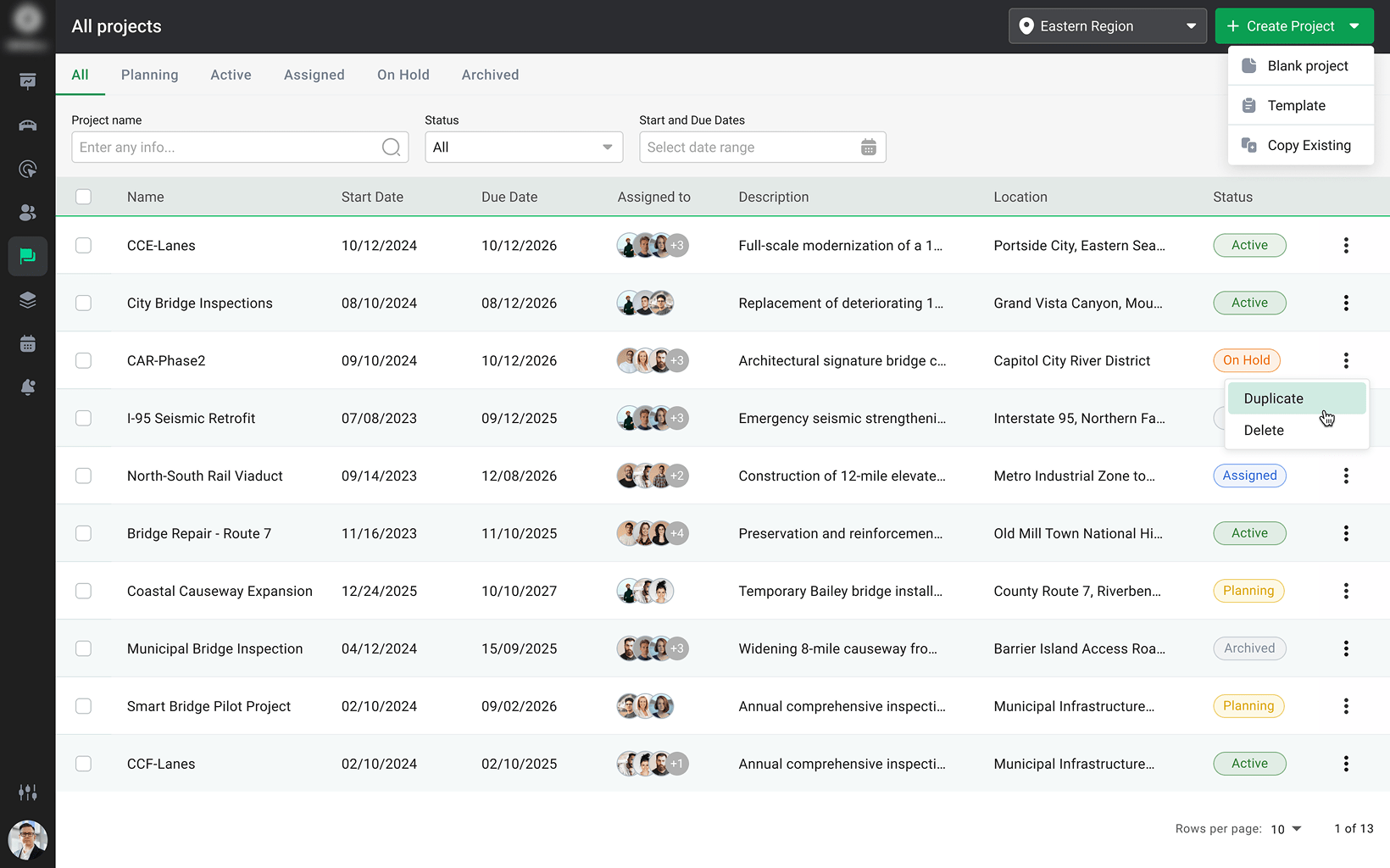
The new construction management system supports both blank projects and template-based projects, giving the flexibility to choose the best approach for employees needs. Blank projects are ideal for unique workflows or custom setups. Construction PMs can create a blank project by specifying its name and assigning staff members, like engineers and analysts, from the list of registered users. Template-based projects streamline setup for recurring initiatives. By selecting a previously saved template, users can quickly launch a project with preconfigured tasks, workflows, and milestones.
Projects Categorization & Archiving
All bridges are categorized based on their lifecycle stage, allowing users to classify projects into Active, Assigned, On Hold, Planning and Archived. Completed construction management projects can be archived for long-term storage or duplicated to launch similar projects without rebuilding from scratch. This feature is especially useful for repeating project types — for example, ongoing structural monitoring studies or repeated field tests — ensuring consistency and saving time.
Real-Time Updates
To keep everyone on the same page, the bridge management platform sends real-time notifications for all project-related changes, such as new assignments, deadline adjustments, or task updates. Notifications can be delivered via email, in-app alerts, or push notifications, ensuring no critical update is missed.
Task & Workflow Management
Before implementing our custom project management software, the client lacked a structured way to manage day-to-day assignments and project timelines. They needed a bridge construction management system that could simplify task tracking, improve team coordination, and reduce manual overhead. That’s why we built a task and workflow management module that transforms how work gets done — from creating to-dos and scheduling meetings to visualizing timelines and tracking progress in real time.
To-Do List
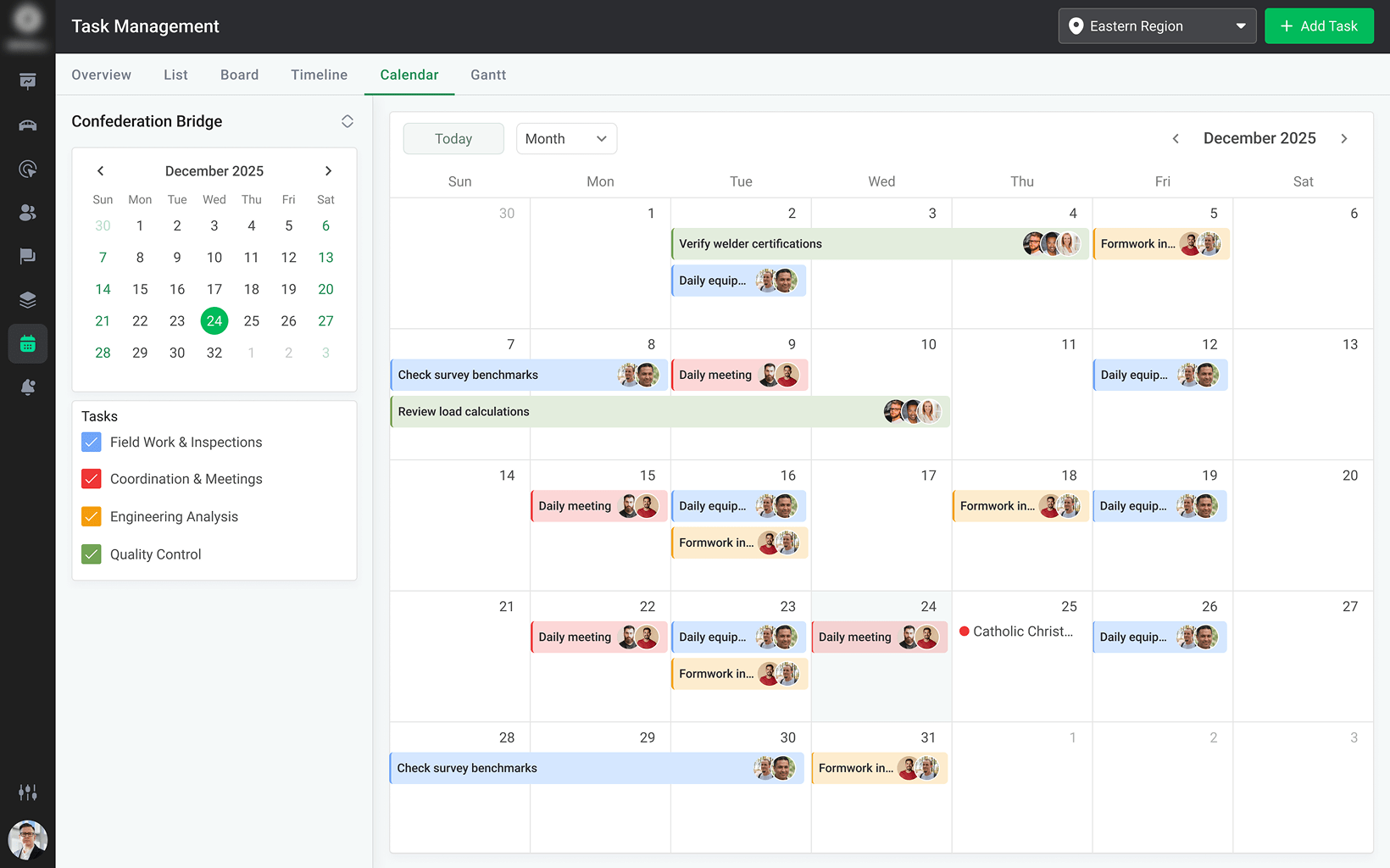
With To-Do lists, construction project management teams, including Research Engineers and Field Technicians, can now break projects into clear steps, assign owners, and track progress in real time. Check-in/check-out workflows add transparency, while built-in meeting prep tools (like agendas and reminders) keep everything on track. Users can also block time in their calendar to focus, locking tasks during that period to avoid disruptions.
Gantt Chart View
The client needed a clear way to visualize project timelines and resources. With the implementation of the Gantt Chart view into the new construction timeline management solution, they can now easily track assignments, milestones, and dependencies in one place. The chart offers day, week, and month views to support detailed planning and quick adjustments. Each task is linked to an owner — such as a Research Engineer, Field Engineer, or Analyst — and can be clicked for detailed info, including start/end times, owners, and notes. Users can also mark specific dates with event names to detect bottlenecks and adjust schedules on the fly.
Calendar & Scheduling
Construction management tasks appear in a scalable calendar view (weekly, monthly, quarterly, yearly) which allows users to visualize assignments at different levels of granularity, depending on their needs, where a weekly view is useful for daily task management, while a quarterly view is better for strategic planning. Users can also link their schedules with Outlook calendar for seamless synchronization, allowing for coordinating field visits, lab testing sessions, and stakeholder meetings, ensuring better coordination, and avoiding overlapping commitments.
Automated Task Tracking & Reporting
The client needed a way to stay on top of project progress without manual updates. With the help of an implemented automated tracking tool, task statuses are updated in real time, providing accurate, up-to-date insights. Reports cover key metrics, like assignment completion rates, time spent on activities, and resource utilization, helping construction managers spot delays, optimize resources, and keep bridge management projects on track.
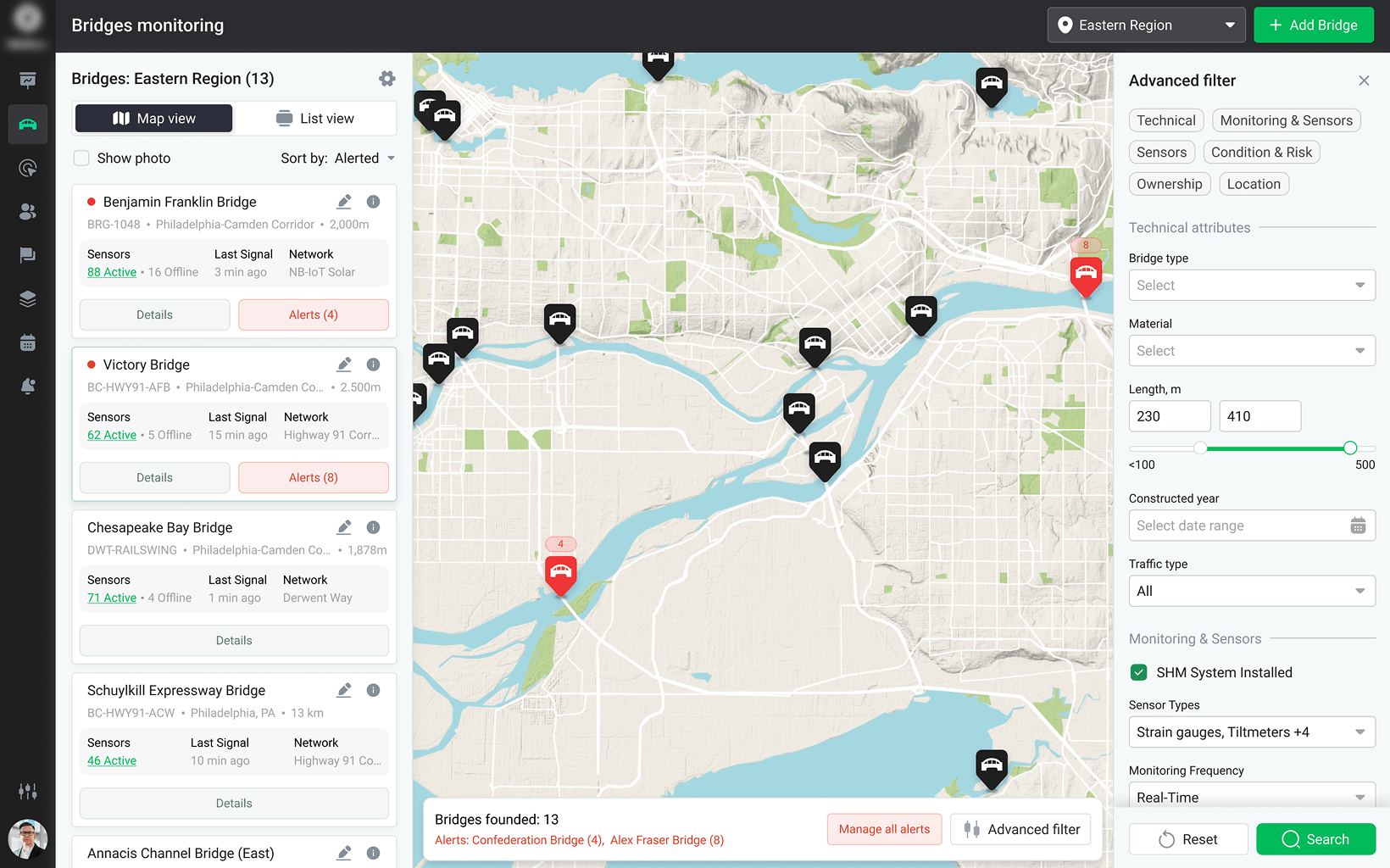
Sensor Signal Configuration & Monitoring
In structural research and bridge development projects, continuous monitoring of physical stress, load, and environmental impact is crucial. To support data-driven decision-making, we built in a flexible signal configuration module that allows engineers to define, monitor, and analyze sensor data in real time.
Custom Signal Setup
The engineering project management application enables custom configuration of signal types, expected value ranges, and frequency of data collection. Construction engineers can assign sensors (strain gauges, tiltmeters, accelerometers, temperature sensors, and more) to specific bridge components or test objects and define individual thresholds for each metric.This is especially critical for field engineers conducting tests on-site and data analysts reviewing behavior in post-processing.
Live Monitoring Dashboard
A real-time dashboard aggregates incoming signals and displays them in a visual, color-coded format for quick assessment. Each signal block includes the current value, timestamp, and status indicator (e.g., within range, warning, or critical). This allows construction researchers to observe structural behavior as it unfolds and make informed adjustments during testing.
Sensor Lifecycle & Assignment
The bridge monitoring platform helps engineering teams to manage the entire lifecycle of their sensor equipment — from assigning it to a specific project phase or physical location to decommissioning or recalibrating it. Metadata, such as sensor type, calibration date, and serial number, are stored for each unit, making it easier to track performance and ensure measurement accuracy.
Historical Signal Logs & Reporting
For documentation and post-experiment analysis, the custom-built project management software for engineers maintains a detailed log of all signal data. Engineers can filter the logs by project, signal type, or component, and export structured reports to use in presentations, publications, or compliance documentation — an essential capability for Construction Research PMs and Data Analysts.
Tools and Technologies
To build a construction management solution that could scale across multiple complex infrastructure projects — while keeping costs down and development flexible — we chose a tech stack that prioritized speed, reusability, and visual clarity. The client needed a bridge construction project management system that supports both detailed task planning and real-time visualization of device placements, so choosing the right tools from the start was crucial.
React JS helped to deal with most of the challenges. However, to accelerate delivery and keep the UI highly interactive, we used the DHTMLX JavaScript UI components, known for its ready-to-use tools like Gantt charts and calendars. On the backend, AWS GraphQL offered the flexibility and scalability needed for handling structured project and device data. Combined with a GraphQL-based database and cloud hosting, this setup enabled smooth performance, fast data flow, and seamless collaboration for employees working across multiple projects.
This approach allowed us to deliver a rich, responsive engineering collaboration platform with powerful planning tools, smart reporting, and device management — all while optimizing costs and future-proofing the solution.
Result
By partnering with XB Software, the structural research organization successfully transitioned to a centralized and scalable construction project management solution. The new bridge design & construction software improved coordination, enhanced visibility, and allowed Research Engineers, Project Managers, and Field Teams to make better use of their time and resources while monitoring critical infrastructure across the region.
- Increased Efficiency: Engineering teams can now manage twice as many projects without additional overhead.
- Seamless Collaboration: A centralized project management platform eliminated redundant tools and improved workflow transparency across Field Engineers, Research PMs, and Analysts.
- Enhanced Project Visibility: The Gantt chart and calendar provided real-time insights into project progress for all bridge-related project stakeholders.
- Scalability for Future Growth: Cloud-based architecture now ensures easy expansion and future enhancements — critical for growing teams and expanding construction research initiatives.
Fill the form to get a no obligation consultation
Your questions and requests are always welcome