Summary
This comprehensive guide explains how Telegram Mini App development helps businesses launch app-like experiences directly inside Telegram without downloads or app store approvals. The guide covers how a mini application works, how it compares to bots and native apps, and also explores development steps, costs, security considerations, and industry use cases.
Messaging platforms evolved from just communication tools into full-scale super app ecosystems. They combine messaging, payments, commerce, entertainment, and in-app services within a single interface. For businesses, this shift opens new opportunities to deliver frictionless, app-like experiences directly in the conversations users already have every day. And at the center of this shift are Telegram Mini Apps.
If your company is exploring new digital channels for engagement, automation, and conversational commerce, this guide will help you to understand what they are, how they work, where they can be used (insurance, ticketing, e-commerce, booking, and more), and whether investing in Telegram Mini App development for business makes strategic sense.
How Is a Telegram Mini App Different from Traditional Mobile Apps?
A Telegram Mini App (or a Telegram Web Application) is a lightweight, embedded web application that runs in the messenger interface. It can be built with HTML, CSS, JavaScript, React, Typescript, Vue.js, or Svelte and uses the Telegram Web App API documentation to work within Telegram’s in-app WebView, enabling authentication, payments, user data access, theme adaptation, and event handling. With the messenger updates, it also provides new features and improvements to mini app functionality, which opens up the door for more possibilities for developers.
Offers good user experience and adaptability (Source)
Unlike traditional mobile apps, this type of mobile application offers unique functionality:
| Factor | Mini Apps | Native Apps |
| Installation Required | No | Yes |
| App Store Approval | No | Yes |
| Development Cost | Lower | Higher |
| Speed to Market | Fast | Slower |
| User Acquisition | Built-in ecosystem | Requires marketing |
| Application Launch | Instant launch from chat | Needs to be downloaded and installed |
In short, it’s an app-like experience inside a messenger.
Mini Apps vs Bots: What’s the Difference?
Clients exploring the ecosystem typically wonder: What is the difference between Telegram bots and Mini Apps? The short answer: they serve different purposes, and in many cases, the strongest solution combines both.
In mini apps, instead of chat bubbles, users see custom-designed interfaces, product catalogs, booking calendars, payment forms, dashboards, and interactive elements. It allows complex CRM integrations, secure payment processing, advanced analytics, geolocation, and UI/UX customization.
Telegram Mini Application is ideal for e-commerce checkouts, insurance policy comparison and purchase, ticket booking systems, loyalty programs, fintech services, subscription platforms.
A Telegram bot is primarily a chat-based automation tool. It interacts with users through text messages, buttons, predefined commands, and simple menus. They are ideal for customer support automation, FAQs, notifications and alerts, simple lead collection, and order status updates. Think of it as a smart assistant, which has:
- UI limited to chat bubbles and inline buttons;
- Complex user flows (like seat selection or multi-step checkout) that can feel clunky;
- Minimal visual customization;
- Typically simpler integrations.
| Telegram Mini App | Telegram Bot |
|
Fully interactive UI Rich frontend experience Embedded web application Allows complex integrations (CRM, payments, analytics) |
Text-based or button-driven interface
Limited conversational flows Basic automation Supports only simple integrations |
There’s also a Telegram bot Mini App option that combines both: the bot acts as the entry point, while the mini application delivers the interactive interface. This model works like this:
- The user interacts with the bot;
- The bot launches the mini application in the messenger;
- The application handles complex interactions (checkout, booking, policy purchase);
- The bot continues communication via notifications, updates, and reminders.
This hybrid model enables powerful bot integration with web app integration in one ecosystem that offers seamless onboarding via chat, rich transactional experiences, automated follow-ups, and re-engagement campaigns.
To put it simple:
- If you only need automation, notifications, or simple support → a bot may be enough;
- If you need transactions, product catalogs, booking systems, or advanced UX (the bot just launches the Telegram’s build-in browser and doesn’t used for customers’ interactions) → a mini application is the right choice;
- If you want both engagement and conversion → you can combine them.
For most companies focused on revenue generation and customer experience, Telegram Mini App development offers significantly more strategic value than bots alone.
Read Also AI at Your Service. How to Build an AI Assistant in 9 Steps (feat. DHTMLX ChatBot)
How Does Telegram Mini App Work?
Understanding how a mini application works helps business owners to see why they are so powerful for conversion, automation, and customer retention. So, let’s walk through the process from a real user.
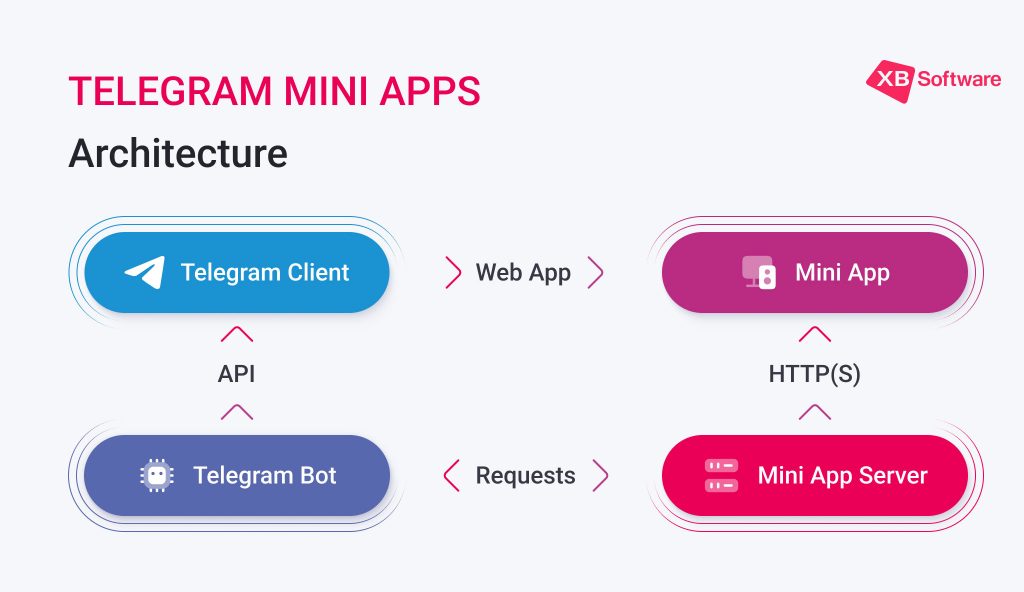
1. Users Open Your Telegram Bot or Use a Direct Link
Users can access your application through a button in the bot, a deep link, QR code, or a promotional campaign. For your business, this means no app store discovery battle — customers enter directly via the messenger chat.
2. Mini App Loads In Telegram’s WebView
When the user clicks a button like “Buy Ticket,” “Get Quote,” or “Shop Now,” Telegram opens the mini application instantly in the WebView. They can just tap “back” to return to the chat bot in a few seconds.
You can also connect a link to your group chat allowing users to easily drift between using the bot for navigation, your group chat for live communication, and the mini application for the services you provide without pressuring a user to switch apps. No download. No redirect to an external browser. This dramatically reduces drop-off rates.
A user can add a shortcut on Home Screen (Source)
From the user’s perspective:
- It feels like a native app;
- It adapts to Telegram’s theme (light/dark mode);
- It works smoothly across devices.
For a business, this means:
- Consistent UI control;
- Fully branded interface;
- App-like experience without native development costs.
Read Also Mobile Application Development: A Full Step-By-Step Guide
3. Offers Secure Automatic Authentication
One of the strongest advantages of Telegram Mini Apps is frictionless authentication. Using Telegram login authentication, the platform automatically provides verified user data (ID, username, language) without asking for password creation, email confirmation, or filling out long forms.
This reduces onboarding friction and improves conversion rates, which is especially critical for insurance signups, fintech services, subscription platforms, and e-commerce checkouts.
4. App Communicates via Telegram Web App SDK
The mini application communicates with the messenger using the Telegram Web App SDK (JavaScript API), which enables:
- Access to user data;
- Theme synchronization;
- Button controls;
- Event handling;
- In-app notifications;
- Closing or expanding the app.
From a business standpoint, this means your application can behave intelligently within Telegram’s ecosystem rather than as a standalone website.
Why Does Telegram Mini App Matter for Businesses?
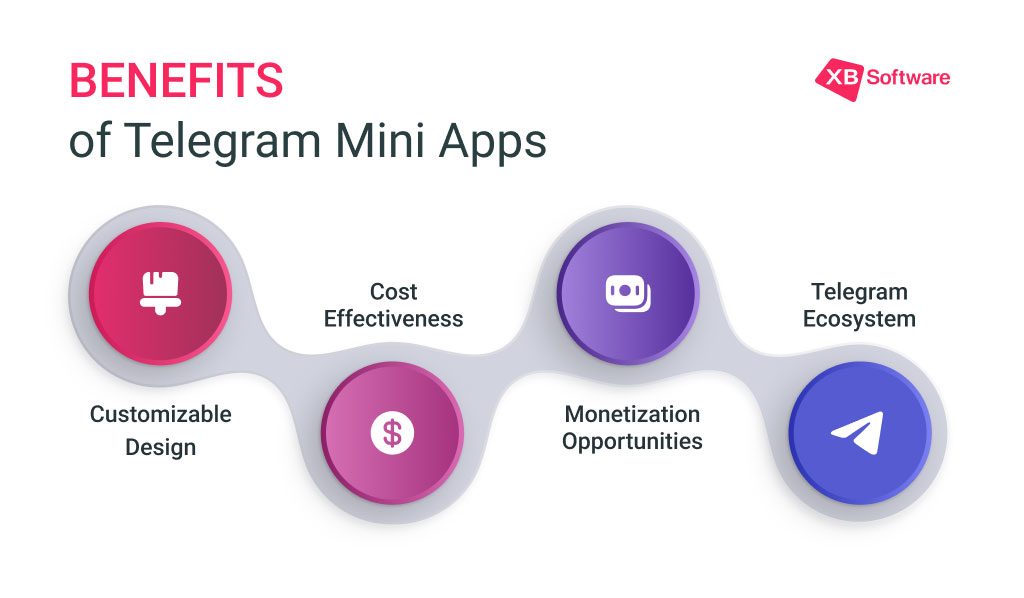
SMB companies focused on growth, efficiency, and customer experience, mini applications are a strategic channel rather than a technical feature. Below are the key reasons why more organizations are investing in Telegram Mini Application development as part of their digital strategy.
Access to a Massive Active Audience
According to Telegram, more than 500 million users interact with mini apps monthly to purchase products, access services, and even play games. The messenger continues expanding globally, offering companies direct access to highly engaged users. Instead of driving traffic to external applications or websites, companies can meet customers where they already spend time.
Zero Install Friction
One of the biggest barriers in traditional mobile application development is installation. Users must go to the Apple Store or Google Play, search for the application, download it, wait for installation, grant permissions, and sometimes create an account before they can even start using the service. At every one of those steps, potential customers drop off.
The fewer steps between user interest and transaction, the higher the likelihood of completion. Especially in industries like ticket booking, insurance, e-commerce, or subscription services, removing installation friction can significantly reduce abandonment and accelerate revenue generation.
Fraud Risk Reduction & Trust Building
Users hesitate when they’re redirected to unknown websites, asked to create new accounts, or required to share sensitive information. Mini application reduces that uncertainty by operating in a trusted, familiar environment.
Seamless In-App Payments
Being able to complete transactions without ever leaving the chat environment is why more and more users would prefer to use Telegram Mini Apps. The entire purchase journey (from product selection to payment confirmation) happens inside the messenger. With Telegram in-app payments, you allow them to:
- Perform one-time payments;
- Claim subscriptions;
- Request the process of booking fees;
- Buy digital or physical products.
There are no external redirects to unfamiliar websites, which significantly reduces cart abandonment. Users stay within a trusted interface, complete the payment in just a few taps, and instantly receive confirmation via chat.
Lower Development Cost & Faster Process
Building and maintaining native mobile applications for both iOS and Android can be expensive, time-consuming, and operationally complex. You typically need separate development workflows, ongoing app store compliance, version updates, and long approval cycles.
Telegram Mini Application development significantly simplifies this process. Updates can be rolled out instantly, without waiting for users to download a new version. This allows companies to respond quickly to market changes, promotional campaigns, or new feature demands.
From a budget perspective, development costs are generally lower compared to native mobile applications, especially for MVPs, startups, and mid-sized businesses. You avoid the overhead of multi-platform development while still delivering an app-like experience.
| Simple Mini App | Medium Complexity | Enterprise-Level | |
| Functionality | Basic UI + payment integration | CRM integration, advanced UI, analytics | Complex automation, fintech flows, advanced security |
| Timeline | 3-5 weeks | 6-10 weeks | 12+ weeks |
| Cost | $3,000-$7,000 | $8,000-$20,000 | $25,000+ |
Read Also How Much Does It Cost to Develop an App and Which Methods Can Reduce Expenses?
Which Industries Benefit from Developing a Telegram Mini App?
Mini apps shine in high-conversion, low-friction scenarios. Let’s explore practical examples of possible solutions.
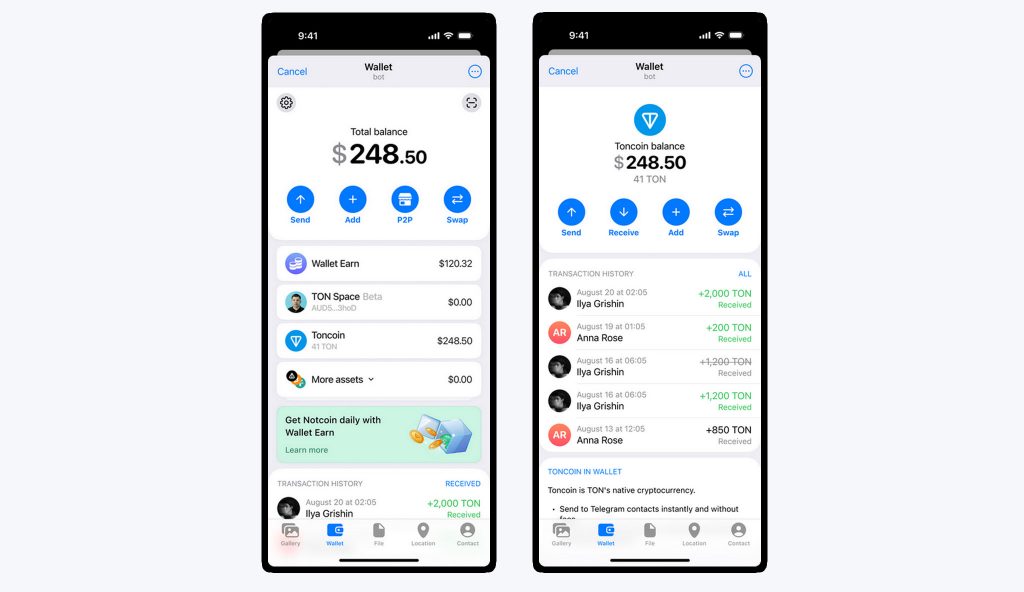
Telegram Wallet (iOS version) – one of the popular finance Telegram mini applications
It allows users to compare insurance plans, get instant quotes, buy policies, receive renewal reminders, and access policy documents. Why it works:
- Simplifies complex flows;
- Reduces abandoned applications;
- Enables insurance sales automation.
This model is ideal for fintech and insurtech startups looking to lower acquisition costs.
A Telegram Mini Application for booking systems (cinema, concerts, transport) allows users to browse events, select seats, pay securely, and receive confirmation via chat. Why does it work? Because transactions happen in-chat, abandoned cart rates drop significantly.
A strong example here would be a cinema chain offering seat selection and payment.
A mini application for e-commerce enables product catalogs, secure checkout, order tracking, and automated delivery notifications. Mini applications also work well for points tracking, reward redemption, cashback systems, and personalized offers. They act as embedded customer retention tools for loyalty programs and digital wallets with direct messaging integration.
This model fits perfectly into chat-based commerce strategies. SMBs can launch a sales channel without investing in a full native application.
Industries that benefit:
- Restaurants;
- Beauty salons;
- Clinics;
- Delivery services;
- Car rentals;
- Real estate.
Users can book appointments, track orders, and manage reservations without leaving the messenger.
Basically any B2C business of any size can offer gift cards/certificates or create prize draw events for their customers to remind them about various promotional deals.
How to Develop a Telegram Mini App (Step-by-Step)?
If you’re considering mini application development, it’s important to understand that this isn’t just about building a small web interface inside Telegram. It’s about creating a conversion-focused, scalable product embedded directly into a messaging ecosystem with millions of active users.
Below is a practical breakdown of how to develop such an application from strategy to launch and what to expect if you partner with XB Software.
Step 1: Defining Business Goals
Before writing a single line of code and thinking about UI, you need to start with business logic. Therefore, at this stage, we clarify:
- Conversion goals – Are you driving purchases, subscriptions, bookings, lead generation, or in-app upgrades?
- Retention strategy – Will the bot send reminders, personalized offers, or automated follow-ups?
- Automation requirements – What processes should run automatically (order confirmations, policy updates, support responses)?
- Integration needs – Are you planning to integrate CRM, internal dashboards, or analytics systems?
For example, in fintech, a Telegram Web Application may need secure onboarding and instant transaction confirmations. In eCommerce, it may focus on frictionless checkout and repeat purchases.
A strong discovery phase defines the product architecture and prevents costly rework later. In our experience, this is where the long-term success of a Telegram Mini App is determined.
Step 2: Creating and Configuring the Telegram Bot
Every application is launched through a bot, so this is your entry point. Using BotFather, it is possible to:
- Generate the bot token (secure API key);
- Configure permissions and privacy settings;
- Set the mini application launch button (via the Web App URL).
Acting as the gateway between users and your Web App, the Telegram bot can also send notifications, trigger workflows, react to commands, and drive users back into the Mini App. Thus, the bot becomes a retention and automation channel, not just a technical requirement.
Step 3: Building the Web Application (Frontend + Backend)
This is where custom Telegram Mini App development truly happens. As for the core technical components, they include:
- Frontend (React, Vue, vanilla JS, etc.), which handles UI/UX, interactive elements, checkout flows, and product catalogs;
- Backend (Node.js, Python, PHP, etc.) that manages business logic, database operations, payment validation, CRM integrations, and analytics tracking;
- Telegram Web App JavaScript API;
- Telegram bot API integration;
- Secure hosting (HTTPS required).
But from a business perspective, this stage is about designing intuitive user flows, minimizing clicks to conversion, ensuring mobile-first performance, and creating clear CTAs. Since users are already in the messenger, the friction is lower, so your job is to keep the experience seamless.
Step 4: Implementing Telegram Web App API
A well-implemented API ensures smooth data exchange between the bot and web application, stable session management, and native-feeling UX. Skipping proper API integration often results in unstable behavior or security gaps — something businesses cannot afford.
Step 5: Applying Security, Payments & Hosting Infrastructure
Security in Telegram Mini Application development is often underestimated. Minimum essentials include:
- HTTPS hosting;
- Secure backend validation of messenger user data;
- Encrypted data transmission;
- Server-side session verification;
- Role-based access control (if applicable).
If your application handles payments, you also need:
- PCI-compliant payment integration;
- Fraud prevention mechanisms;
- Secure webhook validation.
For industries like fintech, insurance, healthcare, or investment platforms, infrastructure architecture must be designed with compliance in mind from day one.
Step 6: Testing, QA & Launch
Although, there is no need for an app store review, that doesn’t mean you can skip testing of a Telegram Mini App. You have to include rigorous QA to check:
- Cross-device behavior (iOS, Android, desktop Telegram);
- Performance under low bandwidth;
- Payment flow validation;
- Bot + application interaction testing;
- Edge case testing (session expiration, reconnects, bot restarts).
After QA approval, deployment is instant. Users can access the application immediately through the Telegram bot.
Conclusion: Should You Build a Telegram Mini App?
If you want frictionless onboarding, in-chat payments, reduced development cost, faster time-to-market, and stronger customer engagement, then building a Telegram Mini App is not only a technical experiment but also a growth strategy.
At XB Software, we specialize in custom Telegram Mini Application development services, helping businesses design secure, scalable, and conversion-focused mini applications tailored to their industry. If you’re exploring how to develop Telegram Mini Apps — from insurance checkout to ticket booking or e-commerce — our team can guide you from strategy to launch. Ready to build an application that converts? Contact us!
Frequently Asked Questions
To ensure strong performance and conversion rates, you should follow these best practices in mini application development:
- Design mobile-first;
- Keep load time under 2 seconds;
- Minimize steps to conversion;
- Follow native Telegram UI patterns;
- Optimize for low-bandwidth environments;
- Secure all payment endpoints.
Common pitfalls include poor onboarding flows, overly complex user journeys, and ignoring performance optimization. An application should feel fast, intuitive, and native to the messenger environment.
Telegram Mini Apps are especially valuable for:
- Insurance companies;
- Ticketing platforms;
- E-commerce brands;
- Fintech startups;
- Booking services;
- Subscription-based businesses;
- Loyalty-driven brands.
Also, Telegram Mini App development can become a strategic growth channel if you rely on fast checkout, high engagement, repeat transactions, conversational automation, and direct customer communication.
As digital engagement increasingly shifts toward conversational interfaces, web applications inside messaging platforms are becoming a primary commerce channel. Early adopters gain:
- Competitive differentiation;
- Higher engagement rates;
- Lower customer acquisition costs;
- Stronger customer retention.
For companies focused on scalable digital growth, a Telegram Mini Application represents both a present opportunity and a long-term strategic advantage.