Summary
This article explores the common misconception that React and React Native are interchangeable platforms, detailing the significant technical and business consequences of this confusion. It clarifies their purposes, outlines what can and cannot be reused when moving between web and mobile, and emphasizes how platform selection is critical for project viability, user experience, and budget.
React has become synonymous with building dynamic, high-performance web interfaces. When businesses need a mobile presence for their React.js web application, they often turn to React Native. It seems logical, since both technologies share the React brand, use JavaScript, and promote a similar development philosophy. However, this often leads to believe the two are interchangeable, and you can seamlessly “convert” a web application into a native mobile app.
This article clarifies why this common assumption can turn into a costly misconception. We will consider these libraries’ approaches to UI development, rendering, styling, navigation, and deployment, explaining why sharing an ecosystem does not mean sharing a platform.
Difference Between React and React Native
| Feature/Aspect | React | React Native |
| Platform Target | Web browsers | iOS and Android devices |
| Rendering | Renders HTML to the DOM via Virtual DOM | Renders platform UI components (native widgets) |
| UI Components | HTML elements | Native mobile components |
| Styling | CSS stylesheets | Styles via JavaScript objects |
| Deployment | Hosted on web servers; instant updates via redeploy or CI/CD; accessible via URL | Bundled as native apps; distributed via App Store/Google Play; must follow platform guidelines |
| Performance | Fast for typical web UIs, especially with Virtual DOM diffing | Near-native performance for most UIs. Complex animations or heavy data can still lag if not optimized |
| Device APIs | Browser APIs | Full mobile APIs via native modules. Richer hardware integration |
| Best For | Building new or modernizing existing web applications | Building new mobile apps targeting iOS/Android. Also used when one codebase for both platforms is a priority |
React and React Native share the same foundation, but they serve very different purposes. React is a web library for interactive browser-based UIs development. It uses standard web technologies (HTML, CSS and JavaScript) and runs inside a browser’s DOM (Document Object Model).
By contrast, React Native is a development tool for building native mobile apps from one shared codebase. It does not use HTML or the browser DOM. Instead, it provides platform-specific UI components and style rules under the hood. In other words, React Native “translates” your JavaScript into real native widgets via platform APIs.
Let’s dive deeper into the differences between various aspects of React and React Native development:
- Platform. React targets web browsers. React Native targets mobile devices (iOS/Android applications);
- UI and Styling. React uses HTML tags (<div>, <span>, etc.) and CSS for layout. React Native uses its own components (<View>, <Text>, etc.) and does styling via JavaScript objects;
- Deployment. React applications run in web browsers. React Native apps are compiled to native binaries and distributed via app stores;
- User Interaction. Web UIs are designed for users that primarily interact with them using mouses or keyboards. Mobile UIs are designed for touch gestures. React Native provides mobile-friendly development components, including touchable buttons, scroll views, and more, but developers must adapt the UX accordingly;
- Ecosystem. Many React development tools (React Router and CSS tools) are web-focused only. React Native has its own navigation libraries (e.g. React Navigation) and UI kits. Some React libraries (like Redux, state management, or utility libs) can be reused for mobile development, but any DOM-specific or browser-only code must be replaced.
Confusing React and React Native can lead to wrong assumptions. React code cannot natively run on mobile operating systems, and React Native apps are not just “React apps in an app shell.” They share React’s core principles, but diverge at the rendering layer.
Read Also React vs. Webix Comparison
Key Platform Differences to Consider: UI, APIs, and App Marketplace Rules
At first glance, turning a web application into a mobile app may seem straightforward — reuse the code, adjust the layout, and ship it to the app stores. In reality, web and mobile platforms follow fundamentally different rules. From UI components and APIs to performance constraints and app store requirements, a direct “copy-paste” approach rarely works and often leads to costly rewrites or rejected apps.
No HTML/CSS
The way you use and style building blocks for web won’t work for React Native. React Native uses a JavaScript-to-native bridge / Fabric renderer. You’ll have to use React Native equivalents, plus you’ll need React Native styles. The layout logic has to be rewritten in React Native’s Flexbox style, and many web-specific UI patterns, such as hover effects or window-resizing, won’t apply.
Different APIs
Web APIs like window, document, or localStorage either don’t exist or behave differently on mobile platforms. Developers often need to use mobile-specific modules, such as AsyncStorage, or native device APIs instead. For example, our development team dealt with a similar issue while migrating a Cordova app to React Native (Cordova apps are basically web apps packaged to run as native mobile apps). Mobile device features require native bridges or platform-specific SDKs, not browser APIs.
Performance & UX
Mobile devices have different performance profiles (CPU, memory) and UX expectations. A complex web UI may run slowly on a phone unless optimized. Heavy DOM-like logic or complex layouts from web apps often cause janky scrolling or input lags. For instance, Google’s Android performance guidelines state that UI thread blocking longer than 16ms causes visible frame drops. Touch interfaces also demand redesign of interactions. For example, a dropdown menu or hover animation on web must be rethought for tap-and-swipe on smartphones and tables, and touch targets must be ~44-48px minimum.
App Marketplace Requirements
Apple App Store Review Guidelines explicitly state that apps must provide “a native iOS experience and cannot be “simply a website wrapped in an app.” It also rejects apps that use only a WebView with minimal native interaction, don’t support offline behavior, and Ignore platform navigation standards. Google Play also enforces quality and functionality checks, especially for performance and responsiveness.
The Migration Playbook: Rewriting UI, Styling, and Navigation
Let’s assume you have a web app and want to build a mobile app as well. When development teams transition React web apps to mobile platforms, there’s a common pattern: Business logic is portable, UI is not. The JavaScript code that handles data fetching, state management, validation, and computations can often be reused with little or no changes. For example, if your app fetches JSON via an API or formats dates, that code works on mobile too.
However, the user interface, navigation, and styling layers require heavy rework. For instance, the following parts of the app must be redone by the development team:
- UI Components. All web components (<div>, <span>, <button>, <img>, etc.) must be replaced with React Native equivalents (<View>, <Text>, <Pressable>/<Button>, <Image>, etc.) This is essentially a full rewrite of every screen’s code;
- Styling. CSS stylesheets must be converted to JavaScript objects. Many CSS properties, like flexbox, for example, work similarly, but things like percentages, units (em/px), and some layout behaviors differ. Developers often have to rebuild styles from the ground up;
- Navigation and Routing. Since React Native doesn’t support React Router, developers need to use another navigation solution, such as React Navigation, and redesign how screens transition;
- Platform Integrations. Web-specific features (cookies, web APIs) have to be replaced with mobile solutions (secure storage, push notifications, GPS/camera access modules, etc.). Even environment variables and configuration might need rethinking;
- Performance Optimization. Developers can rely on such techniques as balancing animations between the JavaScript thread and the main thread, avoiding unnecessary re-rendering of components, optimizing images, and so on.

According to the principles of cross-platform system design, it is essential to ensure business logic synchronization between web and mobile clients. Differences in implementation lead to feature fragmentation and increased maintenance complexity. The solution is a unified data logic and consistent behavior across all platforms.
The development team needs to write almost all the presentation layer anew, while reusing only the generic, non-UI parts. Even the concept of screen layout or navigation flow may need rethinking for smaller screens.
Read Also Taking the Best of React and Webix with Micro Frontends
Common Business Scenarios and Consequences of Confusing What’s Web and What’s Mobile
Choosing between React and React Native is not just a technical decision, it directly impacts your budget, timeline, and product quality. Many businesses run into trouble when they assume that a web application can be easily “turned into” a mobile app, or that one technology automatically covers both platforms without trade-offs. In reality, web and mobile products serve different user behaviors, distribution models, and technical constraints. The following scenarios illustrate where each approach works best, and what can go wrong when the differences between web and mobile development are misunderstood.
If you are building or updating a web app, such as an enterprise admin portal, content site, e-commerce frontend, React is the clear choice. It leverages web development standards and works on browsers directly.
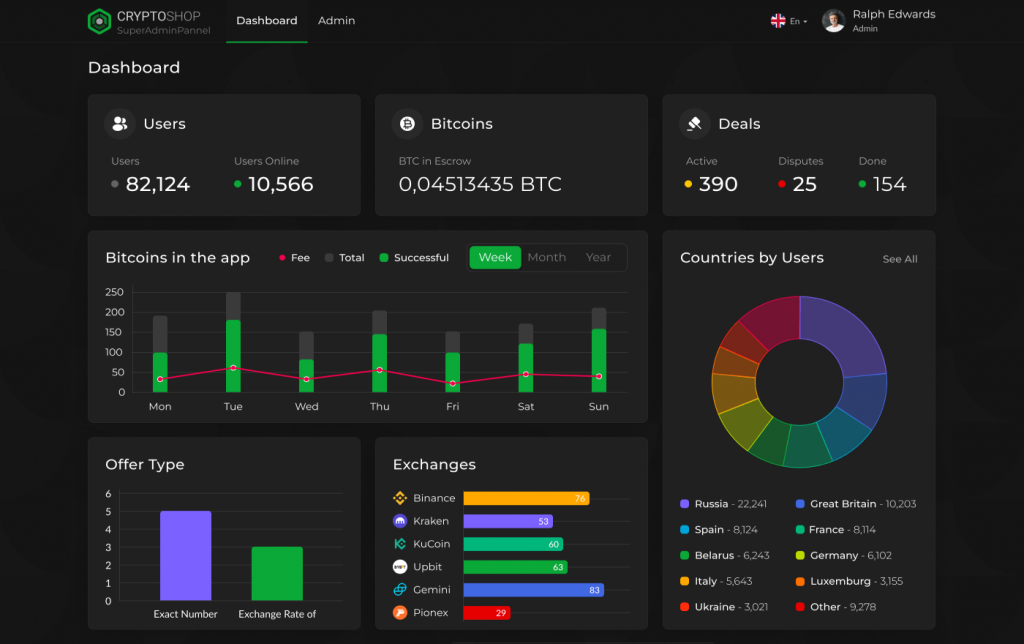
Case study: P2P Cryptocurrency Exchange
For one of our clients who needed a global trading platform accessed via browsers, React was the ideal choice to create its dynamic, responsive interface. It was especially effective for managing real-time data, like fluctuating bitcoin exchange rates.
If your users primarily use iOS and/or Android, and you need app-store distribution, cross-platform development with React Native is the path. It can speed up delivery by sharing code between iOS and Android. Also, React Native lets startups launch faster by maintaining a single codebase for both platforms. Note that if your application requires complex native features, for example, heavy AR or 3D, pure native code might still be better.
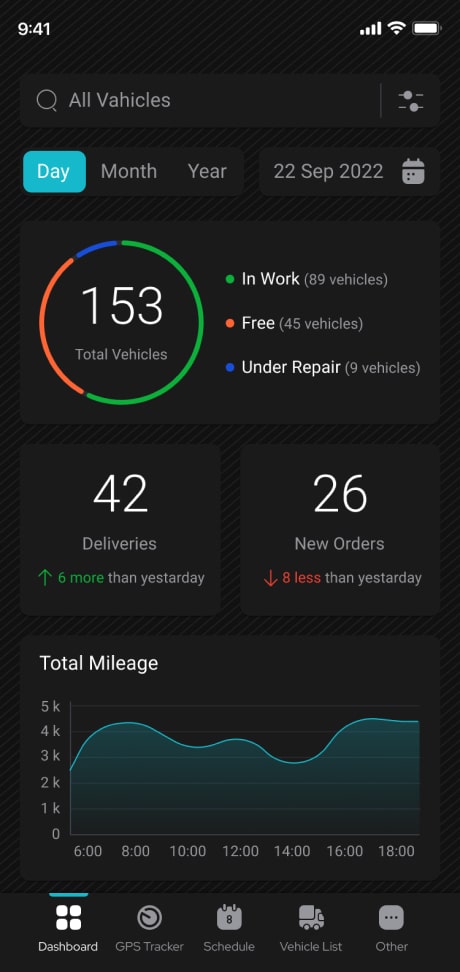
Case study: GPS Vehicle Tracking System
For this project, one of the requirements was to use it on all mobile platforms, making React Native a decent choice to build one codebase for both iOS and Android. It helped deliver features like real-time maps and vehicle condition tracking without developing two separate native apps.
This is the tricky case. You’ll essentially build two applications: one with React for web, and one with React Native, even if they share some logic. This means separate development and maintenance efforts. Teams must budget for a mobile UI rewrite and the overhead of app store approvals, even if the backend is shared.
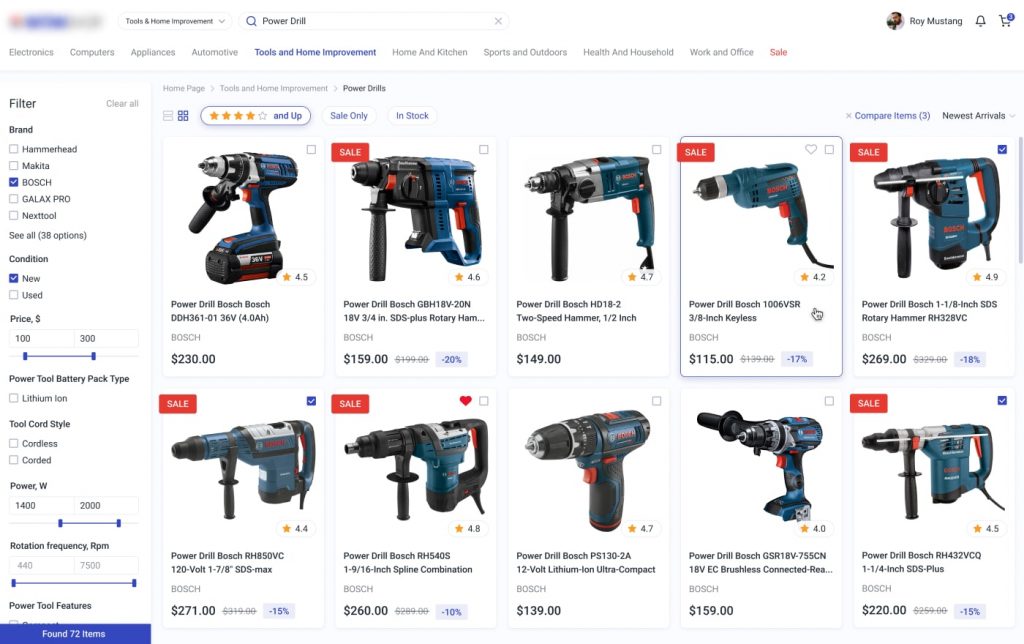
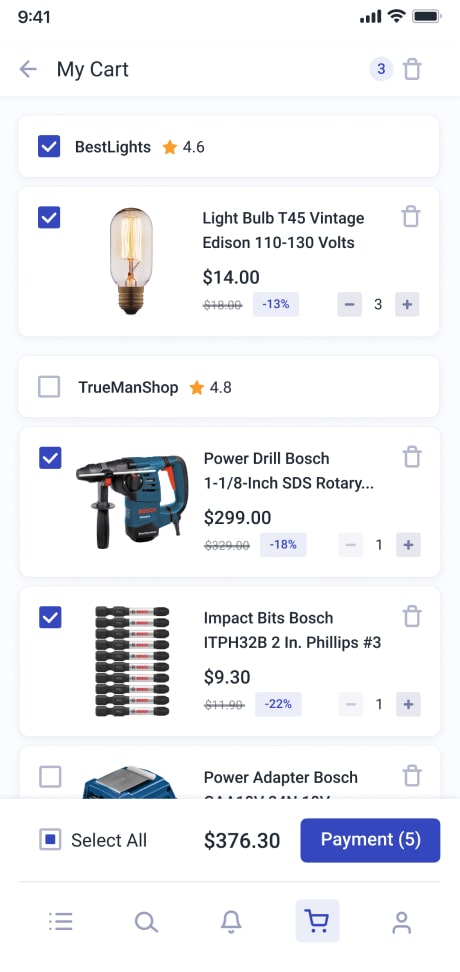
Case study: Online Shopping Portal
To reach a broad audience, the client requested both a full web platform and a mobile app, serving both desktop users with a rich browser experience and mobile shoppers who want to browse and purchase on the go. The development team reused product and cart logic, but still had to build the interactive shopping cart UI twice, once as a React web component and again as a React Native view. This dual delivery expanded the solution’s accessibility and engagement.
Consequences of Confusion
Clients who conflate React and React Native specifics often underestimate development time and cost. For example, expecting a React web app to become a mobile app “in a few clicks” can lead to project delays and budget overruns when developers have to rebuild screens.
Worse, trying to shortcut and use a WebView, for example, risks rejection on the App Store. The choice between platforms is a business decision that affects your budget, timeline, and your app’s performance. Picking the wrong stack or underestimating the work can derail your schedule and frustrate users with a subpar experience.
The solution is to know your audience and product goals. If you only need a web app, stick with React. If you need a mobile application with some common logic and a tighter budget, React Native might make sense. When you need both, be prepared to handle two codebases or consider a team strategy to share logic effectively.
How Much Does It Cost to Build a React Web App vs a React Native Mobile App?
Development cost is often a deciding factor when choosing between React and React Native. While both rely on JavaScript and share some development principles, their pricing models differ because they target different platforms.
| Complexity Level | React Web App Cost | React Native Mobile App Cost |
| Simple (Basic MVP, standard UI) | $5,000 – $20,000 | $15,000 – $40,000 |
| Medium (Custom features, UI/UX) | $20,000 – $70,000 | $35,000 – $90,000 |
| Complex (Advanced features, real-time data, custom integrations) | $70,000 – $500,000+ | $80,000 – $300,000+ |
These ranges reflect typical projects such as dashboards, marketplaces, customer portals, and consumer-facing mobile apps.
Strategic Cost Considerations
While a React Native project may have a higher initial cost than a basic web app, its value is in covering two major mobile platforms. Building two separate native apps (Swift for iOS, Kotlin for Android) to achieve the same reach can cost up to 50-60% more than a single React Native codebase.
What Drives the Final Cost?
The wide ranges are due to key variables:
- Features & Complexity. The number and sophistication of features (AI, custom dashboards) are the primary cost drivers;
- Team & Location. Rates vary significantly by region and partner type (freelancer, agency, in-house);
- Design & Backend. A custom UI/UX and the complexity of the backend API and infrastructure are major factors;
- Ongoing Costs. Plan for annual maintenance costs of 15-20% of the initial development budget.
Cost estimates become more accurate once you define your core platform, identify 3–5 essential MVP features, and decide whether you’re working with freelancers, an agency, or an in-house team. These choices have a direct impact on both short-term spend and long-term product sustainability.
Conclusion: Choosing the Right Path
While React and React Native share a core philosophy and allow for the reuse of non-UI logic, they are engineered for distinct platforms with different rules. React is preferable for building engaging, SEO-friendly web apps that run anywhere there’s a browser. React Native, in turn, is a decent choice for creating performant, app-store-distributable mobile applications for iOS and Android from a single codebase. Attempting to force one into the other’s domain leads to costly rewrites, subpar user experiences, and potential rejection from app stores. If you’re evaluating the best path for your next project and need expert guidance, contact us to discuss your specific goals with our development team.
FAQ
React Native can handle many types of apps and scales well for typical business requirements. However, for very complex applications, especially those with heavy graphics, advanced animations, real-time rendering, or compute-intensive logic, React Native may hit performance limitations compared to fully native solutions. In such cases, developers often need to optimize carefully or implement performance-critical parts in native code, which increases complexity and cost.
React is ideal if the priority is reaching users through browsers, supporting SEO, and building dashboards, marketplaces, or web tools quickly. React Native can be a strong choice for startups that want both iOS and Android apps without maintaining two separate native codebases. It speeds up delivery and reduces cost for cross-platform mobile development. However, keep in mind that debugging, dependency maintenance, and occasional gaps in native API support may require additional effort.
- Assuming React can automatically become a mobile app: Thinking a React web app can be easily “converted” into a mobile app leads to underestimated timelines and budgets;
- Underestimating UI differences: Web components, layouts, and interactions do not map directly to mobile, so nearly all UI needs to be rewritten for React Native;
- Ignoring platform constraints: Mobile app stores enforce guidelines and performance expectations that don’t exist on the web. Simply wrapping content in a WebView can lead to rejection;
- Choosing tech based on familiarity rather than fit: Picking a stack because developers know JavaScript doesn’t guarantee that cross-platform performance or long-term maintenance will be easier. These pitfalls can cause delays, increased costs, and subpar user experiences
It can be, but it’s rarely a straight migration. You can reuse business logic (data fetching, state management, API interactions), but nearly all presentation code must be rewritten for mobile UI, navigation, and styling. The value of migrating depends on whether your business needs a mobile app with native-like performance and distribution through app stores. If mobile usage is a priority, the investment may pay off, but it should be planned as a new project rather than a simple conversion of the web app.