Summary
This article explores the gap between a working demo and a production-ready software in AI-assisted software development. It outlines ten common technical and operational risks found in AI-generated codebases that can lead to revenue loss, downtime, or security incidents. The key takeaway is that while AI tools can rapidly produce functional prototypes, turning them into reliable, scalable products requires deliberate engineering, testing, and operational foundations.
We often meet founders who come to us with a familiar story. They have a compelling concept, a functional application running on their machine, and the sense that AI-assisted software development has brought them to the verge of a breakthrough. “We used AI to accelerate our progress,” they explain. “The core logic is solid. We’re hoping you can just do a final polish before we launch.”
Then we review the codebase they have. And we take a deep breath.
It’s not the idea that frustrates us. Often, it’s market-ready. It’s not even the core functionality, which typically performs exactly as demonstrated. Our reaction comes from recognizing what we’re about to encounter: hardcoded secrets, database queries that will buckle under load, and a complete absence of error monitoring. It’s a pattern that slowly turns into growing regularity.
These founders show us a prototype created through AI-assisted coding that has a domain name and expect it to function as a product. But a compelling demo and a robust product aren’t just different stages of the same journey. They represent fundamentally different philosophies of building.
A demo is optimized for a singular moment. It only has to function correctly once, in a controlled environment. A product is engineered for the long haul. Therefore, it must operate reliably tens of thousands of times, without supervision, under unpredictable conditions. This core distinction is the source of nearly every challenge we encounter in such projects.
In this article, we’ll walk through the most common issues we discovered when reviewing AI-assisted codebases. More importantly, we’ll consider the real business implications for founders who underestimate the gap between demo and product. So, let’s take a look at the risks that threaten your business when you completely entrust your work to AI.
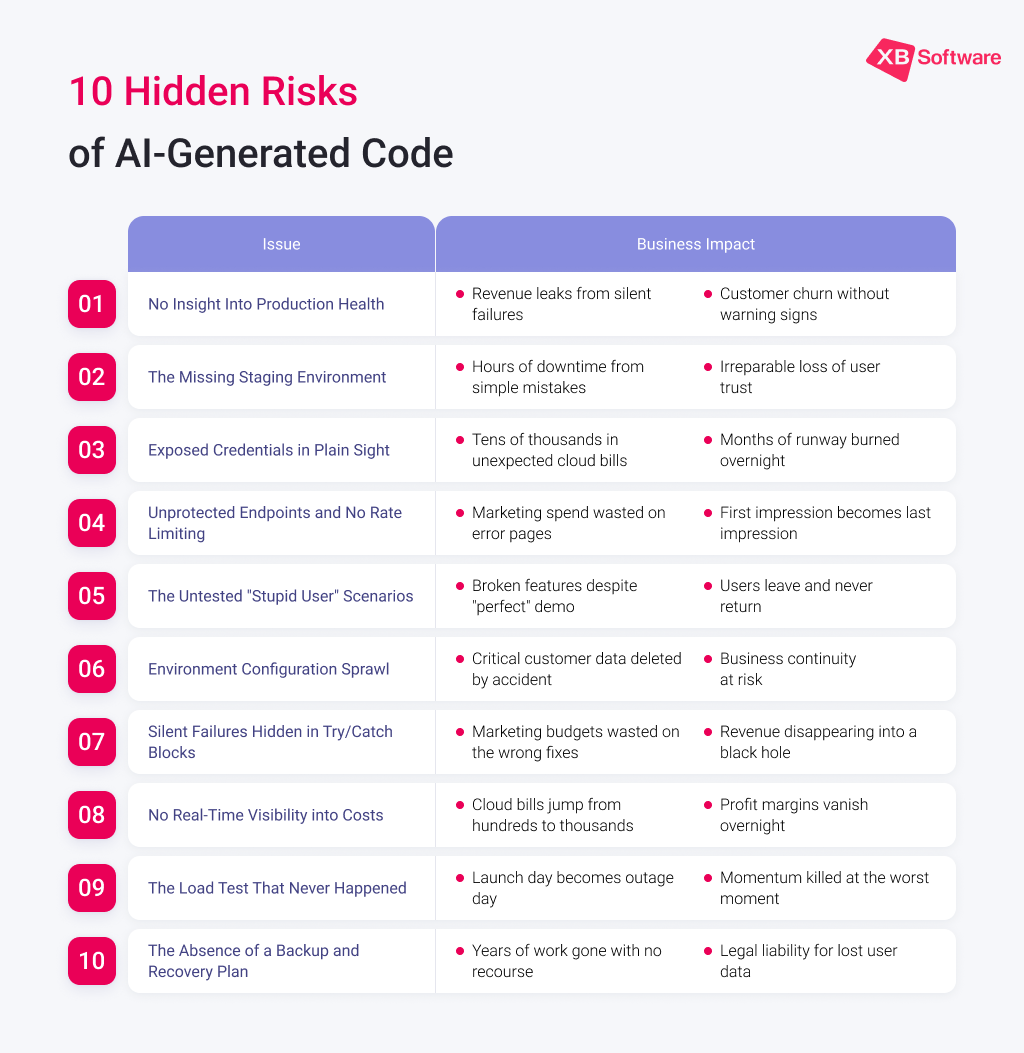
1. No Insight Into Production Health
We ask a client: “Can you walk us through your monitoring and alerting strategy, we do not see them?” The response is often a pause, followed by, “We’ll know if something breaks, we don’t need them for now.”
Relying on user complaints as your primary alert system looks more like a gamble than a solid business strategy. In a demo environment, you are the sole user and observer. In production, entire features can degrade silently, driving users away without a single notification reaching you.
The Business Impact
Imagine a critical payment integration fails silently. The AI generated code contains an empty catch block, effectively swallowing the error. For weeks, users attempting to check out encounter a frozen screen and simply abandon their carts. The founder, seeing no alerts, is puzzled by a gradual decline in revenue. They only discover the issue when a frustrated customer finally emails to complain. By then, the damage to revenue and user trust is significant, and the root cause remains a mystery. Without proper monitoring, you’re flying blind, and your first sign of trouble is often a symptom of a problem that has already cost you dearly.
2. The Missing Staging Environment
This is a common finding: development, staging, and production are all the same server. Every code push, every experimental fix, is deployed directly into the live environment.
The Business Impact
A developer needs to add a simple column to a database table. They connect to what they believe is a test server and run a quick migration script. However, due to a simple typo in the connection details or script itself, the command executes on the production database, dropping a critical table instead of altering it. Months of customer data, transactions, and user records could be erased in milliseconds. While backups might exist, restoring them means significant downtime and potential data loss from the past few hours or days. The trust of users, who suddenly find their accounts or history missing, is incredibly difficult to rebuild. A single deployment mistake can create a business catastrophe.
3. Exposed Credentials in Plain Sight
AI-powered software development tools, optimized for speed and convenience, often embed API keys and secrets directly into the frontend code or client-side requests. This is perfectly acceptable for a local test but catastrophic for a public application.
The Business Impact
Shortly after launch, a curious user or, more likely, an automated bot scanning for vulnerabilities opens the browser’s developer tools on the new site. There, in the network traffic, they find a valid API key for a paid service like OpenAI or AWS. Within hours, that key could be sold or used to run thousands of expensive requests. The founders might only realize something is wrong when they receive their next cloud bill, which has ballooned into the tens of thousands of dollars due to unauthorized usage. The frantic scramble to revoke the compromised key, block fraudulent IPs, and secure the application distracts from every other business priority and creates a significant, unexpected financial hit.
4. Unprotected Endpoints and No Rate Limiting
APIs are built to be consumed, but without safeguards, they can be consumed maliciously or accidentally to the point of self-destruction. In web apps built with AI, public endpoints without rate limiting are an open invitation for abuse.
The Business Impact
A startup finally gets its big break, a mention in a major industry newsletter. Excited business owners watch their traffic spike. But within an hour, their website starts loading slowly, then becomes completely unresponsive. Their database, overwhelmed by the sudden influx of requests, has crashed. To make matters worse, their usage-based API bills begin to skyrocket. It turns out one enthusiastic new user wrote a simple script to scrape all the site’s data, inadvertently creating a denial-of-service attack. The moment of success becomes a public failure, as potential customers are met with error pages instead of the promised product.
5. The Untested “Stupid User” Scenarios
Models used in AI-driven software development are typically trained on ideal paths. They excel at generating code for a user who fills forms perfectly, clicks once, and has a flawless internet connection. They do not account for edge cases: empty submissions, special characters in file names, or double-clicks.
The Business Impact
A new platform for sharing creative work goes live. Everything works perfectly in testing. Then, a user uploads a file with a name containing an emoji. The file-processing library, chosen by the AI for its speed and simplicity, has no Unicode handling and throws an unhandled exception. The application crashes not just for that single user, but globally because the error isn’t isolated. One slightly unconventional filename takes the entire site offline until a developer can manually fix the issue. This scenario illustrates how a single, unexpected user action can create a major incident, turning a “one-in-a-million” edge case into a very real and immediate business disruption.
6. Environment Configuration Sprawl
A single .env file, a shared database connection string, and the same S3 bucket for development and production. The AI configures for functionality, not for safety.
The Business Impact
A developer is running local tests to optimize a slow query. As part of their test, they run a script that truncates a table to reset its data to a known state. Because the application’s configuration is shared and points to production, the truncate command doesn’t hit the local copy and executes on the live user table instead. In a fraction of a second, critical business data, such as user profiles, orders, settings, can be permanently deleted. This isn’t bad coding skills but a failure of structural separation. One wrong command, and the business is facing an operational nightmare with no quick fix.
7. Silent Failures Hidden in Try/Catch Blocks
We see countless try/catch blocks where the catch only logs an error to the console or worse, does nothing at all. The error is caught, the system doesn’t crash, but the operation fails silently. The user sees a spinner that never resolves and eventually leaves.
The Business Impact
A founder is perplexed by poor user engagement and low conversion rates. They’ve invested in marketing, but users seem to bounce from a specific page. What they don’t know is that on that page, an API call that fetches critical user data is failing silently for 30% of visitors due to a subtle, unhandled error. The code generated by AI catches the exception, does nothing with it, and returns null. The user sees a blank section or a loading spinner that never stops. They assume the site is broken and leave. Because the error is silent, the founder spends weeks optimizing marketing funnels while the real problem is a technical leak in the product that remains hidden leading to the company continuing to lose potential revenue.
8. No Real-Time Visibility into Costs
The cloud bill arrives, and it’s an unwelcome surprise. During early AI-assisted app development, an API may only be called a dozen times. In production, that same API call on every keystroke in a search field scales to thousands of requests per user.
The Business Impact
Using AI coding tools, a founder built a useful search feature for their SaaS product. It works well. However, the AI-generated code fires a database query on every single keystroke, performing an expensive, unindexed full-table scan each time. As the user base grows, so does the database load. The cloud provider’s bill, which was a manageable few hundred dollars, suddenly jumps to several thousand. The founder, focused on feature development, never set up cost alerts. They only discover the problem when they see the invoice, realizing that a single, poorly optimized feature is silently destroying their unit economics and profit margins. They are now forced to make an emergency fix while facing the unexpected cost.
Read Also AI as a Co-Pilot, Not an Autopilot: Guidance on Risk Management and Realistic Performance
9. The Load Test That Never Happened
A prototype built through AI-assisted engineering may handle one user flawlessly. It has never been asked to simulate 50, 100, or 500 concurrent users. The AI did not design for connection pool exhaustion, memory limits, or API throttling.
The Business Impact
A startup has a successful launch day. The press is positive, and users are flooding in. Then, 20 minutes in, the site slows to a crawl and finally stops responding. The database, not configured for a high number of concurrent connections, has reached its limit and is refusing new requests. The server runs out of memory. Users, excited to try the new product, are met with “503 Service Unavailable” errors. The social media mentions quickly turn from praise to frustration. The marketing budget spent on acquiring these users is completely wasted, and worse, the first impression for hundreds of potential loyal customers is one of an unreliable, broken service. The company may never get a second chance with them.
Read Also How to Build a Custom Scheduling App Faster with Lovable AI and DHTMLX Scheduler
10. The Absence of a Backup and Recovery Plan
There is data on a server, which feels secure until the server is compromised or fails. There are no automated snapshots, no point-in-time recovery configured, and no off-site backups.
The Business Impact
A founder wakes up one morning to find their server has been compromised. A ransomware attack has encrypted their entire database, and a message demands payment for the decryption key. They turn to their team and ask for the latest backup. The answer is worrying: “There is no backup.” The last one was a manual SQL dump taken months ago, stored on a developer’s laptop that has since been replaced. All customer data, transaction histories, years of work, everything is gone. The business cannot serve its customers, cannot restore their accounts, and faces operational collapse and potential legal liability for losing sensitive user data. This is an existential threat that could end the company.
What a Successful Transition Looks Like
These issues are not unique. We encounter them in most projects built with AI we’re asked to review. The pattern is persistent because the root cause is consistent. AI-assisted software development tools were used to build a demonstration, while the business needs a solid product.
The good news is that these issues are solvable. It requires a deliberate investment in the foundational layer that turns a functioning prototype into a resilient, scalable, and secure business asset. The founders who succeed are those who recognize that an AI-generated codebase is an excellent starting point for a conversation about architecture, not the final architectural blueprint itself. They invest in that foundation before opening the doors to their users.
A demo is built to impress. A product is engineered to survive and perform reliably, securely, and efficiently, day after day, for every user. Contact us if you’re interested in building the second one.