Summary
Automated deployment script for Traccar GPS tracking system creates a complete production environment with monitoring, security, and customization. It handles firewall configuration and systemd auto-restart. Designed for small-to-medium fleets. Deploys on the client’s own infrastructure.
GPS tracking systems have become essential infrastructure for fleet management, logistics, delivery services, and field operations. Companies that manage vehicles, assets, or mobile workers need reliable visibility into where things are and where they have been.
Traccar is a mature open-source platform that handles such functionality well. The challenge is how to get it running in a production environment with monitoring, security, and the ability to customize it without spending weeks on setup.
We built an automated deployment script to solve this. We use it to deploy production-ready Traccar environments, then customize them according to our clients’ needs. This article explains how it works and what we deliver.
What Available Traccar Deployment Options Lack
Traccar is a system for tracking anything that moves: couriers, drivers, fleets, assets, etc. It includes a server, a frontend interface, and mobile applications that can function as GPS trackers themselves. The open-source version is available on GitHub, and anyone can download and try it. However, launching it and running it in production for years are two different things.
Most companies that need GPS tracking software do not want to spend time figuring out which database works best with Traccar, how to set up production environment monitoring so they know when something breaks, or how to configure a firewall to prevent data leaks. They want a system that works, stays running, and alerts them before it breaks down.
The default deployment options available today have gaps:
- AWS Marketplace offers a basic Traccar instance at about $0.03 per hour. You get the software running, but the monitoring is whatever AWS provides by default. Limited styling, no tailored alerts, no ability to change how the system behaves;
- Traccar’s own hosted server for 50 devices costs around $49.95 per month in the US. It includes some branding options (logo, name and colors) with no UX or functional changes available. The server runs in Traccar’s environment, not on the client’s infrastructure. All data lives on Traccar’s servers. For companies with a preference to keep their operational data on their own hardware, this is a non-starter;
- Deploying Traccar yourself on your infrastructure from the open-source repository means your company owns and manages the entire stack. This option includes figuring out deployment, database configuration, reverse proxy setup, monitoring, alerting, and security. It is doable, but it takes time and expertise that most operations teams do not have to spare.
Here is how the available options compare and where we bring our expertise to the table:
| Option | Cost | Modification Capability | Monitoring | Data Location |
| AWS Marketplace Traccar | ~$0.03/hour | Limited branding | AWS standard | AWS infrastructure |
| Traccar hosted server | ~$49.95/month | Limited branding | Traccar-provided | Traccar infrastructure |
| XB Software deployment | Project-based | Full frontend and backend customization | Full stack monitoring | Client’s own servers |
What We Built: Automated Production Environment Deployment
When a client came to us needing a production-ready Traccar deployment without the usual headaches, we delivered it quickly and reliably. Here is what we built and how it works.
Instead of treating Traccar as a standalone application to be installed manually, XB Software built an automated deployment script that creates a complete production environment around it. The script runs on a Linux machine and handles everything needed to get Traccar running in a production-ready state.
Here is what the deployment includes:
- Traccar backend and frontend;
- PostgreSQL database;
- Prometheus for metrics collection;
- Alertmanager for sending notifications when things go wrong;
- Nginx as a reverse proxy for monitoring interfaces;
- Node exporter for Linux machine metrics;
- PostgreSQL exporter for database metrics;
- Firewall configuration using UFW/iptables to expose only necessary ports.
The script checks environment variables, installs Docker and Docker Compose, and generates configuration files from templates. It then sets up the firewall, clones the frontend repository (either standard Traccar frontend or a custom one), builds the stack, and starts everything. The logic strictly separates application, production environment monitoring, and data storage layers. When we update the Traccar interface or Alertmanager settings, the script performs smart, targeted restarts and rebuilds only the affected containers while leaving others untouched. This protects data from corruption, preserves active GPS tracker sessions, and maintains database uptime.
The deployment process with the script is fully idempotent. It never damages the system or creates duplicate resources. All original configuration templates remain on the server.
If a client needs to change monitoring passwords, update email alert settings, or modify any other configuration, there is no need for developers to edit complex files manually. They can update the corresponding variable in the centralized .env file and rerun the script. The infrastructure applies the changes without risking production stability.
For production-level reliability, we separated deployment logic from service management. Systemd handles stack availability, ensuring all containers restart automatically after a server reboot, while build and update tasks remain isolated within the deployment script.
Read Also Leveraging Traccar for Enhanced Fleet Management App Functionality
System Architecture: Simple, Flexible, and Production-Capable
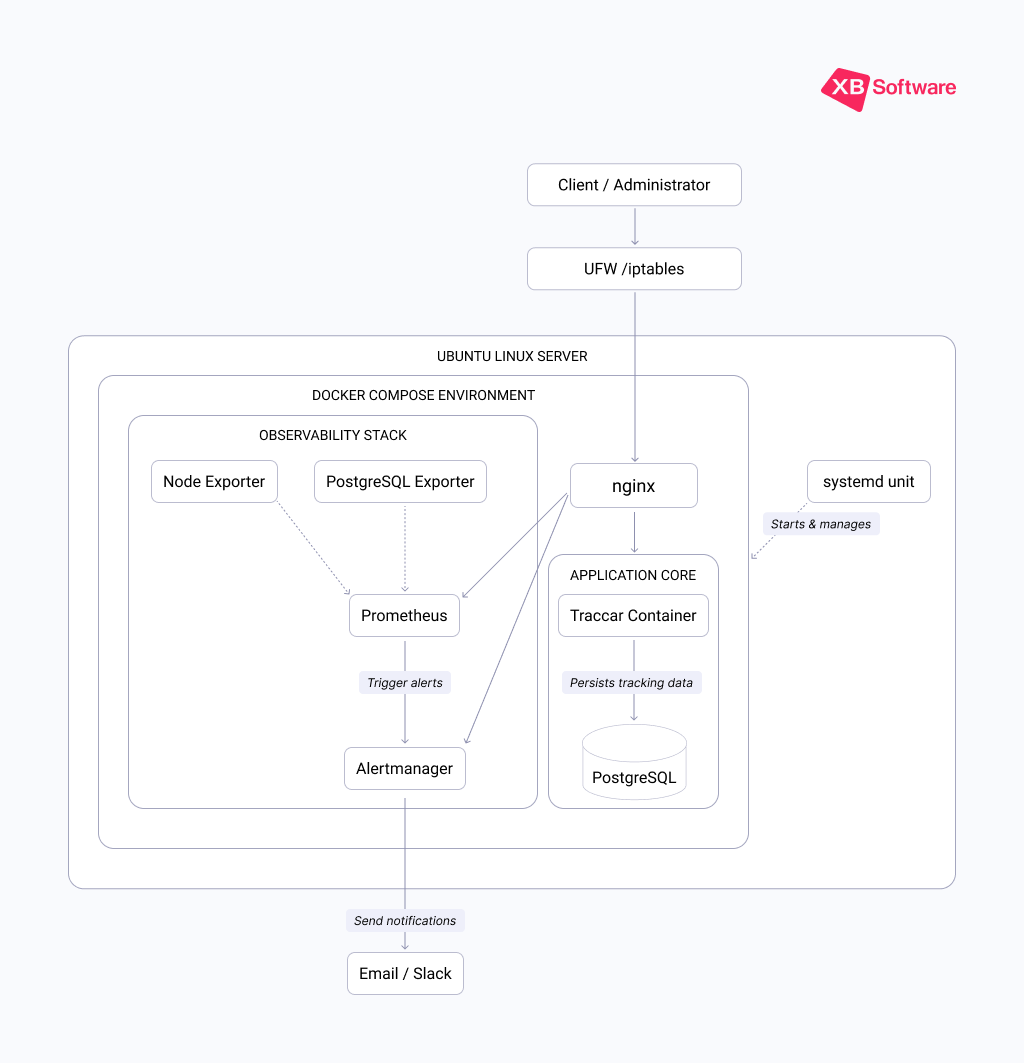
All the components listed above work together in a simple but production-capable architecture. Everything runs in Docker containers on a single server. For small to medium deployments this is more than sufficient. If tracking volume grows, the client can simply move the deployment to a more powerful server.
The Traccar backend and frontend are packaged in a single container. This is how Traccar’s official Docker image works, and it keeps deployment straightforward. The frontend is written in React, and the backend runs on a custom Java server. The mobile applications (Traccar Client for drivers and Traccar Manager for fleet supervisors) are available from the official app stores.
For the database, we went with PostgreSQL. Traccar supports multiple databases, but PostgreSQL handles geospatial queries better than MySQL and manages high loads more effectively. For most fleets, the difference between databases is not dramatic, but PostgreSQL gives more headroom if tracking volume grows.
Prometheus and Alertmanager run in their own container. Prometheus scrapes data from two exporters. The Node exporter exposes such Linux machine metrics as CPU, memory, disk, network (these are the basic ones that can be extended if needed). The PostgreSQL exporter exposes database metrics. Together, they provide visibility into the health of the entire stack.
Nginx sits in front of everything. It routes traffic to Traccar, Prometheus, and Alertmanager. We added basic authentication to the monitoring interfaces so that metrics are not publicly accessible.
Why Traccar Integration Matters for Fleet Operations
Companies don’t buy tracking software and logistics solutions because they enjoy looking at maps. They buy them because they need to know where their vehicles are, how long drivers spend on routes, whether deliveries are on time, and whether assets are being used efficiently.
When the tracking system goes down, operations suffer. Dispatchers cannot assign jobs. Customers cannot get delivery updates. Managers cannot verify that routes were followed. The business loses visibility, and visibility is the whole point.
Our deployment approach addresses this directly.
Monitoring and Alerting: Knowing Before It Breaks
We built a deployment that not only works today but also tells you when it might stop working tomorrow. More vehicles get added. More trips get tracked. The database grows. Memory usage creeps up. CPU spikes during peak hours. Without monitoring, the first sign of trouble is often the system going down.
Our observability stack provides early warning. The alerts we configured track:
- Host health: CPU, memory, disk usage, network activity;
- Database health: PostgreSQL connections, query performance, storage;
- Service availability: whether Traccar and its components are responding.
When metrics cross predefined thresholds, Alertmanager sends notifications. The client can see exactly what is happening on dashboards and plan upgrades before the system fails.
Read Also How Traccar fits into an event-driven logistics platform
Security: Basic But Solid
Security follows the same principle as the rest of the stack: simple and effective. The script configures iptables (a traditional utility used to configure and manage IP packet filtering and NAT rules in the Linux kernel) to block all ports except those needed for the application to function.
This is essentially the same approach major cloud providers use with their security groups, just without the fancy UI. All internal traffic (database queries, exporter metrics collection) is fully isolated within Docker’s private virtual networks and physically hidden from the outside world.
Customization: Frontend and Backend Modifications
A production environment also has to reflect the client’s needs. One of the reasons companies choose Traccar is that they can customize it. In our experience, clients typically prioritize UX improvements. So we built flexibility into the deployment script accordingly. The repositories it uses are defined in environment variables. The frontend repo variable can point to the standard Traccar frontend on GitHub, a private repository with custom styles, or even a local directory.
This means we can:
- Apply branding: replace the Traccar logo with the client’s logo, adjust color palettes;
- Modify UI elements: add, remove, or rearrange features in the frontend;
- Update the frontend: pull new versions from the repository without changing the deployment script.
For a logistics client, we used this approach to redesign the entire Traccar interface and add role-based dashboards, custom report builders, and driver management:
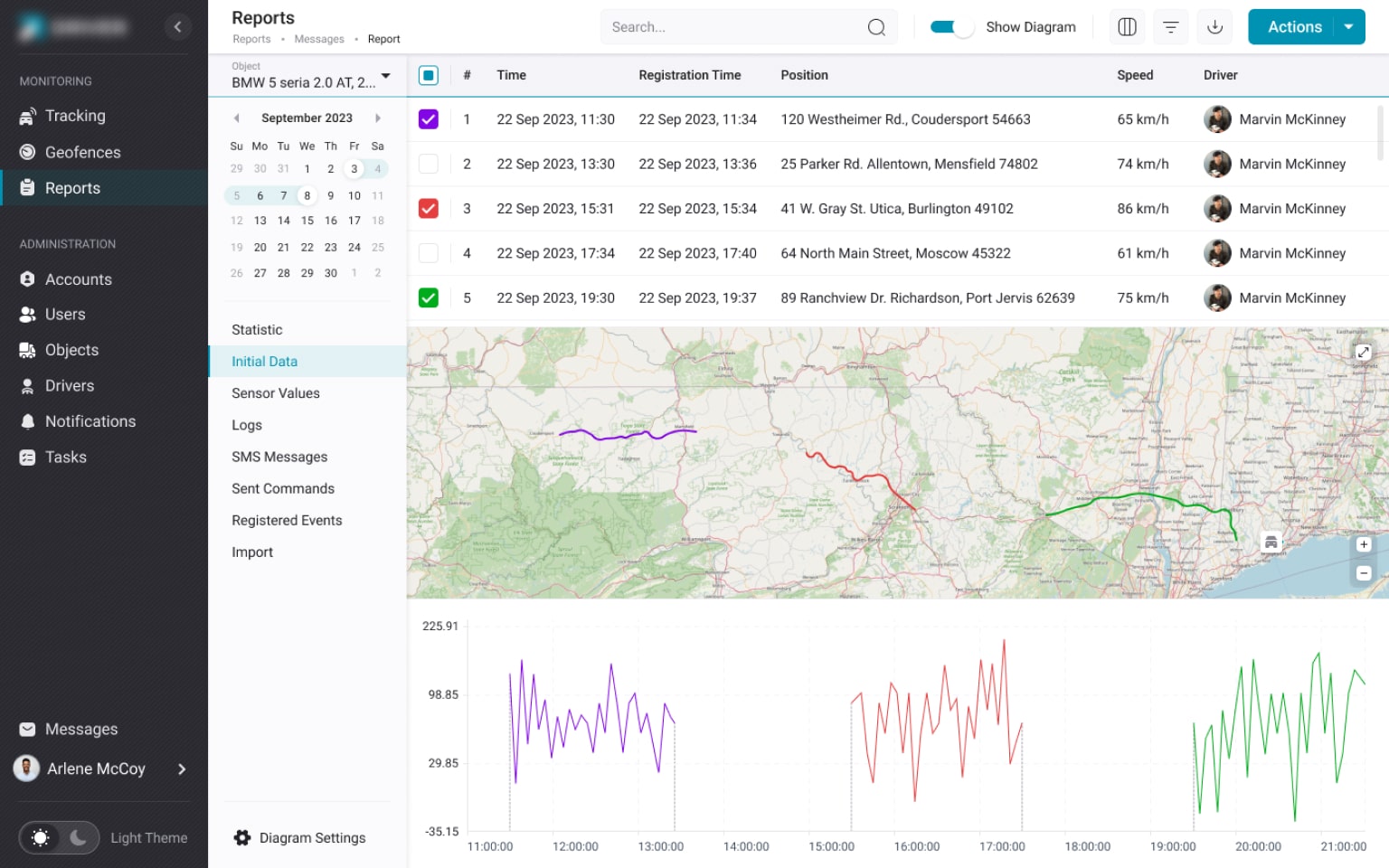
Сompletely reworked Reporting module that added logic to the reporting process in the Traccar-based XB Software project
Most clients do not ask for backend changes. But for those who do need backend modifications (custom business logic, integrations with existing systems, specialized tracking features) we can handle those as well.
Support: Ongoing Maintenance, Adjustments, and Troubleshooting
Deploying the system is only the first step. When something drifts out of spec (memory spikes, database connection bloat, or unusual latency) we can diagnose it, and adjust the server or Traccar configuration before it becomes a problem.
Future Enhancements for Traccar Production Deployments
The deployment script is a foundation. As we work with more clients, we will refine the monitoring rules, expand the customization options, and improve the deployment process.
One area we are exploring is using AI-assisted development to accelerate frontend customization. Instead of manually modifying React components for each client, we could generate custom interfaces based on client requirements.
This is still in the exploration phase, but the potential is significant.
We are also considering how to handle larger deployments. Docker Swarm or Kubernetes would provide better scaling for fleet management software that works with hundreds or thousands of vehicles. The current script is a starting point, and we can build more complex architectures as client needs grow.
Conclusions
Traccar is a powerful GPS tracking system. But power without reliability is useless, and reliability without visibility is dangerous. Our automated deployment creates a production environment that combines Traccar’s capabilities with the monitoring, security, and customization that businesses actually need.
Our clients focus on their business. We make sure the tracking system stays online, stays secure, and stays useful. Contact us if you need GPS tracking without the headache of managing infrastructure.