Summary
Examarius 1.03 adds new tools for flexible testing, training, automated evaluation, and deeper analysis of student performance that improve test management and performance analysis both for examiners and students.
Online testing is not always about setting a deadline, limiting attempts, and assigning a final grade. Depending on the learning or assessment scenario, students may need time to practice, choose between question variants, or complete a test without the pressure of a countdown. At the same time, examiners need more flexible ways to share tests and analyze results, while administrators need convenient tools for managing the platform.
The new Examarius 1.03 update expands the platform in all these areas. The major release introduces new capabilities for online testing software, so let’s take a closer look at what’s new in Examarius.
Quality-of-Life Updates and UX Enhancements for All Modules
The 1.03 release of Examarius introduces new online assessment software features for the Examiner and Student modules. Some focus on simplifying platform management, while others give examiners more control over how tests are assigned and evaluated. The update also adds more detailed performance statistics both for examiners and students, making it easier to review online test assignments and examine individual student results.
Users with Examiner and Student roles can now sign in to Examarius using their Google accounts. This provides an additional authentication option and makes access more convenient for users who already use Google accounts for their work or educational activities. Besides that, new features include flexible test-sharing options, training mode with unlimited attempts, elective questions, and a detailed Statistics tab.
More Flexible Test Sharing for Examiners
Examarius 1.03 expands the ways examiners can share tests with students. In addition to traditional timed or deadline-based assignments, examiners can now choose a sharing flow that better fits the purpose of a particular test.
Testing Without Time Restrictions
The new Send Now Without Time Limits test-sharing option allows an examiner to make a test available to students immediately, without setting a deadline or limiting the number of attempts.
With this option:
- The test is available immediately after sharing;
- There is no availability deadline;
- Students can complete the test at their own pace.
This option is useful when students need flexibility while completing a test. The test remains available without the restrictions of a scheduled or time-limited assignment. If a student does not answer a question, it is counted as incorrect.
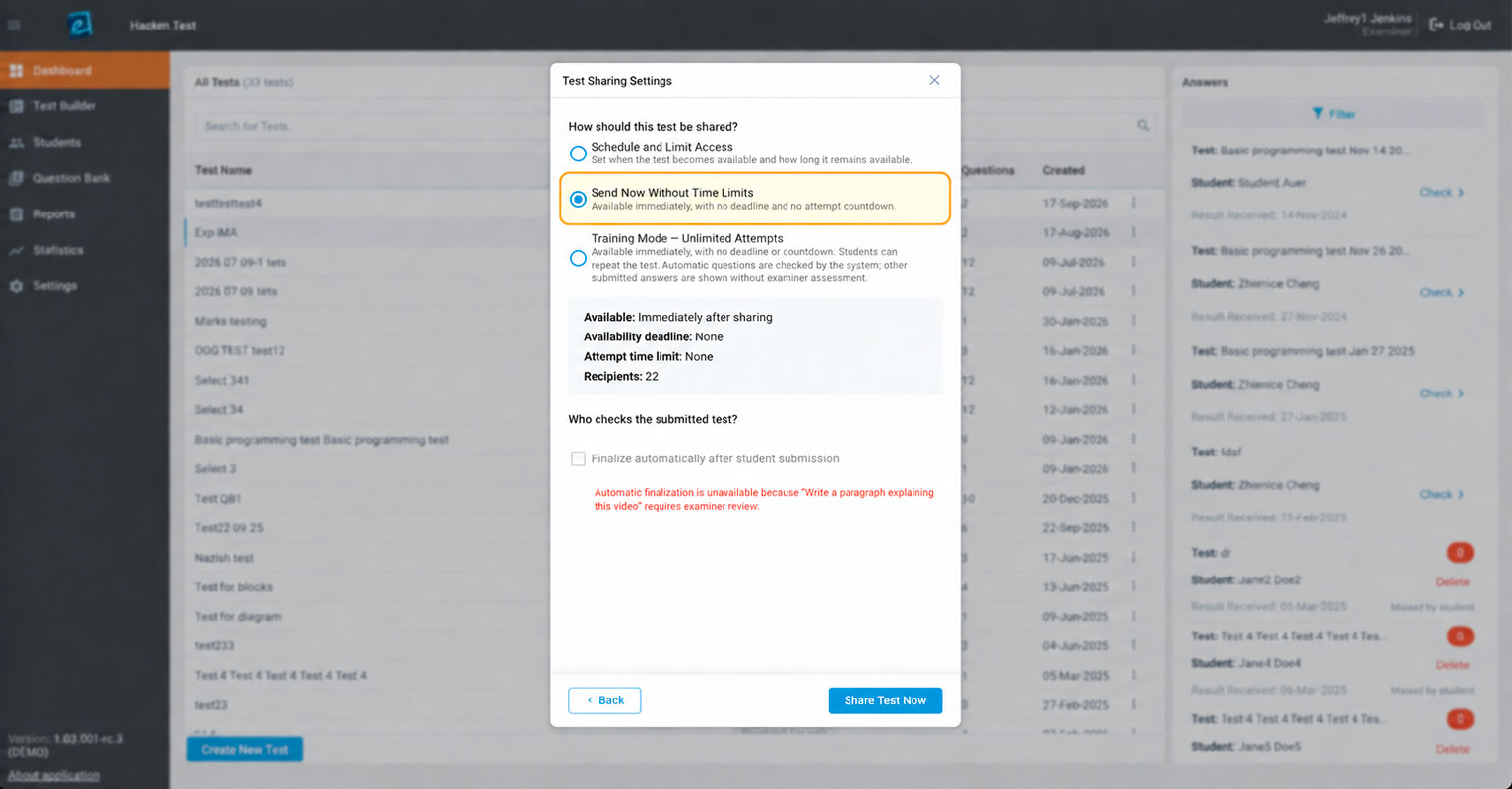
Examarius demo showing a pop-up with the test sharing options and the conditions for automatic finalization availability
Automatic Test Verification
For both testing options (with or without a set time limit), an examiner can now choose a fully automated test verification when sharing the test. The feature is available when a test consists entirely of components that can be checked automatically.
Once a student completes the test, the system automatically calculates the results and marks the test as verified. This automated assessment eliminates the need for the examiner to review the test manually. Students can receive their results as soon as the test is completed and automatically evaluated.
Training Mode with Unlimited Test Attempts
Examarius 1.03 also introduces Training Mode, designed for situations where students need to practice and test their skills rather than complete a one-time assessment.
An examiner can create and share a test in training mode, allowing students to access it immediately after sharing. They can repeat it as many times as needed with no deadline. Automatic questions are checked by the system; other submitted answers are shown without assessment.
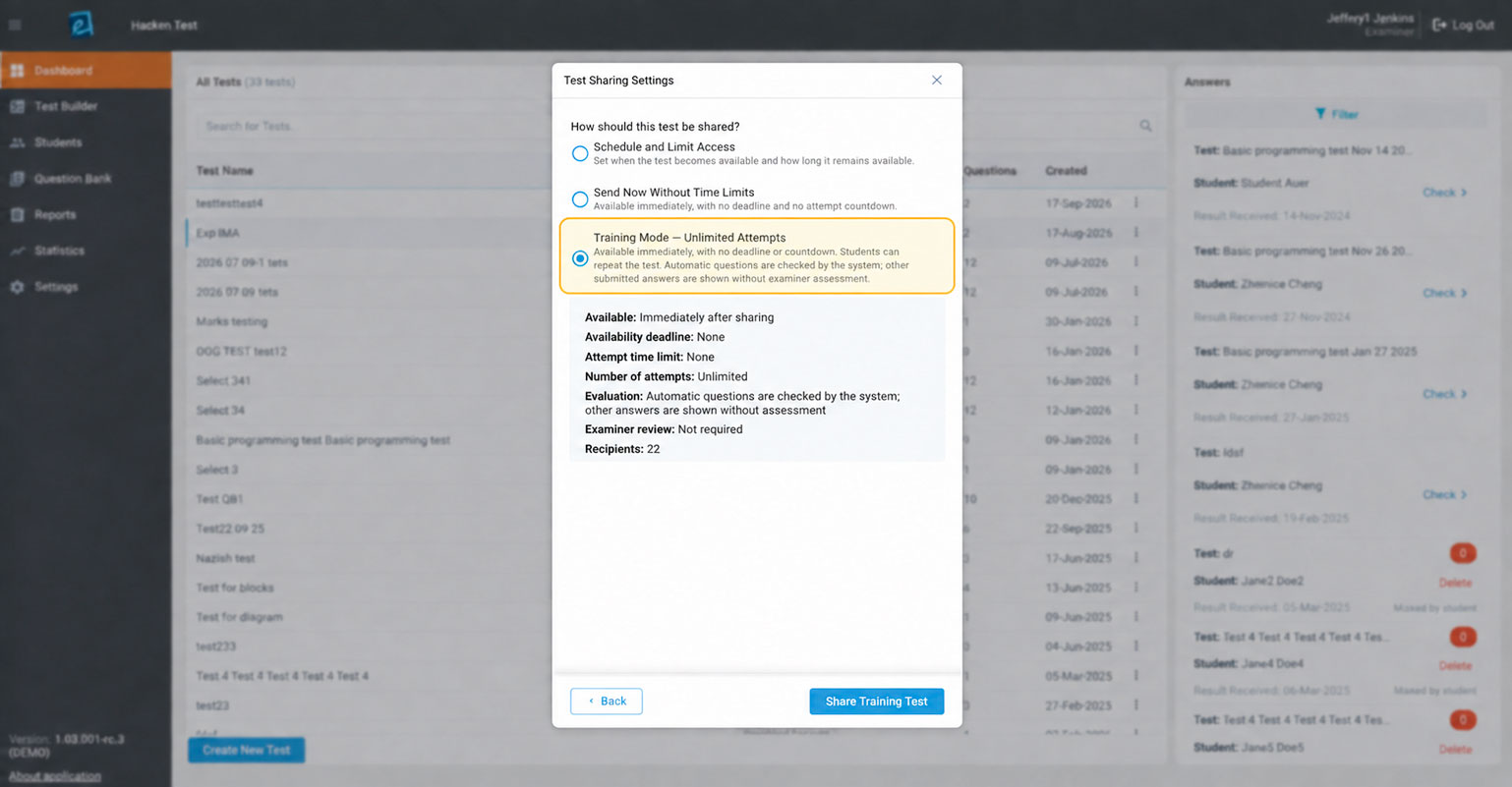
Examarius demo showing Training Mode as one of the testing options
This approach allows students to work through a test repeatedly without waiting for a new assignment or worrying about running out of attempts. It can make online testing more suitable for skills development, revision, and self-directed practice.
For examiners, the main advantage is that training activities can be provided without requiring manual review of every attempt.

Not every test is a timed assessment — sometimes students need to practice, choose between question variants, or complete a test without a deadline. At the same time, examiners need clearer data to understand the results.
Elective Questions Give Students More Choice
Examarius 1.03 introduces Electives control ー a question component that gives students a choice at the first level of the assessment. An examiner can create several questions within one elective component, with each question containing up to 10 text variants.
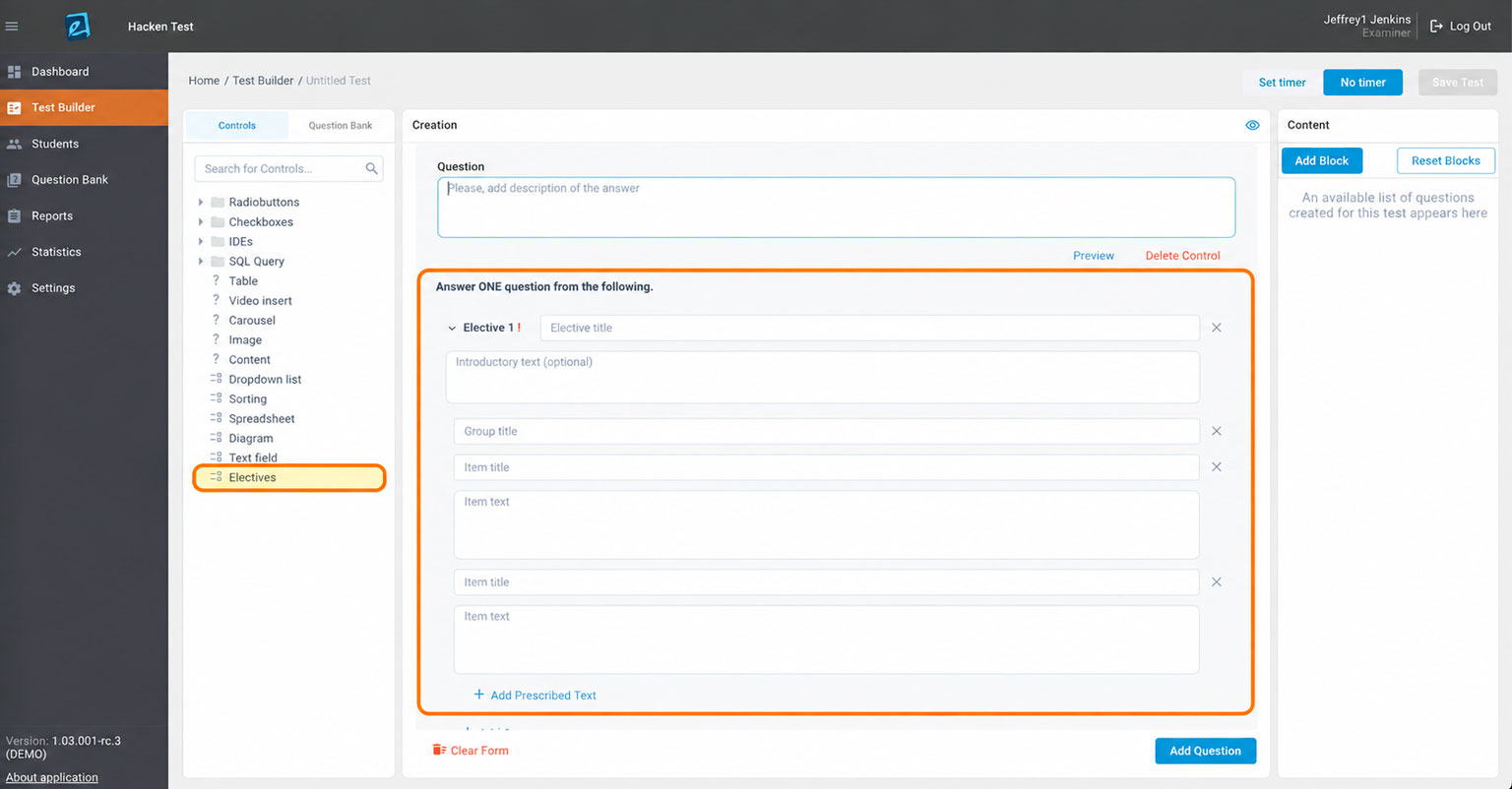
Test Builder with the Electives control option for creating elective questions in tests
During the test, the student first chooses one of the available questions. The system then randomly displays one of the text variants associated with that question. The student must provide a free-form written answer based on the text they receive.
This approach allows examiners to create more varied assessments while giving students some choice over which question they want to answer. Randomizing the text variant also provides additional flexibility when the same assessment is taken by multiple students.
Read Also How to combat cheating in online exams
Detailed Statistics for More Insight Into Test Results
Examarius 1.03 also expands the platform’s reporting capabilities with a new Statistics tab.
Assessment Reporting for Examiners
The new statistics view provides examiners with a broader picture of how assigned tests are performing. Instead of looking only at individual results, examiners can review patterns and compare assignments using several performance indicators.
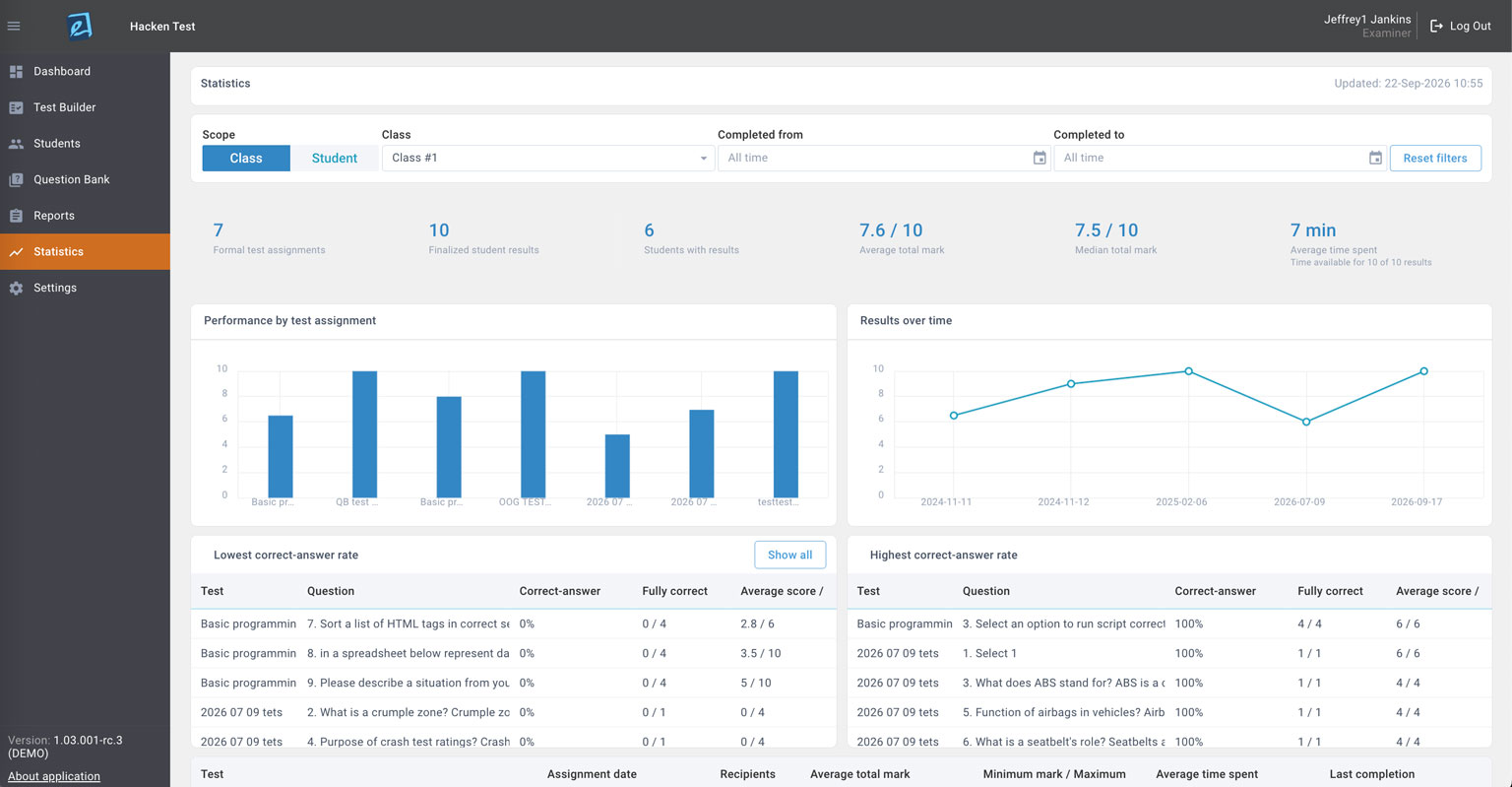
Statistics dashboard for Examiners that helps overview testing analytics and reveal patterns among students
The Statistics tab shows:
- The amount of formal test assignments, finalized student results, and students with results;
- Average and median total marks
- Average time spent on tests among students;
- Performance by test assignment;
- Results over time;
- Lowest correct-answer rate;
- Highest correct-answer rate.
Besides that, the examiners can check the additional information for each test assignment, including the assigned test, when it was assigned, which students received the assignment, and even more details. This gives examiners several ways to understand how students are performing across different assignments and over time.
If needed, the examiners can export individual student results as PDF. An examiner can select a test assignment from the grid to see the results of the students who completed it, making it easier to save, share, or use the results outside the platform.
This creates a more complete workflow for reviewing assessments: examiners can start with an overall view of test performance, select a particular assignment, and then examine the corresponding student results.
Student Performance Analytics
The new Statistics tab also gives students a clear overview of their finalized results for formal tests. It focuses on completed assessments, while excluding training attempts and tests that are still awaiting review.
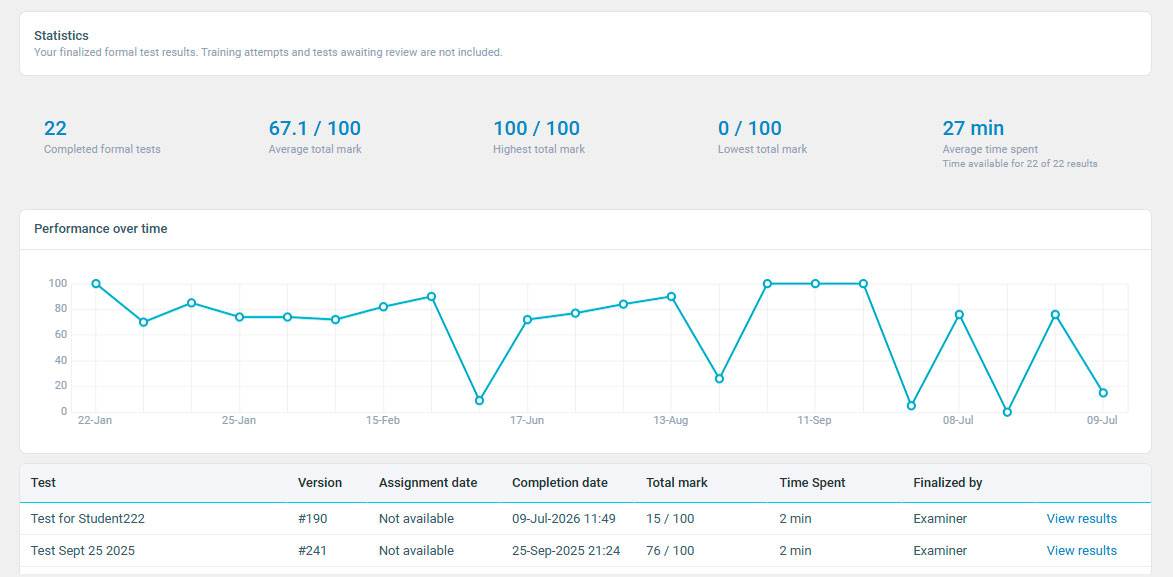
Statistics dashboard for Students that demonstrates academic performance
The Statistics tab shows:
- Number of completed formal tests;
- Average, highest, and lowest overall score;
- Average time spent completing tests;
- Performance over time.
Students can also view a grid listing the tests with available results. This makes it easier to review completed assessments and track their performance over time.
With Examarius 1.03, we wanted to give organizations more flexibility in how they use online testing. This update brings these scenarios together while making test management and performance analysis more convenient.
Conclusion: What Examarius 1.03 Changes for Different Users
The new release adds capabilities for different stages of the online testing process. Version 1.03 expands Examarius beyond a one-size-fits-all approach to online assessments.
Google single sign-on provides another way to access Examarius, while the new sharing flows provide more flexibility when assigning tests. For students, these changes provide more flexibility in how they interact with tests, while examiners get more insights on the testing process and academic performance.
Together, these additions make Examarius a broader and more flexible online testing solution for organizations that need to support both assessment and training scenarios. So, if you want to check the demo or get all the new functions right away, contact us.