Summary
This article describes how XB Software built a local, on‑premise AI agent that automatically extracts actionable work items from unstructured monthly developer reports. The pipeline uses a locally hosted Gemma 4 E2B model to normalize text, filter out vague entries, enrich available data with Jira ticket descriptions, and apply vector embeddings for duplicate detection. The CPU‑only architecture ensures data sovereignty, eliminates cloud vendor lock‑in, and provides a predictable, low‑cost automation path for enterprise teams.
Our management team spent hours manually extracting work items (“bug fix”, “released version 1”, etc.) from dozens of developer reports. The task was repetitive, error‑prone, and a security risk when using cloud‑based AI tools, since it means exposing internal activity to external servers.
To solve this, we built a local LLM‑powered agent that runs entirely on our own servers, normalizes chaotic report data, filters out useless noise, enriches descriptions from Jira, and generates a clean list of actual accomplishments. In this article, we break down the architecture and explain why a CPU‑only, on‑premise approach is practical for enterprise clients who prioritize data privacy.
The Problem: Manual Work List Generation Is Slow, Inconsistent, and Insecure
Usually, our managers followed the same routine: collect a month’s worth of developer reports, manually scan through hundreds of entries, and pick out the items that actually represented completed work. This process was straightforward but flawed.
The first issue was data quality. Developers write reports in wildly different formats. Some include detailed Jira ticket IDs and descriptions, others are cryptic one‑liners like “fixed issue”. When a manager who wasn’t deeply involved in the project later reviews these reports, the meaning is often lost. What does “adjusted header” refer to? Which feature did “refactored code” touch? What we really needed was an AI-powered task management approach that could process this unstructured data automatically.
The second issue was duplicate work. Managers would occasionally include tasks that had already been declared in previous months, creating overlaps. Another example is a task that spans several days. In this case, the same activity could be logged repeatedly, producing many near-identical entries. There was no automated way to compare new reports against historical data.
The third issue was security. Initially, we experimented with feeding entire monthly reports into ChatGPT, asking it to clean up the data and suggest a final list. It worked reasonably well, but we were handing over a full month of internal project activity to a cloud service. For many enterprise businesses, especially those in finance or healthcare, that level of exposure is unacceptable.
Read Also How AI Search Solves the Problem of Working with Unstructured Data
The Solution: A Secure, On‑Premise AI Agent for Task Extraction from Reports
Our approach was to implement a console‑based application that converts reports into tasks automatically. It runs on our internal server, triggered by a cron job (or an optional API call) at the end of each monthly reporting cycle. The local LLM agent processes raw reports for each active project, applies a series of transformations, and outputs a polished list of work items.
The entire pipeline runs on a CPU‑only server using Ollama to serve a local instance of the Gemma 4 E2B model. For embedding generation (used in duplicate detection), we use the tiny nomic‑embed‑text model, which is only a few megabytes in size. Here’s a high‑level view of the process flow:
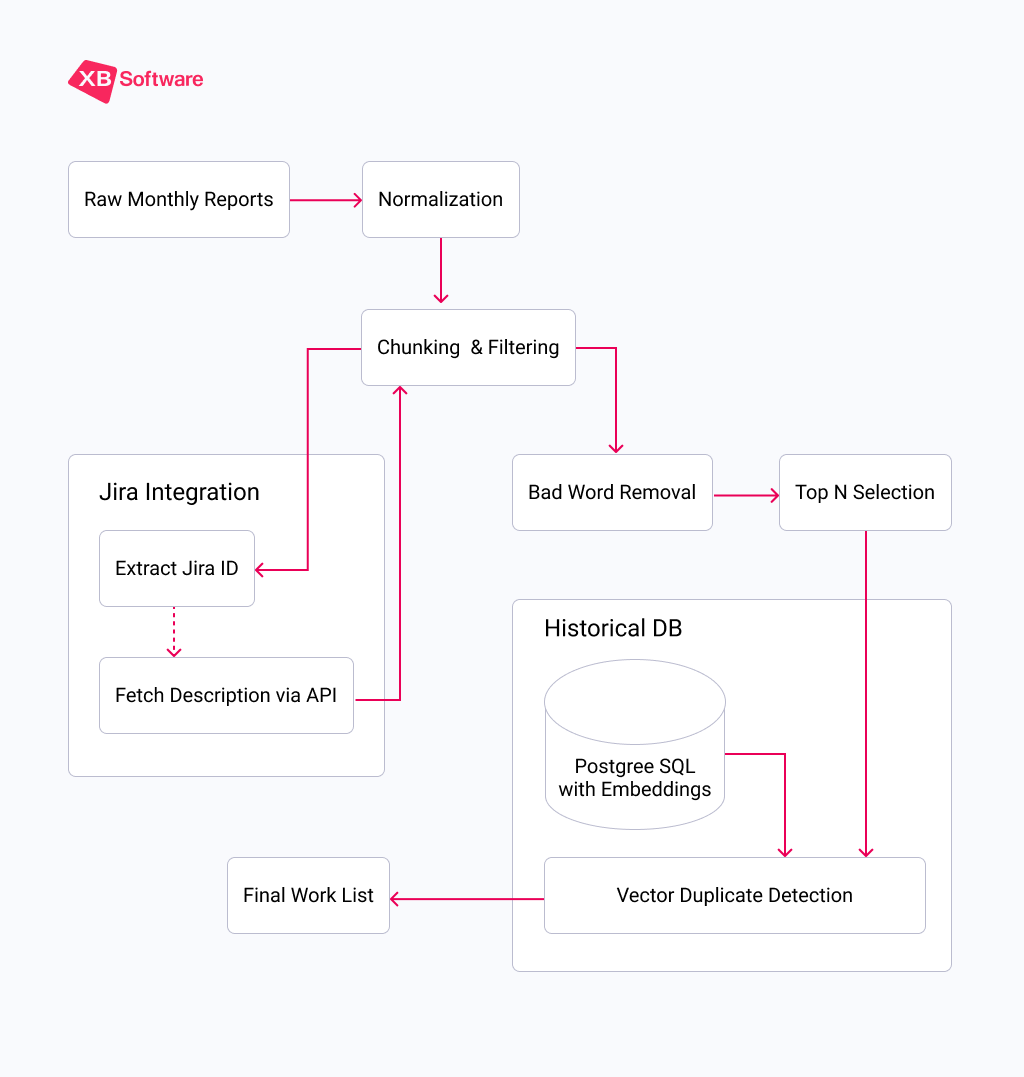
Let’s walk through each stage in detail.
1. Normalization: Making Chaos Readable
A single project might receive 80+ individual reports per month with varying levels of detail. The first task for our AI agent was to normalize these disparate inputs into a consistent, machine‑readable format. This step alone turns a jumble of free‑form text into structured data that the rest of the pipeline can reliably process.
2. Chunking: Working Within Token Limits
This is where we hit our first major technical constraint. Running on CPU via Ollama, our Gemma 4 model is limited to a context window of 4,096 tokens. That’s not a lot. A single month of reports from a busy project can easily exceed that.
We solved this by chunking. The AI system calculates the approximate token count of the combined report text and splits it into batches of about 20 reports each. This ensures that the LLM never runs out of context space and that each chunk receives full attention.
Within each chunk, we also further split entries that contain multiple tasks in a single line (e.g., “Did A, did B, did C”). After this splitting, 22 raw reports became 94 individual work items in one of our test runs.
3. Jira Enrichment: Adding Missing Context
One of the most valuable features of our local LLM agent is its ability to automatically fetch additional context from Jira. When the system detects a Jira ticket ID in a report, it calls the Jira API to retrieve the ticket description.
Developers often write terse reports assuming the ticket ID is enough. But when that report later appears as “AAA‑123 – done”, it tells nothing. By pulling the full, manager‑written description from Jira, our AI agent replaces the vague entry with a clear, professional summary of what was actually accomplished.
4. Filtering Out the Noise
Not every report entry is worth including. Generic statements like “working on…” or “following up” don’t convey meaningful work. We built a bad‑word filter, one of key components of our intelligent document processing (IDP) pipeline. It flags entries containing these vague phrases.
The LLM processes each chunk and identifies data that match our exclusion list. In our test, this filter removed 69.1% of entries and only 29 items out of 94 survived the cut. What remained were concrete, specific descriptions of completed tasks.
5. Selecting the Best Candidates
Once we have a clean set of candidates, we need to choose the top N entries to present. The number N varies by project and is stored in our internal reporting database. To account for further filtering in the next step, we typically select a larger pool, say, 80 items.
6. Vector Duplicate Detection: Ensuring We Never Repeat Ourselves
This is the secret sauce that prevents duplicate entries. Before finalizing the list, the AI agent compares each candidate against a historical database of all work items we’ve ever submitted for that project. Here’s how it works:
- Embedding Generation. Each work item is converted into a vector (a list of numbers) using the nomic‑embed‑text model. This vector captures the semantic meaning of the text;
- Similarity Calculation. The system compares the new candidate’s vector against the vectors of all previously stored data for that project;
- Threshold Decision. If the similarity score exceeds 0.85 (85%), the candidate is flagged as a duplicate and removed. This threshold catches not just exact matches but also near‑duplicates where the phrasing or word order has changed while the underlying idea remains the same.
The historical data is stored in a lightweight PostgreSQL table with just a few fields: project_id, text (the final description), embedding (the vector), and created_at (date of creation).
After duplicate removal, we’re left with a set of truly unique, high‑quality work items. These are then formatted for final delivery to the project manager.
Read Also Using AI to Generate a List of Works in Construction
Real‑World Performance: What Test Run Tells Us
Let’s walk through an actual test run to see the numbers in action. These test run results demonstrate how an AI report analysis tool can summarize reports into tasks even with noisy, inconsistent input.
| Stage | Items In | Items Out | Reduction |
| Raw reports | 22 | — | — |
| After line splitting | — | 94 | — |
| Bad‑word filter | 94 | 29 | 69.1% removed |
| Duplicate detection | 29 | 16 | 44.8% removed |
Technical Deep Dive: Why CPU‑Only Deployment Works
One of the most common objections to running local LLMs is the perceived need for expensive GPU hardware. We deliberately chose a CPU‑only deployment to keep costs manageable and to prove that on‑premise AI doesn’t require significant infrastructure investments.
Model Selection: Gemma 4 E2B
We evaluated several local models and settled on Gemma 4 E2B. Here’s why:
- Size. At 5 billion parameters, it fits comfortably in RAM without needing a GPU. Our server has extra memory allocated specifically for the model;
- Performance. It’s fast enough for batch processing;
- Quality. The model handles JSON output reliably, and follows detailed prompts with minimal hallucination.
NOTE: If you work with a multilingual team, make sure that the model you use understands target languages natively.
Proper Model Settings and Prompt Engineering for Consistency
Each pipeline stage has its own carefully crafted prompt that includes:
- A clear role definition (e.g., “You are a specialized Data Parsing Engine”);
- Good examples and bad examples of expected output;
- Explicit formatting rules (JSON structure, field names);
- Instructions to avoid creativity (temperature set to 0).
For the bad‑word filter, we provide a list of prohibited terms and their synonyms: “working on,” “following up,” “in progress,” “discussed,” etc. The LLM simply acts as a pattern matcher with semantic understanding. It can recognize that “still working on the header” is conceptually similar to “in progress” and flag it accordingly.
Also, for data‑processing tasks like this, we always disable “thinking” or “chain‑of‑thought” modes. Those are useful for complex reasoning but introduce unnecessary variability and output length in structured extraction tasks.
Read Also The Gap Between AI Prototypes and Production Software: 10 Risks You Can’t Afford
Extra Challenges We Overcame
Challenge 1: LLM Unpredictability. Even with temperature set to 0, LLMs can occasionally produce unexpected output. We added timeout limits to prevent the model from getting stuck in a loop, and we structured our prompts to request strictly formatted JSON that is easy to validate programmatically.

All LLMs glitch. We can never fully trust them. They help, but everything still needs to be reviewed and rephrased. They assist, but they don’t solve the task 100%.
Challenge 2: CPU Processing Speed. Processing 94 items across multiple LLM calls takes time. We solved this by running the local LLM agent as an overnight cron job, so speed is never a bottleneck. The manager arrives in the morning to a ready‑to‑review list.
Read Also AI as a Co-Pilot, Not an Autopilot: Guidance on Risk Management and Realistic Performance
Why This Approach Matters for Enterprise Clients
1. Complete Data Sovereignty
When you use on-premise Artificial Intelligence solutions, no data ever leaves your infrastructure. The LLM runs locally, the embedding model runs locally, and the historical database resides on your own PostgreSQL server.
2. No Vendor Lock‑In
Cloud AI services change their pricing, deprecate models, or alter their APIs without notice. By using local AI agents and Ollama, you retain full control over the entire stack. Need to switch to a different model tomorrow? Just pull a new one and update the configuration.
3. Predictable Costs
The only ongoing cost is the electricity to run the server. There are no per‑token API fees, no monthly subscriptions, and no surprise bills after a particularly busy month of processing. For organizations that process thousands of reports annually, the savings are substantial.
4. Customizable to Your Workflow
Because we own the code, we can adapt the pipeline to fit your specific reporting format, integrate with your existing project management tools, and fine‑tune the prompts to match your industry’s terminology. This enables using AI for business process automation across diverse sectors, from construction to healthcare.
From Manual Chore to Automated Precision
Before, turning chaotic developer notes into clean reports meant choosing between tedious manual work or exposing sensitive data to cloud AI. Our private AI agent for document analysis offers a third way. Namely, secure, on‑premise automation.
By combining Gemma 4 on standard CPU hardware with vector‑based duplicate detection and direct Jira enrichment, we’ve turned hours of monthly review into a hands‑off process. The system normalizes vague entries, filters out noise, and guarantees you never repeat a task description.
Contact us if you want to secure and streamline your reporting workflow.