Summary
Developers from XB Software tested GitHub’s Spec Kit on a real legacy project. A week‑long task was completed in half the time, with the AI surfacing hidden requirements gaps and generating clean, pattern‑matching code, proving that Spec‑Driven Development works in mature codebases when paired with clear specs and experienced oversight.
Bringing new AI-powered development tools into a large, established legacy project is rarely straightforward. While conversations around tools like GitHub’s Spec Kit mostly focus on greenfield projects and startups, our team decided to test something different.
Our experiment was to handle a real, week-long task from our backlog using Spec Kit, integrated with AI agents. The results were both promising and revealing. This article shares what worked, what didn’t, and the lessons we learned about using Spec-Driven Development in a mature codebase with years of history.
The Challenge: Why Large Legacy Tasks Are Hard to Execute
Our legacy project is anything but small. With four years of development behind it, the codebase has grown into a complex ecosystem of established patterns, legacy components, and deeply embedded business logic.
The task we selected for the experiment wasn’t algorithmically groundbreaking, but still substantial. It involved creating new components, styling, and API integration. This is the kind of “routine” work that eats up time and represents exactly the type of task where even skilled developers struggle to remember all the nuances.
Read Also From Old to Gold: Transforming Legacy Systems with Modernization Techniques (with Real Examples)
The Process: How Spec Kit Turned a Jira Ticket into Working Code
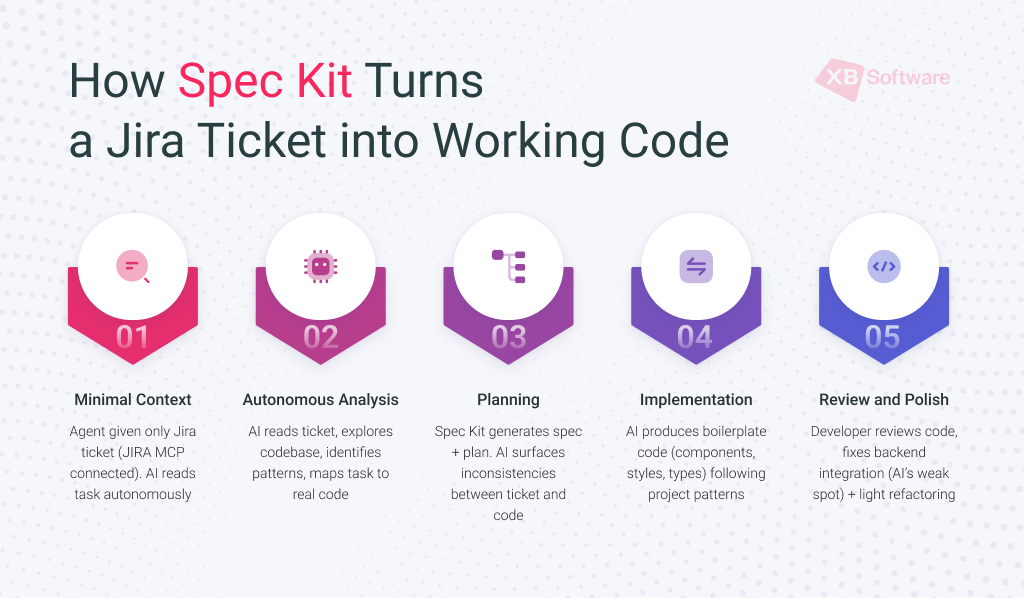
Our developer followed a deliberately minimal intervention approach. The goal was to see how much the AI tool could handle autonomously, and where human judgment would still be required.
Step 1: Minimal Context
We gave the agent with integrated Spec Kit the Jira ticket number. Because we had the JIRA MCP (Model Context Protocol) connected, the AI agent could autonomously read and analyze the task details. No hand-holding, no additional explanations.
Step 2: Autonomous Analysis
The AI tool read the ticket, explored the existing codebase, identified relevant components, and recognized established patterns. It helped map the task to the real project codebase.
Step 3: Planning
Spec Kit generated a detailed specification and implementation plan. This phase delivered an unexpected benefit: the AI surfaced inconsistencies and ambiguities between the ticket requirements and the existing implementation. These issues would have likely been discovered much later, during development or even testing. Here, the AI tool acted as a technical analyst, refining the task before writing the code.
Step 4: Implementation
Following its own plan, the AI agent began generating code. It produced the bulk of the boilerplate code (components, styles, types) strictly adhering to the patterns it had identified in the project.
Step 5: Review and Polish
Our developer shifted into reviewer mode. He inspected the generated code, fixed integration issues with the backend (which proved to be the AI’s weak spot), and performed light refactoring. Notably, the core business logic generated by the AI agent required no modification.
The Results: Faster Delivery with Maintained Code Quality
From the developer’s perspective, the week-long task was completed in roughly half the time it would have taken manually. The time savings came primarily from automating the repetitive, high-volume coding work that’s necessary but doesn’t require deep architectural thinking.
The generated code passed linters and TypeScript checks without issues. More importantly, the AI correctly reused existing components and utilities from the project, rather than reinventing them.
Perhaps the most surprising outcome was the improvement in requirements quality. By surfacing ambiguities and contradictions early, Spec Kit played the role of an analyst, asking clarifying questions at the very beginning of the process, before development began.
Key Spec Kit Limitations in Practice
No tool is perfect, and our experiment revealed important constraints that shaped how we think about Spec Kit’s role:
- Spec Kit is overkill for tasks estimated at two days or less. The overhead of going through the specification and planning phases exceeded the time savings from automation. For smaller tasks, working directly with an AI agent makes more sense;
- Integration remains the weak link, especially with external APIs and complex edge cases. Code involving external APIs and complex integration logic often required manual adjustment. The AI excelled at generating code within the boundaries of the existing system, but struggled with connections to the outside world;
- Better input produces better output. The quality of results correlated directly with the quality of the input. Tasks like “make it look like the screenshot” were doomed from the start. We learned that detailed text descriptions, clear acceptance criteria, components used, and links to related Jira tickets provide Spec Kit with the necessary context to understand the task;
- The reviewer’s expertise matters most. Spec Kit acts as a multiplier that amplifies the capabilities of the person using it. In the hands of a well-versed developer who understands architecture, patterns, and the project’s context, it removes friction and accelerates delivery. However, it also multiplies the errors of junior developers, who wouldn’t notice problems in the generated code. A thorough code review by a human becomes just as, if not more, important.
Read Also How AI Helps Modernize Legacy Code in Real Projects
When and How to Use Spec Kit Effectively
Looking back at the experiment, several lessons stand out that could benefit other teams considering similar tools.
Spec Kit works best for large, well-described tasks. The ideal use case is substantial work with significant boilerplate. For instance, new modules, complex features, or anything that would normally require days of writing code and follows established patterns. Here, the speed gains and planning improvements are maximized.
Invest in ticket quality. A critical precondition was the quality of the task description. Over time, we’ve been moving toward making our tickets self-sufficient, meaning they’re detailed enough that any team member, even someone new to the project, can understand exactly what needs to be done. The initial planning phase incurs a higher cost, but the resulting savings during implementation, software testing, and reduced reliance on analysts and QA team significantly outweigh the upfront expense.

Our investment in better specifications pays off regardless of whether AI is involved, but it turns out to be absolutely essential when AI becomes part of the equation.
The triad for success. Effective use of Spec Kit requires three elements working together: a skilled business analyst who writes detailed requirements, an experienced developer who sets up the task and performs thorough reviews, and the AI tool itself to automate the routine work. Missing any of these compromises the results.
Maintain human oversight. The AI is not a replacement for an experienced developer, and code review becomes more critical. The main purpose of intelligent coding tools is not to remove developers from the process but to free up their time for higher-value activities.
Read Also AI as a Co-Pilot, Not an Autopilot: Guidance on Risk Management and Realistic Performance
Conclusion: Spec-Driven Development Works Great in Legacy Projects (with Conditions)
Spec Kit and SDD are most effective in large legacy projects when the specification is clear, the architecture is understood, and human review stays in the loop. AI is not a replacement for developer expertise. It’s a new tool in the engineering toolkit, like version control, linters, or debuggers before it. In the hands of an experienced engineer who understands the architecture, the patterns, and the context, it removes friction and enables faster delivery. For those who don’t yet have that foundation, it can help create messy code faster.
XB Software’s next step is to formalize these learnings into practical guidelines for the team: how to write AI-friendly tickets, when to reach for Spec Kit versus direct agent interaction, and how to maintain quality standards while moving faster. The technology will continue to evolve, but the fundamental principles of clear specifications, thoughtful architecture, and human judgment remain as important as ever.
Contact us if you’re looking for a team that combines expert engineering with AI workflows to build better software, faster.