Summary
This article describes how to add AI-based semantic search to an existing fitness app without migrating your database or over‑engineering. Using MySQL, JavaScript, and in‑memory vector comparison, this pragmatic approach helps users find content by intent, not exact-match keywords.
Fitness apps grow fast. What starts as a handful of short answers to common questions quickly turns into a library of meal plans, coach notes, product recommendations, recovery guides, and habit-building content. At some point, the search starts to fail.
Users don’t know how editors title articles or how coaches phrase questions in the article collection. One person types “craving sugar,” another types “I keep reaching for chocolate at night.” To a human, these are the same question wrapped in different words. To a keyword‑based search engine, they’re different queries that might lead to different results or no results at all.
This article walks through how we solved this issue in our client’s fitness and nutrition app. We’ll cover why keyword search falls short for fitness content, how semantic search works in practice, and how we built a working semantic search implementation without over‑engineering the architecture.
When Keyword Search Stops Working for Fitness Content
The product we’re talking about is a mobile app for people tracking nutrition, building habits, and working out. Inside the app, there’s a knowledge base that includes questions and answers about weight loss, training, food choices, eating habits, meal timing, and recovery.
Early on, this section was manageable. With a few dozen articles, users could simply browse categories or type a word into the search bar. But as the content grew, it became more difficult for users to find the article they were looking for. This happened because people described a condition, doubt, or everyday situation in their search queries:
- “what to eat so I don’t binge at night”
- “can I drink diet soda while losing weight”
- “what to buy at the store for more protein”
If the article doesn’t contain those exact words, regular keyword search fails. Sometimes it finds a formally similar article, but not the one that actually answers the question.
This is where semantic similarity search comes in. Instead of matching words, it matches meaning. Users type naturally, and the app returns content that’s conceptually close to their query, not necessarily containing the same words, but aligned with the user intent.
Here’s a quick comparison of how the two approaches differ:
| Keyword Search | Semantic Search |
| Matches exact or partial words | Matches meaning and user intent |
| Misses synonyms and related concepts | Understands that “sweet craving” and “sugar urge” are the same thing |
| Returns nothing if words don’t match | Finds relevant content even with different phrasing |
| Depends on manual tagging and titles | Works with the content itself |
| Requires users to guess the right keywords | Lets users ask naturally |
Read Also Club Management System for Salons and Fitness Centers
How AI‑Based Semantic Search Matches User Queries with Fitness Articles
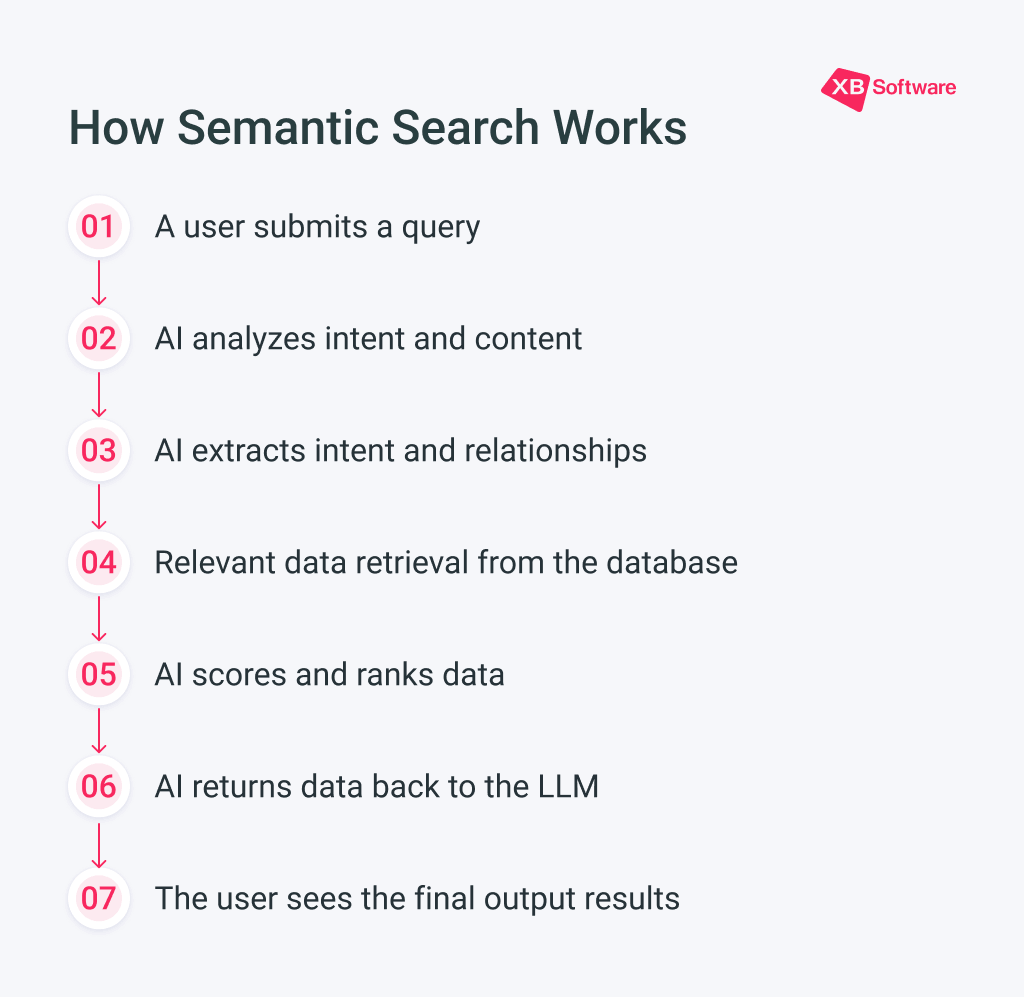
This approach is useful when the content can be described in text. For a fitness app, that’s exactly the scenario. Every piece of content has meaning: a question, an answer, a problem description, a recommendation, an example, an explanation.
But here’s a catch: if your content library only has a dozen short entries, implementing semantic search is pointless. A user query needs something to compare against. So before we could test the approach, we expanded the base to 160+ entries, such as questions and answers about nutrition, weight loss, training, food choices, sugar cravings, and other common topics.
Variety matters too. If everything in the base is written in the same dry, formal language, some natural user queries will still fall through the cracks. Good content for this type of search describes the topic from different angles: through goals, pain points, habits, shopping scenarios, training context, casual language. The better your base covers real user phrasing, the more accurate the search.
The system doesn’t generate answers or replace articles. It helps users find what’s already there. Articles and user queries get converted into numerical representations of meaning called embeddings. The system then compares these representations and returns the closest matches.
Read Also AI search for unstructured data
How We Built Semantic Search Without a Separate ML Service
The project already used MySQL 8. It’s a solid, stable foundation, but it doesn’t have native vector search support. And semantic search relies on vectors. In this approach, text gets turned into arrays of numbers, and the system compares how close those arrays are.
Theoretically, we could have started with a major rebuild: migrate the database, move data to a different DBMS, connect a separate vector database, and build a new sync layer. But for this task, that path seemed too heavy for a couple of reasons:
- The main database was already working and handling its job;
- Migrating a database for one new feature always carries risks, such as compatibility issues, testing overhead, or potential regressions;
- We still needed to prove the feature was valuable. If users didn’t actually use the smart search, a complex infrastructure would have been premature.
So the team chose to leave the stable core alone and add intent-based search as a separate layer. The architecture ended up being fairly straightforward.
A Server-Side Search Layer with In-Memory Comparison
The original content stays in the main knowledge base. For each entry (question, answer, or text block), the system generates a vector representation. The vector gets stored alongside the record in MySQL as JSON. Not an ideal vector database, but for a pilot it works and is easy to understand.
On the server side, an indexer runs periodically. It scans the database, finds new or changed records, recalculates their vectors, and updates the in‑memory search index. Indexing is configurable and can be triggered, for example, when new content is added or on a schedule.
When a user enters a query, the server doesn’t scan the entire database each time. The query gets converted into a vector using the same model that indexed the content. Then that vector gets compared to the article vectors already loaded in memory. The user gets back the closest matches.
For vectorization, we used a model from the Xenova Transformers family, available in a JavaScript environment. This was convenient since we didn’t have to spin up a separate Python service or ML infrastructure just for a prototype. For more context on why we chose JavaScript over a separate Python service, check out our comparison of Node.js vs Python.
Each text block was converted into a vector with 384 dimensions. In simple terms, a vector is a numerical fingerprint of meaning. Two phrases with similar meanings have vectors that are closer together than phrases about different topics.
For example, “I constantly want sweets” should land closer to articles about sugar cravings, eating habits, and snack options than to articles about choosing dumbbells or squat technique. The exact word “sweets” doesn’t have to be the only anchor. The system looks broader: at context, meaning, and related topics.
On a server with 4 cores and 16 GB of RAM, this approach proved realistic. In the prototype, the model and index took roughly 500‑600 MB of memory. For a single search feature, that’s noticeable but not critical, especially compared to the cost of separate infrastructure.
What Made Semantic Search Accuracy Difficult to Tune
Getting everything right requires more than just picking a model and turning it on. Several challenges emerged after implementation.
Short queries are ambiguous. A user typing “protein” could be looking for high‑protein foods, protein powder recommendations, or an explanation of why protein matters for muscle recovery. The system has to guess from context, and without much context, it’s a coin flip.
What gets vectorized matters. If you embed the full article including the title, body, and metadata, the vector might be pulled in different directions. If you embed only the title, you might miss relevant content where the body is more useful than the headline. We tested different approaches and found that combining the question and a short answer summary worked best for our use case.
Similarity scores aren’t everything. The closest match by cosine similarity isn’t always the best outcome. Sometimes a slightly less similar article is more useful because it covers the user’s specific situation better. Ranking needs a human touch or at least some behavioral signals.
Embeddings need updating. When content changes, the vector needs to be regenerated. If you forget this step, old vectors point to outdated content. We built a simple versioning system to track when each article was last embedded.
In‑memory search has limits. As the content grows, memory usage grows too. At some point, you either need to scale the server or move to a dedicated vector database.
Why a Lightweight Semantic Search Setup Was Enough for the First Version
A dedicated vector database has advantages. It handles large volumes, complex indexes, high load, and distributed architecture better. But it also has costs: a new service, configuration, monitoring, backups, data sync, DevOps support, additional points of failure.

For this project, the main question was “Can we quickly and safely test whether this approach provides value to users?” For such cases, excessive infrastructure stretches the launch timeline, increases the budget, and shifts focus from the product hypothesis to the technical platform.
So we chose the more compact path first. It let us show working mechanics, test result quality on real scenarios, and understand how much content is needed for the feature to actually make sense. This build-what-you-need approach is a solid foundation of effective custom AI software development that helps deliver value without over-engineering.
If the base grows to tens of thousands of entries, search becomes a primary scenario, there are 10‑20+ queries per second, multiple server instances, and uptime requirements, then it’s time to move to a dedicated search layer. That could be a specialized vector database or a separate service that stores a copy of the content, builds the index, and handles only semantic search results.
Read Also RAG vs. Fine-Tuning: Data Requirements and Implementation Costs
Business Value: Making Existing Fitness Content Easier to Find
For the product, this feature is valuable not just because it has an AI component. The technology itself is rarely a sufficient argument. What matters is what changes for the user and the business.
- The knowledge base starts working better. Data that used to sit deep in a section now appear more often in search results and start delivering value.
- Users get answers faster and get less frustrated by empty search results. This matters especially in apps where user motivation is fragile: today they’re ready to figure out nutrition, tomorrow they’ve given up.
- Support load decreases. Coaches, trainers, or consultants can focus on cases that actually need individual attention. Repetitive questions get handled through a well‑organized information repository.
- The product gains a foundation for future features. Personalized recommendations, smart navigation through educational materials, search across video transcripts, suggestions inside the meal tracker or workout log.
Our solution here is a layer that increases the value of accumulated content and opens the door to a more personalized user experience. For apps dealing with health‑related content, our healthcare software solutions can be tailored to incorporate this kind of intelligent retrieval without disrupting the existing user flow.
Final Takeaways: Adding In‑App Semantic Search Without Changing the Core Architecture
The described approach works well for products that want to quickly test intelligent search on real content but aren’t ready to implement a separate vector infrastructure yet. It provides a clear entry point: start with stored content, evaluate result quality, collect feedback, and only then decide about scaling.
Smart search doesn’t have to start with a big migration. Sometimes, it’s better to leave the stable system alone and add a careful layer on top that solves a specific user problem. If you’re facing similar content discovery challenges in your fitness, health, or wellness app, contact us, and we’ll help you add semantic search without rewriting your entire architecture.