Summary
This article explains why front-end development often becomes the main delivery bottleneck in data-driven systems and how Webix helps teams move faster without sacrificing performance or usability. It explores modern front-end trends and shows where Webix adds real value through production-ready components and predictable UI behavior across industries.
Modern front-end development focuses on enabling users to work efficiently with complex systems. Internal platforms, admin panels, dashboards, and planning tools are often data-heavy and critical for daily decision-making, which makes the UI one of the slowest parts of delivery.
Javascript UI frameworks like Webix help teams to move faster without compromising usability or performance. Many of our clients rely on Webix to deliver polished, intuitive interfaces within weeks, and the reasons go beyond speed alone.
Why Front-End Development Becomes a Bottleneck
In many software development projects, delays do not occur because of backend complexity or lack of technical expertise. More often, the bottleneck appears during front-end development — at the layer where business requirements are translated into user interaction.
A common scenario looks like this: the backend architecture is complete, APIs and data models are stable, core business logic is implemented. Yet the product is not ready for release.
The reason is that modern web interfaces are inherently complex, especially in enterprise and data-driven systems. Front-end development is no longer about visual presentation alone, it is responsible for usability, performance, data clarity, and workflow efficiency.
Most business-critical web applications require:
- High-performance data tables capable of handling large datasets;
- Advanced filtering, grouping, sorting, and export functionality;
- Analytical dashboards with charts and KPIs;
- Planning and coordination tools such as Gantt charts, Kanban boards, and schedulers;
- Role-based access control and permission logic;
- Flexible workflows that adapt as processes evolve.
When these capabilities are built using low-level frameworks or excessive custom code, front-end development quickly becomes the most time-consuming, expensive, and unpredictable part of the project.
From a business perspective, this often leads to:
- Extended delivery timelines;
- Higher development and maintenance costs;
- Limited scalability of the user interface;
- Slower adaptation to changing business needs.
In practice, backend development often follows a predictable path, while front-end development slows down due to shifting feature priorities and the pressure to keep up with evolving front-end trends — ultimately delaying go-live and increasing budgets.
This is precisely the challenge Webix JavaScript UI framework addresses.
Modern Front-End Trends Explained and Where Webix Adds Value
Webix was designed to reduce UI complexity in enterprise-grade applications by providing ready-to-use, high-performance components for data visualization, planning, and interaction. By leveraging a mature JavaScript UI framework instead of building everything from scratch, companies can significantly accelerate front-end development, improve predictability, and deliver usable, scalable interfaces faster.
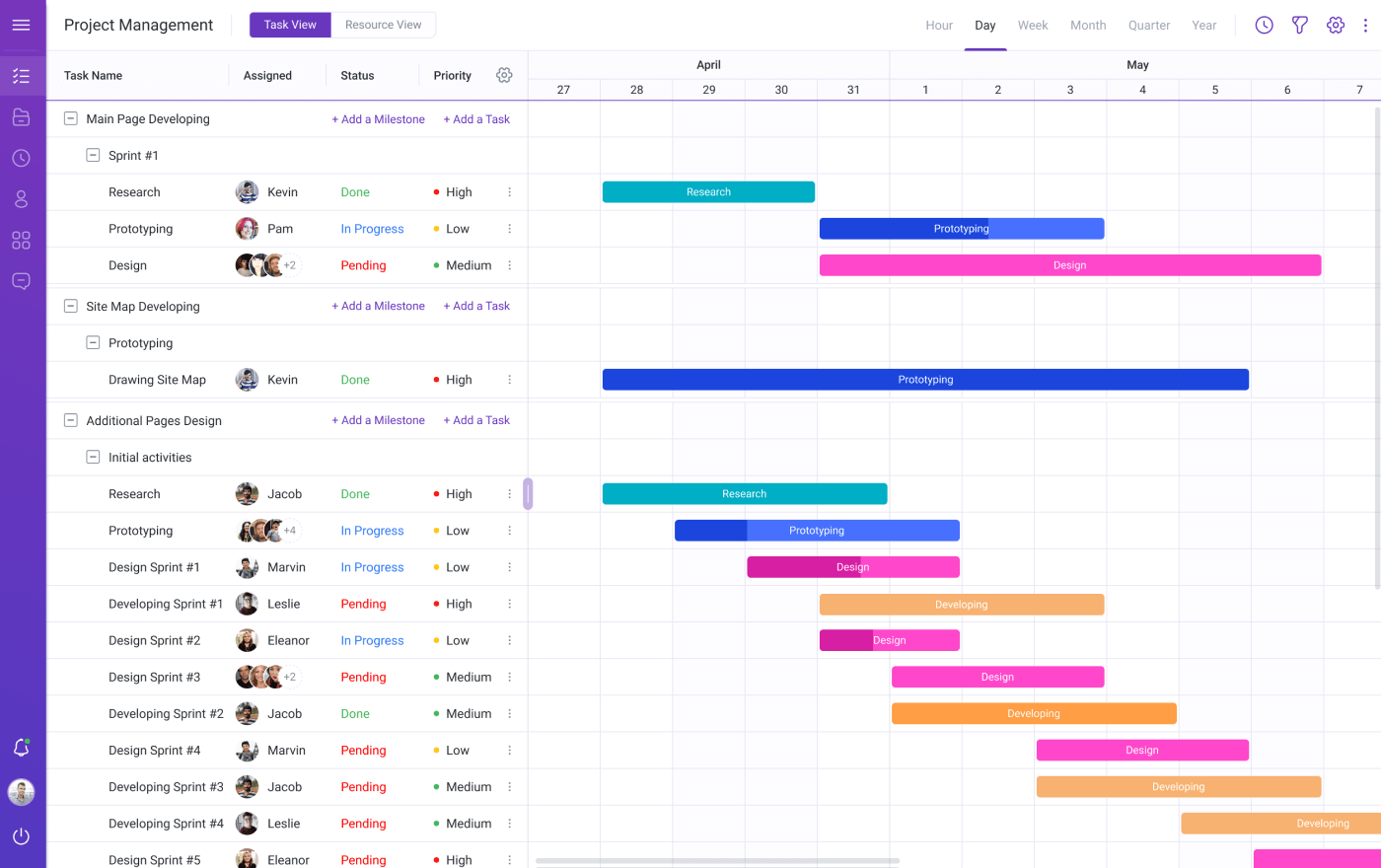
Case study: Project Management Application Based on the Gantt Chart
1. AI-Powered Front-End Development
AI tools such as GitHub Copilot and ChatGPT accelerate coding, refactoring, and documentation. They help teams to move faster, especially at early stages. However, they have a risk of inconsistent or unsafe code, strong dependency on developer experience, and limited help with complex UI logic and performance tuning.
Where Webix fits:
Webix reduces reliance on AI-generated boilerplate by providing stable, production-ready UI components with predictable behavior. AI becomes an accelerator, not a risk multiplier.
2. Low-Code and No-Code Platforms
Low-code tools enable rapid prototyping and are popular for internal dashboards and admin panels. But they offer limited customization and poor scalability for complex workflows.
Where Webix fits:
Webix acts as a developer-friendly low-code enabler. It accelerates development through ready-made components while preserving full control over logic, performance, and architecture.
3. Component-Driven Architecture and Micro-Frontends
Reusable components and micro-frontends improve team independence and UI consistency. On the other hand, they have complex tooling and coordination as well as performance overhead if poorly managed.
Where Webix fits:
Webix is inherently component-based, offering a cohesive UI ecosystem without the operational overhead of managing multiple front-end runtimes or fragmented UI libraries.
4. Performance-by-Default Expectations
Users expect instant interaction, even with complex datasets. Virtual scrolling, lazy loading, and optimized rendering are no longer optional. However, it’s important to consider higher development complexity and overengineering for internal tools.
Where Webix fits:
Performance is built into Webix components by default. Large tables, trees, and dashboards remain responsive without custom optimization or heavy tuning.
5. Full-Stack Meta-Frameworks (Next.js, etc.)
Meta-frameworks promise best practices and optimized output. But there is a twist: they have hidden complexity, framework lock-in, and steeper learning curve for enterprise UI logic.
Where Webix fits:
Webix complements backend and full-stack frameworks instead of replacing them, focusing specifically on accelerating complex UI and data interaction layers.
How Webix Helps to Speed Up Front-End Development
Overall, Webix is focused on building complex, data-driven interfaces faster. At its core, it’s a large UI widget library for JavaScript, a set of reusable UI components for enterprise use cases, and a structured way to build maintainable front end architecture.
Unlike React, Webix doesn’t expect you to assemble everything from tiny building blocks. Tables behave like tables. Schedulers behave like schedulers. And dashboards behave like dashboards. That sounds simple, but in real projects, it saves months:
- You Stop Reinventing the Same UI Patterns
One of the biggest time sinks in front-end development is rebuilding the same things over and over. Data grids, filters, inline editing, validation, export to Excel or CSV ー with Webix, most of this already exists.
Instead of spending weeks building a custom JavaScript data grid, you configure one. Instead of debugging edge cases, you focus on business logic. That alone can reduce development time by 30-50% on data-heavy projects.
- Declarative UI Makes Changes Less Painful
Webix uses a declarative approach to UI. You describe what the interface should look like, not how every pixel behaves. This matters more than it sounds.
When requirements change, and they always do, declarative UI components are easier to adjust. The UI stays readable, predictable, and easier to maintain, especially in long-term projects.
- Performance Is Built In (Especially for Big Data)
Many teams only think about performance once users complain. Webix handles performance at the component level offering virtual scrolling, smart rendering, efficient data binding, and more.
This is especially important for big datasets, where a poorly built UI can make an otherwise good system unusable.
Read Also React vs. Webix Comparison
A Quick Note on Webix Grid (Because Data Tables Are Everywhere)
Almost every front-end project ends up revolving around data tables in one form or another. Lists of users, transactions, assets, schedules, reports — sooner or later, everything becomes a grid in your app.
When building data-heavy interfaces for our clients, we choose Webix because its component ecosystem is mature and consistently evolving. Thus, JavaScript Grid, one of the latest Webix components, tends to quietly carry a large part of the UI without much attention. It’s not flashy, but it solves a very common problem: how to display, edit, and work with large datasets in a way that doesn’t fall apart once real users and real data arrive.
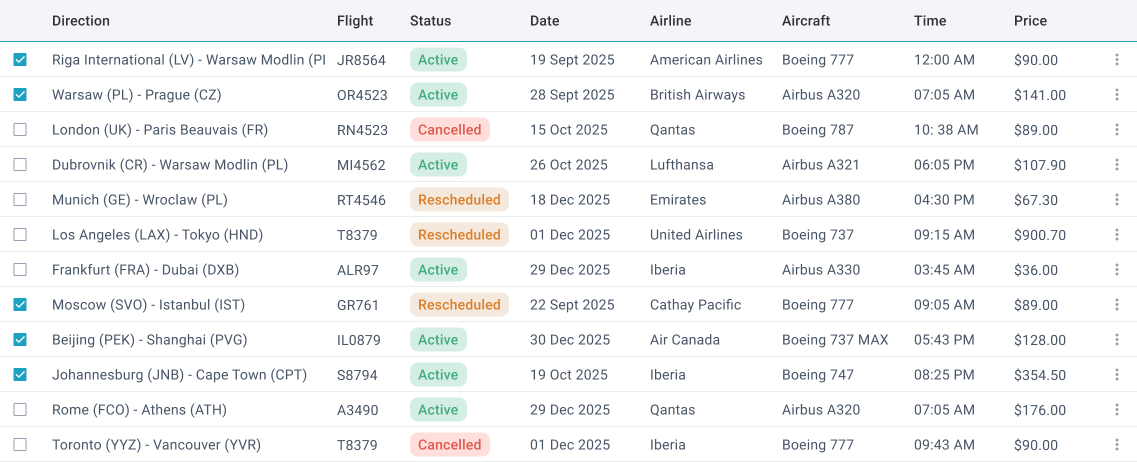
In practice, the grid already supports things that teams usually underestimate in scope:
- Sorting, filtering, grouping, and aggregation;
- Inline editing with validation;
- Column resizing, reordering, and hiding;
- Export to Excel and CSV;
- Virtual scrolling for large datasets
- Customizable in-cell charts – sparklines.
These are features that often start as “nice to have” and later become mandatory. When they are not available out of the box, teams end up implementing them incrementally, which stretches timelines and increases maintenance complexity.
Another practical aspect is performance. Webix Grid handles thousands of rows without turning the interface sluggish, thanks to smart rendering and virtualization. This matters a lot for internal systems where users expect fast response times, even when working with heavy operational data.
In real projects, Webix Grid often becomes the backbone of admin panels, reporting tools, and internal dashboards. Not because it’s heavily marketed, but because it removes a whole category of recurring front-end problems that teams otherwise have to solve repeatedly.
Read Also Clash of the Libraries. Building a Data Dashboard with React, Vue.js, and Webix
Where Webix Works Especially Well (By Industry)
Web front-ends aren’t one-size-fits-all, and different industries bring different UI challenges, from regulated workflows to data-heavy dashboards. In our experience, Webix consistently delivers value when projects need clarity, stability, and fast iteration. Below are examples of where Webix has proven itself in real projects.
Healthcare systems demand clarity and predictability — users can’t be slowed down by confusing interfaces or unpredictable behavior. In clinical and administrative environments, even small usability issues can lead to errors, frustration, or workflow disruptions. Interfaces must support fast, confident decision-making while handling sensitive data, complex workflows, and strict regulatory requirements. As a result, front-end solutions in healthcare need to prioritize consistency, transparency, and reliability over visual experimentation.
For example, when a digital health clinic needed a Migraine Tracking App, we suggested that it’s vital to allow patients to record migraine episodes, track triggers and treatment effectiveness, and share insights with clinicians. The interface needed to support:
- large volumes of structured and unstructured patient data;
- intuitive dashboards for personal health insights;
- responsive design for mobile and desktop users.
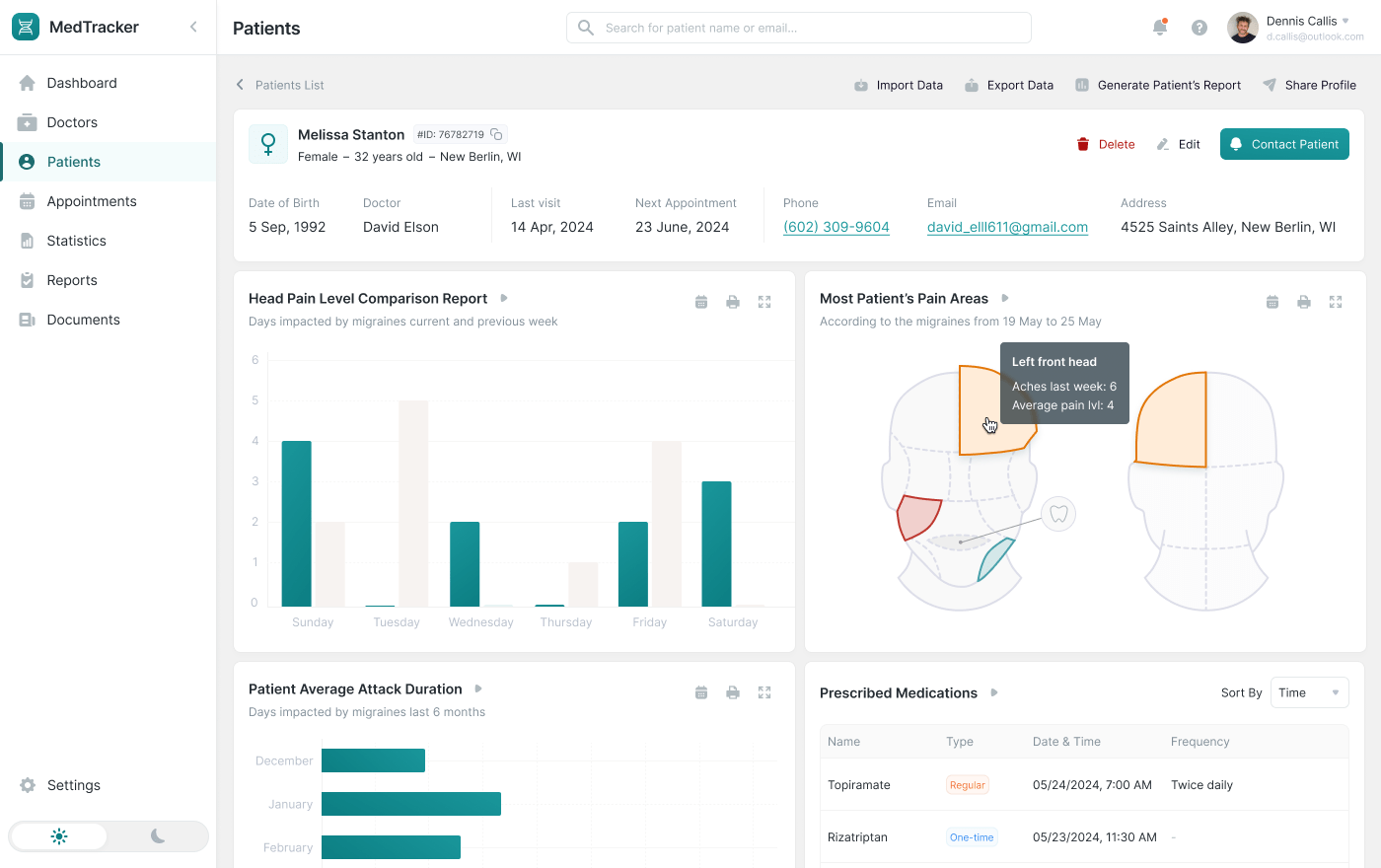
Case study: Migraine Tracking App
How Webix helped: Webix’s structured UI components helped us to deliver value faster for the client by reducing the time spent on building and stabilizing the interface. Instead of investing weeks in custom UI logic, we were able to quickly assemble clear forms, charts, and timelines using ready-made components that already handled performance, validation, and data updates. This meant the client could see and validate real workflows early, provide feedback sooner, and move toward launch with fewer surprises. In the end, the system was delivered faster, remained easy to extend, and provided a reliable, predictable user experience for day-to-day operations.
Construction and engineering systems are built around planning, coordination, and accountability. Project managers, engineers, and site supervisors rely on the interface to understand timelines, dependencies, and resource allocation at a glance. When the UI is cluttered, inconsistent, or slow, planning errors multiply, deadlines slip, and teams lose trust in the system. In this domain, the front end must clearly reflect real-world processes while remaining stable under frequent changes to schedules, scopes, and responsibilities.
In one of our projects, a construction company was working with a long-standing internal application that supported project and work planning but had become difficult to use over time. The system contained years of accumulated logic, complex data relationships, and role-based workflows, yet the outdated UI made even routine tasks slow and error-prone. The client needed to modernize the interface without disrupting existing processes or forcing users to relearn how they work.
The updated solution needed to support:
- visual project planning with timelines and dependencies;
- data-heavy tables for tasks, resources, and progress tracking;
- role-specific views for managers, engineers, and coordinators;
- a gradual transition from the legacy interface to the modern UI.
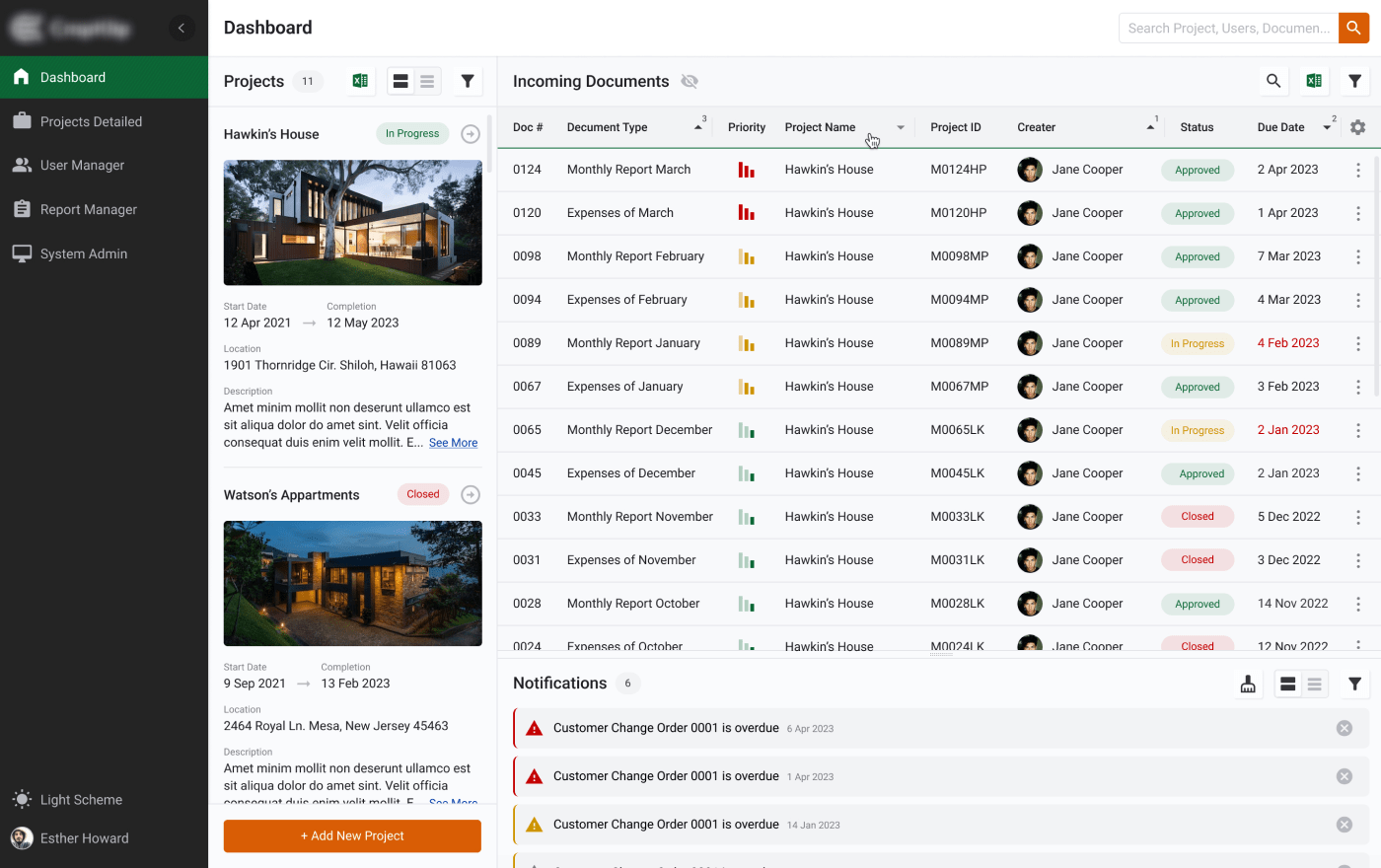
Case study: UI/UX Modernization for a Construction Management Web App
How Webix helped: Webix allowed us to modernize the interface while preserving the underlying business logic and user workflows. Using structured components such as data tables, forms, and planning views, we rebuilt the UI faster than a custom approach would allow, while ensuring consistent behavior across the system. The ability to run the new and legacy interfaces in parallel reduced adoption risk and allowed users to transition at their own pace. For the client, this resulted in a more intuitive and responsive planning tool, shorter modernization timelines, and a future-ready UI that can evolve alongside their projects without reworking the entire front end.
Energy management platforms are built around continuous monitoring and fast reaction. Operators, engineers, and managers depend on dashboards to make sense of real-time data streams, detect anomalies, and respond to issues before they escalate. In these environments, slow interfaces, delayed updates, or unclear visualizations directly impact operational efficiency and decision-making. The front end must be capable of handling high data volumes while remaining stable, responsive, and easy to interpret under pressure.
For a cloud-based drilling management platform we built, the client needed a system that could consolidate operational data from multiple sources and present it in a clear, actionable way. The interface had to support both real-time monitoring and historical analysis, without overwhelming users with raw data. At the same time, the system needed to remain flexible enough to adapt to changing operational workflows and reporting requirements.
The solution required:
- real-time visibility into equipment status and performance metrics;
- clear presentation of operational alerts, events, and logs;
- data-heavy tables with fast filtering and sorting;
- scheduling views for coordinating field workers and drilling operations.
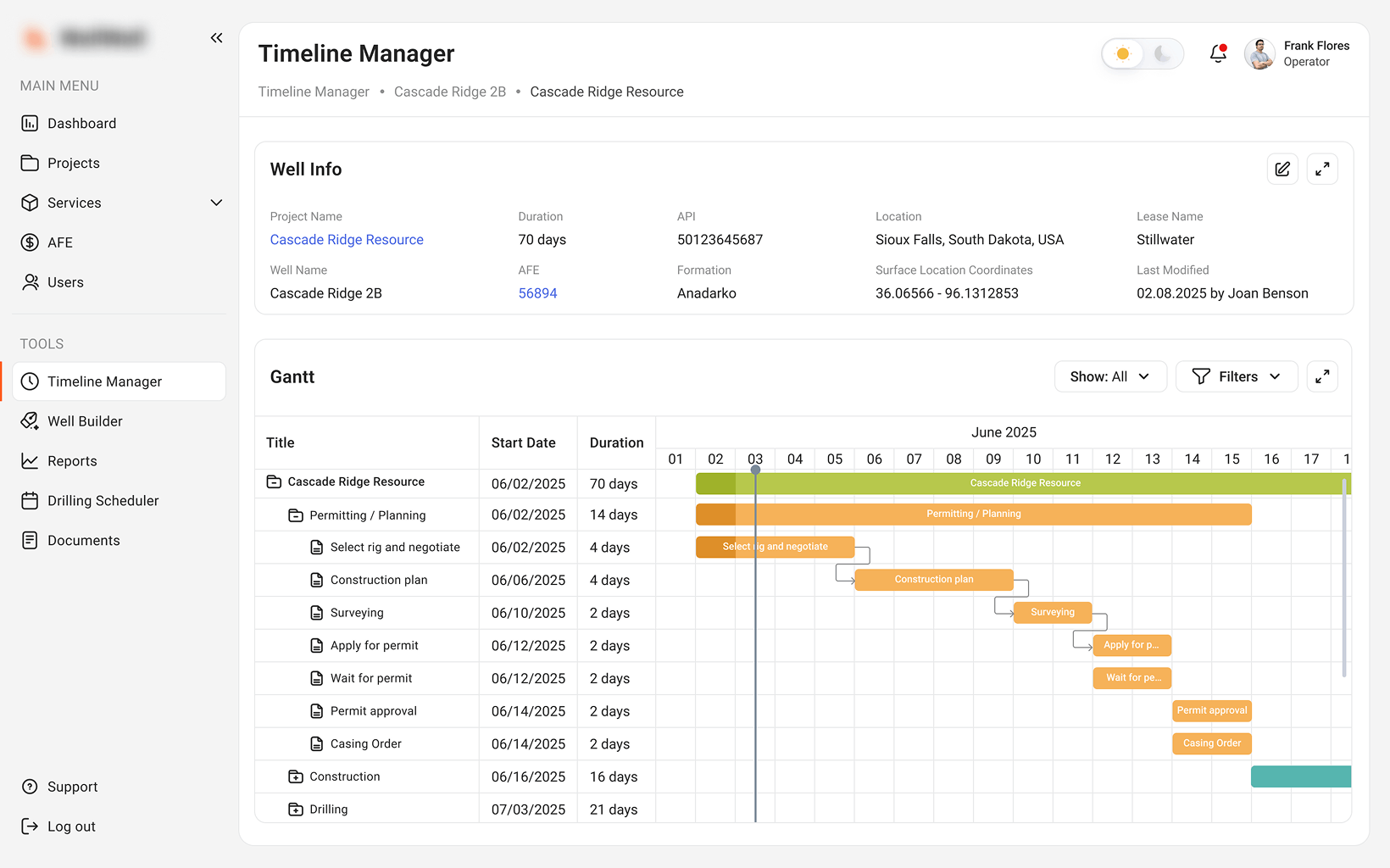
Case study: Cloud Drilling Management Software
How Webix helped: Webix made it possible to turn complex backend signals into usable, structured interfaces without building custom data grids from scratch. Its data-aware components handled real-time updates, large datasets, and interactive tables efficiently, allowing the team to focus on business logic rather than UI performance tuning. As a result, the client received a responsive monitoring platform that operators could rely on in day-to-day operations, with faster development cycles, predictable UI behavior, and a front end capable of scaling alongside growing operational demands.
Education platforms often look simple on the surface, but behind the scenes they manage a wide range of interconnected processes. Scheduling courses, tracking learner progress, managing assessments, and issuing certifications all need to work together without friction. Users expect clarity and consistency, whether they are instructors managing cohorts or learners tracking their own achievements. If the interface becomes confusing or slow, engagement drops and administrative overhead increases.
To evaluate the skills of our employees and to certify them, we needed a unified platform that could support multiple user roles while keeping workflows easy to follow. The system had to present complex educational data in a structured way, without forcing users to navigate through scattered screens or disconnected reports.
The interface was designed to support:
- curriculum and course tracking dashboards;
- learner progress reports and performance insights;
- assessment and certification workflows;
- role-based views for instructors, administrators, and students.

Case study: Online Training and Certification System
How Webix helped: Webix enabled us to organize complex educational data into clear, consistent views without slowing down development. Ready-made components for tables, forms, and dashboards allowed the team to quickly assemble role-specific interfaces that behaved predictably across the platform. This helped our employees to validate learning workflows early, adapt the system as requirements evolved, and launch a stable solution faster. In the end, the platform remained easy to maintain and extend, while providing users with a reliable, intuitive experience for daily learning and certification tasks.
Logistics and supply chain platforms are built around speed, visibility, and control. Users make decisions based on constantly changing data (shipment statuses, inventory levels, delivery timelines) and the interface must keep up. If dashboards are slow, cluttered, or hard to filter, even small delays can ripple into missed deliveries, higher costs, and frustrated teams.
In the Logistics & Supply Chain Management Application we delivered, the client needed a system that could consolidate large volumes of operational data into a single, reliable workspace. Different user groups (dispatchers, managers, and external partners) all required access to the same data, but with role-specific views and permissions.
The interface was designed to support:
- interactive tables for shipments, routes, and inventory;
- real-time status updates across multiple systems;
- advanced filtering and cross-referencing of logistics data;
- role-based dashboards tailored to daily operational tasks.
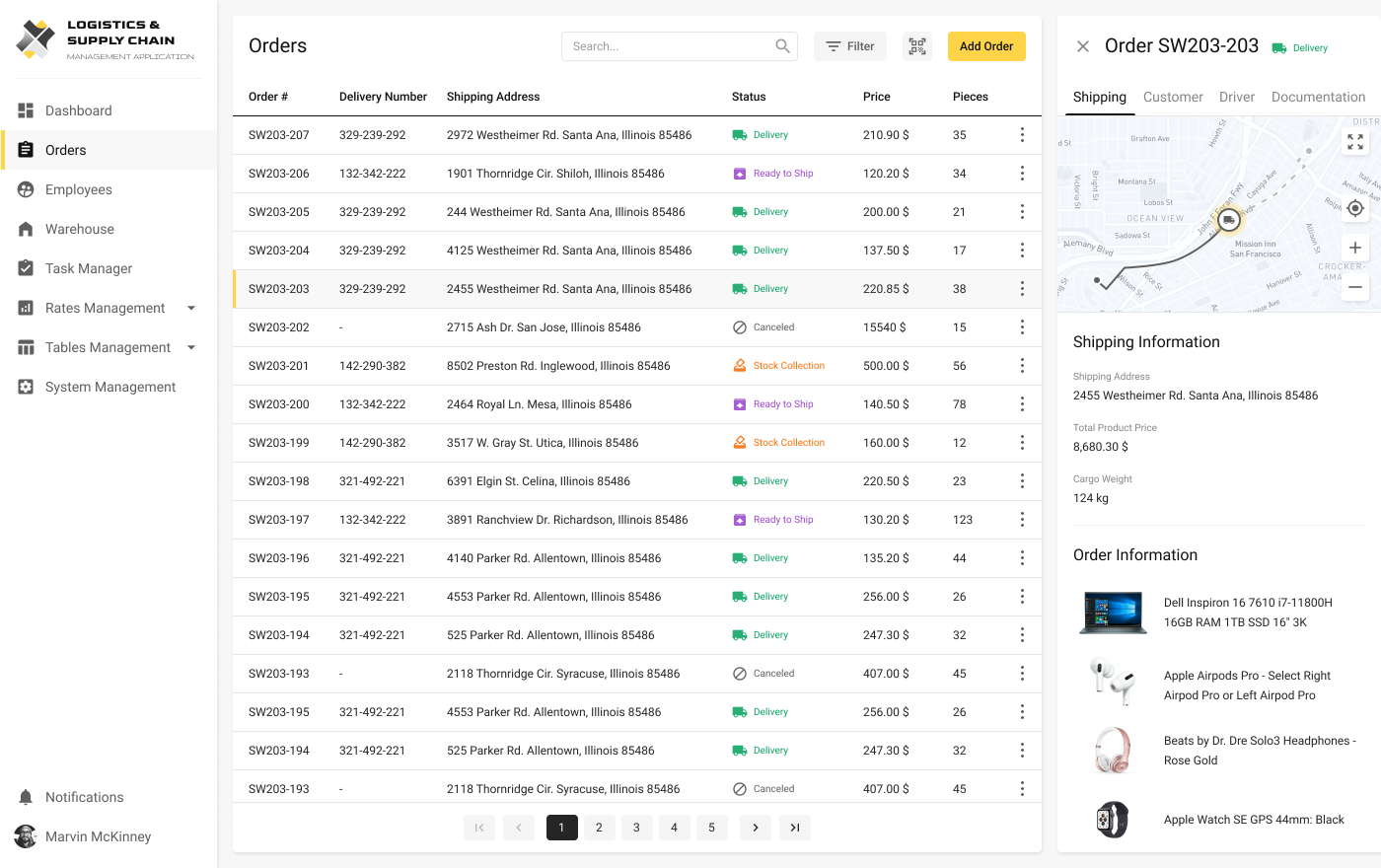
Case study: Logistics & Supply Chain Management Application
How Webix helped: Webix allowed us to build data-intensive dashboards quickly without sacrificing performance or usability. Its high-performance grid and data-aware components handled large datasets smoothly, enabling users to filter, sort, and analyze information in real time. This reduced development effort on custom UI logic and helped the client to move faster from backend readiness to a usable product. As a result, the platform launched sooner, scaled reliably as data volumes grew, and gave logistics teams the clarity they need to manage operations efficiently day to day.
What These Examples Reveal
Across industries, a few common themes emerge:
- Users expect data clarity and responsiveness;
- Interfaces must support complex workflows without confusion;
- Developers want a framework that lets them move fast without crafting every component from scratch.
Webix doesn’t solve every UI problem — it’s not a replacement for React or Angular in every context — but in projects where structured, reliable, and data-aware UI components matter, it shines.
Conclusion: Faster Front Ends Without Sacrificing Stability
Speed in front-end development isn’t about cutting corners, it’s about choosing the right level of abstraction for the problem you’re solving. As the examples in this article show, modern business applications are rarely simple. They involve large datasets, complex workflows, multiple user roles, and constant change. When teams try to build all of this from scratch, the UI layer often becomes the main source of delays, rework, and budget overruns.
Webix helps to address this challenge by removing a large portion of repetitive front-end work. When the goal is to deliver a usable product quickly without accumulating front-end chaos, Webix proves to be a tool that works not just in theory, but in real projects. So, if you want to develop or modernize a system faster and with a user-friendly interface, contact us, and we will help you.