Summary
Most construction firms still manage field crews through spreadsheets and phone calls. The result is idle time and misallocated labor. Custom Workforce management software connects planning, execution, and analytics in real time, reducing downtime and improving efficiency.
Construction has a productivity problem. The industry employs more than 8 million workers in the United States alone and contributes roughly 13% of global GDP. Yet most construction firms still coordinate their field workforce through spreadsheets, phone calls, WhatsApp groups, and disconnected systems.
Idle crews waiting for equipment that never arrived. Scheduling conflicts that leave multiple trades competing for the same workspace. Rising labor costs that erode already thin margins. These challenges are exactly why many construction companies invest in workforce management software — to improve resource allocation, reduce downtime, and keep projects moving.
Why Downtime and Crew Misallocation Hurt Construction Projects
Construction downtime doesn’t always look like a crew standing around. More often it’s a problem that’s hard to see until the weekly report comes in, and the numbers don’t add up. The root causes fall into several categories:
- Planning failures. Contractors often use spreadsheets as their main planning tools, partially because their existing systems don’t fully meet workforce planning needs. The problem with spreadsheets is that they’re static. A crew’s availability changes when someone calls in sick, a project gets delayed, or a certification expires. As the spreadsheet doesn’t update itself, it’s hard to spot these changes on time;
- Skill and certification mismatches. Sending the wrong construction team to a job site is surprisingly common. A worker might have the right trade but lack the required safety certification. Or the job requires a specific license that someone on the crew doesn’t hold. These mismatches lead to delays, rework, and compliance risk;
- Delayed field updates. When a foreman radios the office to say materials haven’t arrived, and that information takes hours to reach the person who can reassign crews, idle time accumulates;
- Office-site disconnect. Many construction firms still operate with two versions of reality: what the office thinks is happening and what’s actually happening on site. When these don’t match, decisions get made based on bad information.
Misallocations have the cascading impact. When one site is overstaffed and another is understaffed, the overstaffed site bleeds labor costs while the understaffed site falls behind. Schedule compression follows, and teams rush to catch up, quality suffers, rework increases, and the cycle continues.
Read Also How to Connect Projects, Schedules, and Subcontractor Data
How Workforce Management Software Reduces Downtime and Misallocation
Workforce management software development addresses these problems by doing what spreadsheets can’t: connecting planning, execution, and analysis in real time.
Centralized Workforce Visibility
The foundation of any good construction system is a single source of truth for who’s available, where they are, what they’re qualified to do, and what they’re currently assigned to. When a project manager needs to fill a crew request, they can see across all projects to find the right person.
This workforce visibility extends to certification tracking. A centralized system flags expiring credentials before workers arrive on site, preventing unqualified personnel from handling specialized equipment or performing high-risk tasks.
Real-Time Scheduling and Dispatch
When conditions change the app can help managers update assignments quickly and notify field teams through mobile tools. A foreman on site can report that materials haven’t arrived, and the system can recommend moving part of the team to another task or site instead of keeping them idle.
Modern construction scheduling software integrates multiple variables: labor availability, site logistics, equipment, and material delivery dates. The result is dynamic scheduling that adapts to reality rather than fighting it.
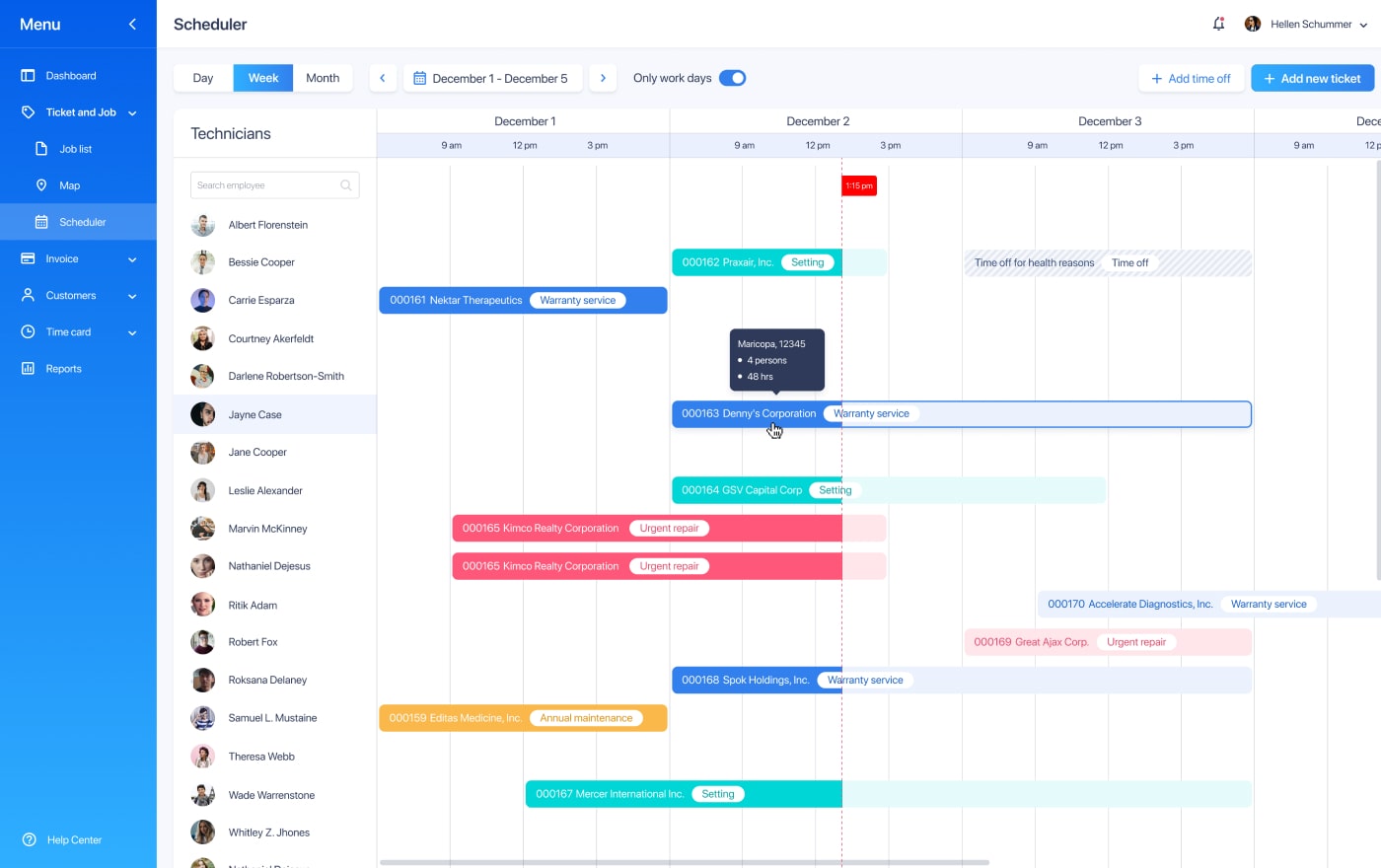
Case Study: Cutting-Edge Web App For Field Service Management
Dispatchers face a constant challenge: knowing where technicians are, what they’re working on, and how to get them to the next job without wasted time. A field service management platform tackles this through an intelligent task calendar.
When a dispatcher assigns a job, they see the technician’s current location on a map view powered by Google Maps. If a technician has multiple tasks in one day, the system calculates travel time between assignments and displays it clearly. The platform also includes blocked time functionality, so no one gets scheduled during lunch breaks, training sessions, or time off.
Instead of calling around to figure out who’s free and where they’re headed next, dispatchers see everything at a glance. They know who can take a new job, how far they are from the site, and when they’ll actually arrive. That visibility removes the guesswork that creates downtime and lets the team make better calls when schedules inevitably shift.
Labor Forecasting and Resource Planning
Construction resource planning tools look ahead to identify demand, capacity gaps, workload peaks, and schedule risks before they become delays. This is especially important given the industry’s workforce challenges. The construction industry in the US needs nearly 500,000 more workers to meet demand in 2026.
With forecasting, construction firms can plan for upcoming projects, identify skill gaps, and make informed hiring decisions rather than scrambling at the last minute. Moreover, using AI in construction software enables intelligent forecasting. The system can analyze historical data, current crew utilization, and upcoming task requirements to predict where demand will exceed capacity.
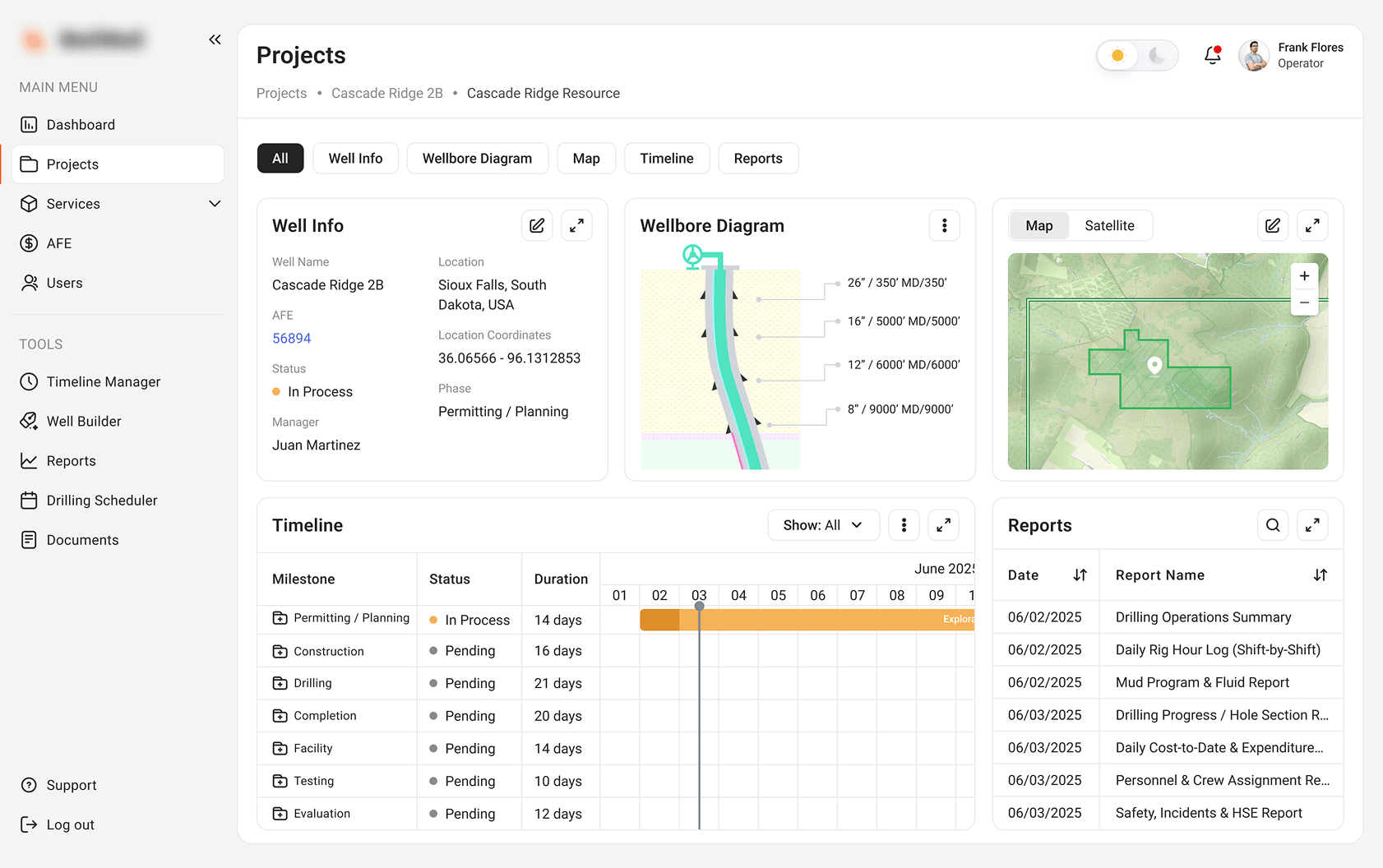
Case Study Cloud-Based SaaS Platform for Well Drilling & Construction Management
Well construction in oil and gas is a coordination nightmare. Drilling, completion, and facility setup happen across different phases, often with different crews and contractors.
One U.S. operator was running everything through Excel and shared drives, and the delays were piling up. A cloud-based platform replaced that fragmented system with a Drilling Scheduler module that gives real-time visibility into schedules and resource needs.
Here’s how it works in practice. Say an engineer adjusts the casing depth on a well design. The Timeline Manager updates the entire schedule automatically, and the AFE budget recalculates on the spot.
The system also sends automated lead-time alerts. If casing is scheduled for five days out, the platform notifies the cementing crew that they need to mobilize. Teams now see capacity gaps and scheduling conflicts before they become actual delays. Financial forecasts stay in sync with operational reality, and the guesswork that used to drive reactive firefighting is gone.
Skill- and Certification-Based Allocation
Matching people to tasks based on skills, safety training, licenses, and project experience reduces errors and rework. Instead of manually checking who has what certification, the system can handle it automatically. This is particularly valuable for firms managing multiple trades across multiple sites.
Time Tracking and Productivity Analytics
Construction time tracking software captures actual hours and labor activity, making idle time, overtime, and job cost variance visible. This helps understand where labor hours are actually going and whether they’re aligned with project budgets.
Integrations That Reduce Duplicate Work
The best construction workforce management tools connect with existing systems. This reduces duplicate entry and gives decision-makers a single and reliable data source. When workforce data flows seamlessly into financial systems, labor cost tracking becomes real-time rather than retrospective.
Build vs Buy: When Custom Field Workforce Management Software Makes Sense
Off-the-shelf tools work well for standard scheduling, time tracking, and basic reporting. They’re quick to deploy and relatively inexpensive. But they have limits.
Custom construction software development services make sense when your company has:
- Unique allocation rules. If your workforce planning involves complex formulas (union rules, shift differentials, project-specific skill requirements) off-the-shelf tools may not handle them;
- Complex subcontractor workflows. Managing multiple subcontractors with different contracts, compliance requirements, and performance standards often requires custom logic;
- Multi-site operations. If you’re running construction projects across regions with different labor markets, regulations, and cost structures, a one-size-fits-all solution may fall short;
- Custom integrations. Connecting workforce data to your specific ERP, project management, and financial systems may require custom development;
- Role-based portals. Project managers, foremen, subcontractors, and owners need different views and permissions;
- Offline data capture. If your sites have unreliable connectivity, you need a mobile app that works offline and syncs later;
- Advanced dashboards. Standard reporting may not provide the specific KPIs your leadership team needs.
Custom project management software allows you to get exactly what your operations require, without paying for features you don’t need or struggling with workarounds for features you do.
Features to Look for in Construction Workforce Management Software
| Feature | Why it matters | Tie to downtime / misallocation |
| Crew scheduling and dispatch | Assign workers, shifts, and jobs across sites | Prevents one site waiting while another is overstaffed |
| Availability and workload view | Shows who is free, assigned, overloaded, or absent | Reduces manual calls and last-minute gaps |
| Skills and certification tracking | Stores licenses, safety training, roles, and experience | Avoids sending unqualified crews to critical tasks |
| Mobile field access | Lets foremen and supervisors update status from site | Shortens the delay between plan changes and field action |
| Offline mode | Supports remote or low-connectivity job sites | Keeps data capture alive when internet access is unstable |
| Time and labor tracking | Captures actual hours and labor activity | Makes idle time, overtime, and job cost variance visible |
| Forecasting and resource planning | Maps future demand against available workforce | Prevents schedule compression and reactive hiring |
| Dashboards and alerts | Highlights utilization, open requests, conflicts, and risks | Turns hidden allocation problems into actionable signals |
| Integrations | Connects ERP, PM, HR, and BI systems | Reduces duplicate work and data mismatch |
Implementation Roadmap for Field Workforce Management Software
Once you’ve identified the features that matter most for your operation, the next question is how to get them into the hands of your teams. Rolling out a new construction resource management solution across all sites isn’t like deploying it in an office. Field crews are mobile, connectivity varies, and change management is harder when people are spread across multiple locations. Therefore, you need scrupulous planning.
1. Audit current workflows. Map out how crew allocation, scheduling, and reporting currently work. Identify the pain points:
- Where do delays happen?
- Where does information break down?
- What data is missing?
2. Define your workforce data model. What roles, skills, certifications, and availability rules matter to your operation? What project demand data do you need? What equipment dependencies exist? What approval rules apply?
3. Set KPIs before implementation. Measure your current state so you can track improvement. Good starting points are labor utilization rate, idle crew hours, reassignment time, overtime hours, labor cost variance, and schedule adherence.
4. Start with a pilot. Pick one project, region, or team to roll out first. It will help limit risk and give you a chance to work out kinks before scaling.
5. Integrate with existing systems. Connect the new software to your ERP, payroll, project management, scheduling, and BI tools. This is where many implementations fail. If data doesn’t flow, people won’t use the system.
6. Train office and field users separately. Office staff need to understand reporting, scheduling, and analytics. Field teams need mobile workflows that work in real conditions. Don’t assume one training session covers both.
7. Review and expand. After the pilot, review data quality and adoption metrics. Fix what’s broken, then expand gradually.
Beyond Tracking: The Real Value of Workforce Visibility
Construction downtime and crew misallocation are symptoms of fragmented information and slow decision-making.
The right software helps get the right people to the right place at the right time. Workforce coordination directly affects profitability, timelines, and client satisfaction. Real-time dashboards, mobile field apps, AI-driven analytics, and automated workflows give managers the tools they need to anticipate problems before they happen and respond faster when they do.
Contact us to discuss a custom construction workforce management or field operations solution for your firm.