Summary
Modernizing web apps requires balancing technical compatibility (Strangler Fig, Anti-Corruption Layer) with UX continuity (incremental redesign, old/new UI toggle). A phased, human-centered approach prevents disruption and user resistance.
Application compatibility, in the context of software modernization, means many things. For instance, preserving seamless data exchange, ensuring API compatibility, and maintaining user experience (UX) continuity. Integrating a modern frontend with a legacy application that wasn’t built for it or overhauling a UI without alienating users requires deliberate technical and human-centered strategies.
This article explores a dual-pronged strategy. First, we examine the architectural patterns that ensure technical integration. Second, we dive into UX methodologies that prevent user resistance.
Architectural Patterns for Technical Compatibility
When modernizing a web application, the greatest risk often lies in the backend. Legacy databases, outdated APIs, and codebases were not designed to interface with modern services, including cloud-based platforms. To ensure technical compatibility, developers turn to proven incremental patterns.
The Strangler Fig Pattern for Gradual Replacement
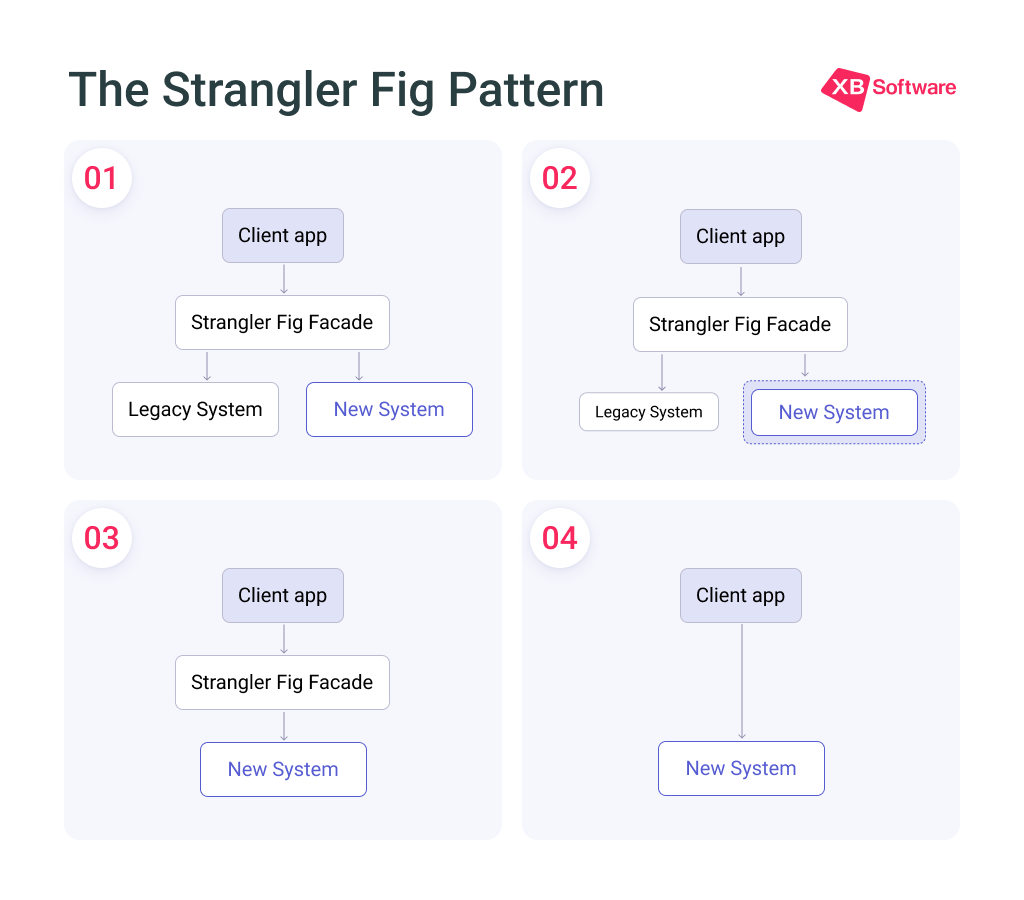
The Strangler Fig pattern (a term introduced by Martin Fowler) helps ensure app compatibility by enabling a controlled, piece-by-piece migration from a legacy system. Instead of replacing everything at once, you gradually substitute old components with new applications and services. Over time, the new application absorbs all the valuable functionality of the old one, allowing you to retire the original application completely.
How the pattern works:
- Step 1. Set up a routing layer. Place a proxy (or facade) between client applications, the legacy system, and the new environment. Initially, the proxy directs nearly all traffic to the old system, keeping operations running without interruption;
- Step 2. Shift incrementally. With each development cycle, you move more features to the new application. The proxy gradually reroutes requests away from the legacy app, steadily reducing its role;
- Step 3. Retire the legacy system. Once every function has been migrated, the proxy sends all requests to the new system. You then remove the proxy, and clients connect directly to the modernized application.
When to use. Large, complex applications where a full-scale rewrite would be too risky. However, watch out for potential bottlenecks. The proxy must be designed for high availability and performance, as it becomes a critical traffic hub.
The Strangler Fig pattern fits naturally into any app modernization strategy because it lets teams progress at a sustainable speed. You keep your existing system productive while gradually introducing improvements, prioritizing high-value replacements first. This incremental method ensures compatibility, reduces disruption, and avoids the classic “big bang” failure where a single migration attempt breaks everything at once.
Read Also From Old to Gold: Transforming Legacy Systems with Modernization Techniques (with Real Examples)
The Anti-Corruption Layer (ACL): Shielding the Modern System
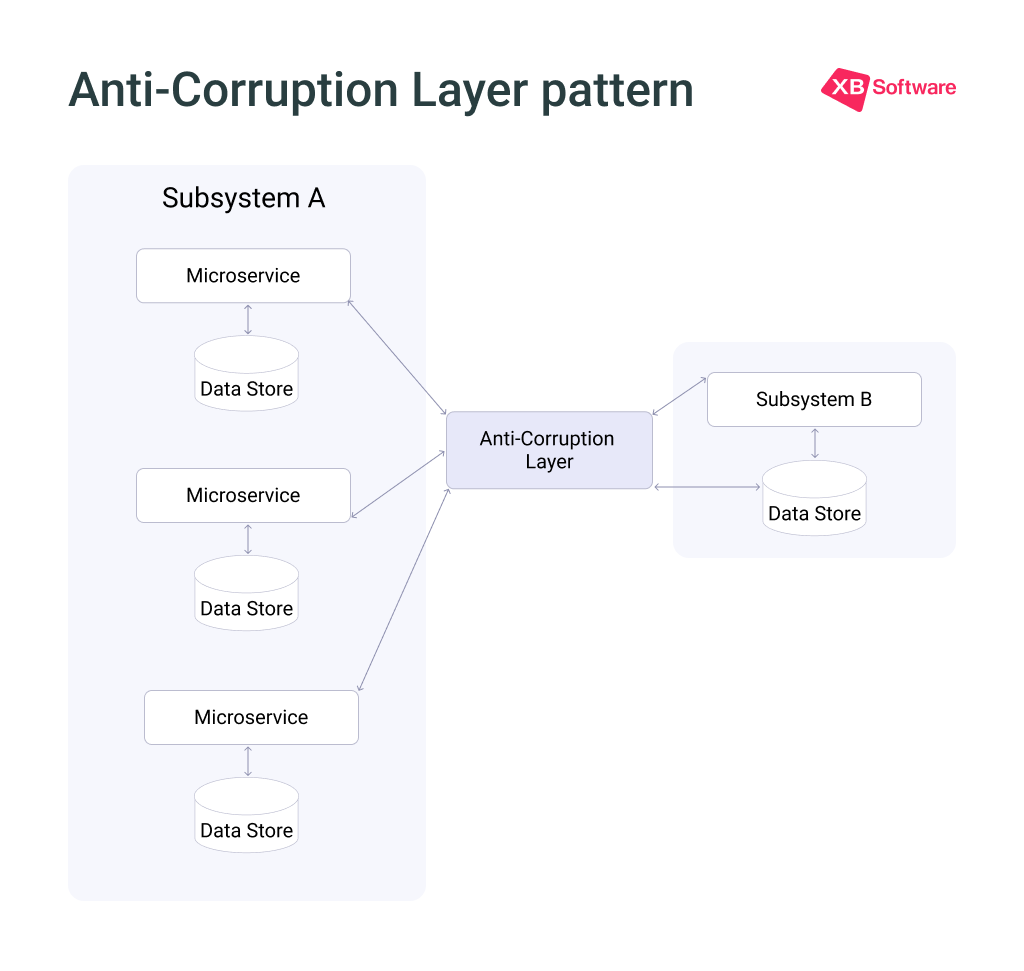
While the Strangler Fig pattern handles incremental replacement, the Anti-Corruption Layer pattern addresses the semantic mismatch problem. Old applications often have convoluted data schemas, obsolete APIs (e.g., SOAP instead of REST), or business logic that doesn’t align with modern architecture and breaks compatibility. If your new application communicates directly with the legacy system, you risk “corrupting” your clean design with legacy quirks. The ACL acts as a translation layer between the two systems:
- Translates Requests. Your modern application talks to the ACL using your clean, sensible API. The ACL performs all translation, transforming requests into the format the old system expects;
- Shields Your Codebase. The ACL quarantines all legacy-specific logic. Your domain models, APIs, and services remain pristine and uninfluenced by outdated protocols;
- Preserves Architectural Integrity. The old system continues to function, receiving the data it needs, while your new system maintains its modern technological approach.
When to use. The ACL approach is especially valuable when your modernization project requires app compatibility during gradual migrations where new features must interoperate with existing resources. It allows different subsystems with different semantics to communicate without either side compromising its design.
The ACL adds another service to manage and monitor, and it introduces some latency. But the trade-off is worth it. Your app modernization efforts remain clean, maintainable, and future-proof, and don’t become entangled in legacy complexity.
Read Also Data Migration in Software Modernization. Balancing Automation and Developer’s Expertise
Business and Product Methodologies for UX Continuity
The way people work today has evolved far beyond what software from ten years ago was designed to support. Over time, old applications collect countless small inefficiencies, such as outdated workflows, clumsy workarounds, and interface quirks. Each of them adds to the daily burden on users. Yet moving from an old interface to a modernized one comes with its own challenge, including user resistance.
Even when a new design delivers clear improvements, people tend to push back against anything that disrupts their established habits.
Read Also How to Understand It’s Time for UX/UI Modernization
The Incremental UX Redesign Strategy
For better application compatibility, rather than ripping off the bandage, smart modernization teams adopt an evolutionary UX approach. This involves updating interface elements section by section while preserving core architecture. You update navigation patterns in one module, gather feedback for two weeks, then move to the next section. This minimizes disruption and allows teams to validate impact and adjust iteratively.
Practical techniques for UX continuity include:
- Progressive Disclosure. Introduce new features gradually, allowing users to adopt them at their own pace and not overwhelming them with a completely new interface;
- Keep existing workflow structures intact. Don’t alter the step-by-step processes your team relies on every day. Stick with terms users already know when those terms still carry the right meaning;
- Provide a switch to move between old and new interfaces. Give people the option to flip back and forth from the original application to the updated version. This approach works especially well for business-to-business setups, where keeping operations running without interruption is paramount.
A fresh design will often be perceived as a worse design simply because it is new and breaks user habits. A better strategy is to play up familiarity and build on users’ existing knowledge of how an application works. This means avoiding complete overhauls in favor of modular, testable changes.
Read Also How to Redesign a UI Without Losing Usability: A Case Study on Modernizing a Legacy App
Role-Based Interfaces and AI-Embedded UX
UI/UX modernization that makes usual things smarter also helps to avoid rejection of the new. Modern ccompanies that provide app modernization services incorporate two major trends:
- Role-Based Dashboards. Stop giving every employee the same dashboard. A manager needs different data than a floor worker. Context-aware design shows users only what they need for their specific job, reducing clutter and speeding up decision-making. Role-based design should also govern data access, ensuring that sensitive information is only available to authorized roles;
- AI-Powered Interfaces. Features like predictive inputs, natural language processing, and intelligent data analysis can improve outdated workflows. Users can type or speak commands to retrieve data without complex queries. AI can suggest the next best actions based on patterns and past behavior, helping users stay on track with minimal input.
AI in app modernization helps automate code analysis and accelerate migration while also transforming the end-user experience.
XB Software’s Application Compatibility Modernization Approach
At XB Software, we recognize that legacy modernization services must address both technical integration and user adoption simultaneously. Over the years of delivering web app modernization projects, we have developed a systematic approach that preserves what works while evolving what doesn’t.
For instance, during SaaS API integration, we modernize outdated applications by integrating them with cloud-native SaaS platforms and APIs. Our approach includes designing multi-tenant architectures, implementing secure and scalable APIs, and automating updates. We maintain strict API compatibility through versioning strategies and consumer regression tests.
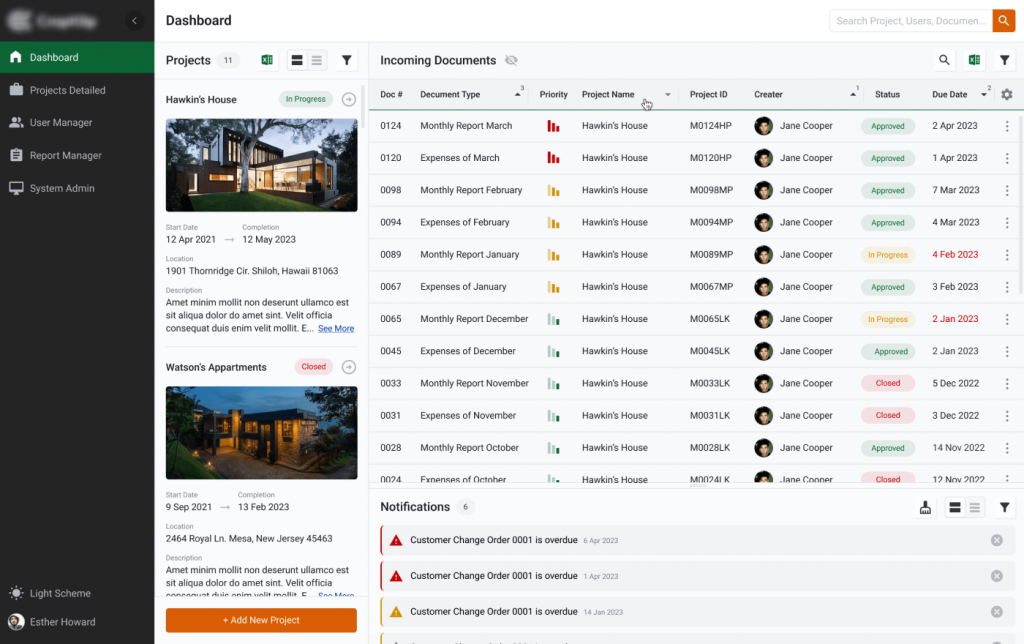
From a UI/UX perspective, rather than forcing users into an entirely unfamiliar interface overnight, we prioritize incremental, human-centered UX updates. A proven technique from our practice, demonstrated in the UI/UX modernization project, is the old/new UI toggle, that allows employees to switch between the old interface and the modernized version at will. This eliminates fear, builds confidence gradually, and results in zero downtime and minimal resistance.
Conclusions
Modernizing a web application while maintaining compatibility is a continuous balancing act between technical integrity and user trust. For organizations seeking legacy modernization solutions, the path forward is clear: they need to adopt a phased, modular approach that prioritizes compatibility at every layer. It’s also important to consider the human factor as seriously as the technical one, because an application that users refuse to adopt delivers no ROI.
Ready to modernize without disruption? Contact us to discuss how we can help you balance innovation with continuity, preserve compatibility, and empower your users.