Summary
AI can accelerate legacy code modernization, but successful migration still depends on human engineering judgment and thorough validation. This article explores how AI-assisted development helped modernize an eight-year-old SaaS product. It examines where AI can speed up the process, the challenges of preserving behavioral parity, and the best practices technical leaders can use.
When teams talk about AI-assisted modernization, the conversation often drifts toward speed. AI can definitely accelerate legacy application modernization, but generated code is only part of the equation.
In one of our SaaS modernization projects, we used AI-assisted software development approach to migrate an eight-year-old web SaaS product from JavaScript, jQuery, KineticJS, Grunt, and PHP 7 toward TypeScript, native browser APIs, SVG, Vite, and Node.js. The project showed where AI-assisted code migration saves time, where manual review remains essential, and why behavioral parity matters as much as the new architecture.
When Legacy Code Becomes a Bottleneck: Why Modernization Matters for Mature SaaS Products
Legacy software rarely becomes a problem overnight. A product can remain commercially useful for years while its technical foundation gradually becomes harder to maintain.
Obsolete dependencies accumulate. Build processes become difficult to change. A seemingly small feature can require modifications across several tightly coupled parts of the codebase. Open issues continue to grow, while some of them become difficult to reproduce or understand because they depend on behavior established years earlier.
Eventually, the technical debt starts affecting the product itself. Development becomes slower, testing becomes more complicated, and each change carries a greater risk of introducing regressions. Thus, according to KPMG’s 2026 survey, 56% of technology professionals surveyed in the United States said that the cost of addressing technical debt prevents their organizations from investing in new technology programs.
This was the situation with the web SaaS product in this project. It had been in development for approximately eight years and continued to serve its purpose, but its technology stack reflected the period when the product was originally built.
The frontend relied on JavaScript, jQuery, KineticJS, and a Grunt-based build process. The backend was built around PHP 7. Over time, the product had accumulated technical debt, obsolete dependencies, and a substantial list of open issues.
The team therefore faced a familiar modernization question: How can we modernize a legacy application without destabilizing the product that customers already rely on?
There was no need to replace everything at once. We first established a target architecture, defined a migration plan, and separated modernization from historical bug fixing and future feature development.
This distinction became one of the most important decisions in the entire project.
Read Also How AI Performs on Real Tasks in a Legacy Codebase
Legacy Modernization Strategy: From Technical Debt to a Target Architecture
A successful legacy software modernization strategy starts with understanding what the system should become, not just identifying what should be removed. That is why, the first step we did is we established these two key foundational pillars:
1. Define the main project goals
The team treated the project as a structured codebase migration rather than a large-scale rewrite. The target architecture defined the direction of the work and provided criteria for evaluating each migration step, including these goals:
- move the frontend from JavaScript to TypeScript;
- replace jQuery with native browser APIs;
- replace KineticJS with a simpler SVG-based rendering approach;
- replace Grunt with Vite;
- move backend responsibilities away from PHP 7 toward Node.js;
- establish clearer module and service boundaries;
- introduce stronger testing and review practices;
- preserve the existing product behavior wherever it remains intentional.
2. Separate different types of work
The team separated three types of work that are often mixed together during modernization:
- Modernization — rebuild the architecture, replace obsolete dependencies, and establish a more maintainable baseline.
- Bug fixing — reviewing existing issues after the new foundation was in place.
- New development — adding or changing product functionality.
This migration sequencing made the project easier to control. An old issue could be caused by the legacy architecture, become irrelevant after refactoring, or still require a product decision. Fixing everything during the migration would have made it much harder to understand what was actually improving the system.
The team therefore worked toward a maintainable baseline first and used recurring review meetings to document architecture decisions, unresolved questions, and corrections.
Moving the Front End from JavaScript and jQuery to TypeScript and Native APIs
The frontend modernization combined several related changes rather than treating each technology replacement as an isolated task.
The first major step was the JavaScript to TypeScript migration. Moving toward TypeScript gave the team stronger typing and clearer module structures, which made the modernized code easier to understand and maintain.
The second was the jQuery migration. Instead of relying on a legacy abstraction for DOM manipulation, the new implementation used native browser APIs. This reduced dependency on an additional library and made the relationship between the application code and the browser platform more explicit.
The build process was modernized at the same time. Grunt was replaced with Vite, creating a simpler and more contemporary build pipeline.
The visual layer required another architectural change. KineticJS was replaced with SVG, while unused Canvas-related remnants were removed. This simplified the rendering approach and reduced the number of legacy components the team had to maintain.

Taken together, these changes were more than a collection of technology upgrades. They reduced unnecessary dependencies and established clearer module boundaries, making the frontend easier to inspect, test, and extend.
The same principle applies to AI code refactoring: the objective should not be to make the code look newer. Each refactoring step should move the codebase toward a defined architectural goal.
Migrating the Backend from PHP 7 to Node.js
The backend migration followed the same principle.
A PHP to Node.js migration should not be treated as a line-by-line translation from one language to another. Changing the runtime without reconsidering how responsibilities are organized can simply reproduce the same architectural problems in a different technology.
In this project, the migration was therefore approached as an architecture decision.
The team worked toward clearer service boundaries, more explicit API contracts, and a cleaner separation between request handling and heavier processing. This is particularly important for Node.js applications because long-running or CPU-intensive work should not block the main event loop. Node.js itself recommends keeping event-loop work small and moving expensive processing to appropriate worker mechanisms or other background execution patterns.
The broader lesson is useful for teams considering legacy system modernization with AI: a backend migration creates an opportunity to reconsider where business logic lives, how APIs validate and exchange data, and which operations belong on the main request path.
The goal is to leave the backend with clearer responsibilities and fewer hidden dependencies.
Read Also Where AI Actually Helps in Application Modernization
AI-Assisted Code Migration: Where AI Saved Time and Where Human Review Still Mattered
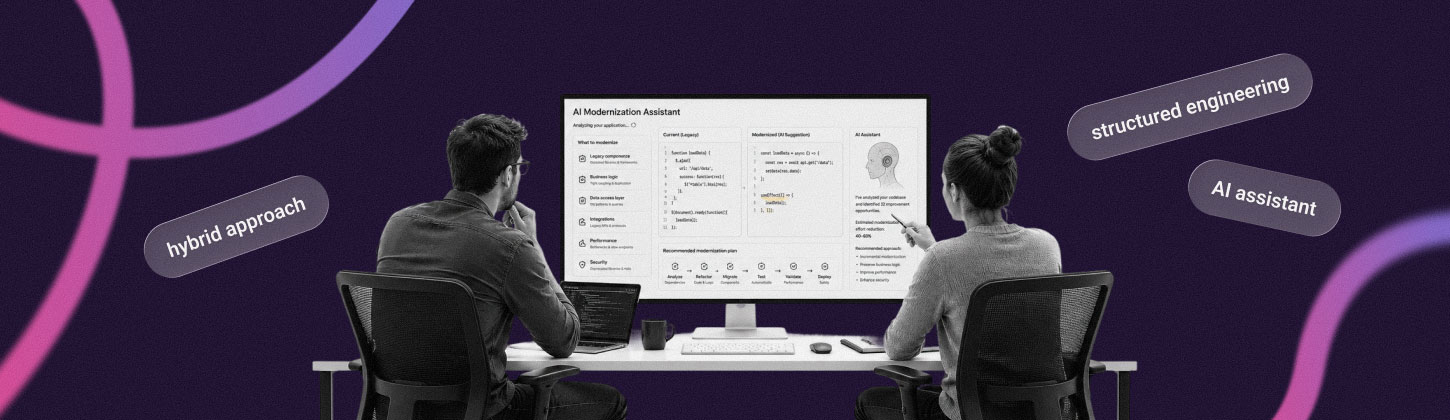
AI played a significant role in the modernization of this SaaS project, but it was used as part of an engineering workflow rather than as an autonomous replacement for the development team.
This distinction is important when discussing AI-driven legacy modernization. AI can analyze existing code, suggest migration steps, generate repetitive structures, transform code, and produce initial implementations much faster than a developer would typically write every piece manually. But the generated result still has to fit the target architecture and preserve the behavior that matters to users.
In this project, AI-assisted software development helped with both planning and implementation.
The team initially used AI to turn a broad modernization objective into a more concrete migration plan. More detailed prompts and structured workflows produced plans that could be broken into individual milestones instead of asking an AI system to “rewrite the application.” We then used AI for repetitive parts of the migration, including generating TypeScript structures, reorganizing code into modules, and producing first-pass implementations.
According to the team’s internal estimate, performing the same work entirely manually would likely have taken approximately 1.5 to 2 times longer.
That estimate should not be interpreted as a universal productivity multiplier. It reflects this particular project, workflow, and codebase. The result depended on the ability of engineers to define the work clearly and verify what AI produced.
What AI Accelerates in the Migration Workflow
Several parts of the AI-assisted modernization workflow were particularly well suited to automation:
- Migration planning: AI helped to turn broad modernization goals into a sequence of concrete technical steps.
- Code transformation: Repetitive changes, such as restructuring JavaScript into TypeScript-oriented modules, could be accelerated with AI-generated first drafts.
- AI code refactoring: AI was useful for identifying opportunities to reorganize functions, clarify responsibilities, and prepare code for the target architecture.
- Initial implementation: Instead of starting every migrated component from an empty file, developers could review and adapt an AI-generated implementation.
This is where automated code migration and AI-assisted development can provide practical value. The machine handles a portion of the repetitive transformation work, while engineers spend more time on architecture, validation, and decisions that depend on product context.
The same approach can be applied to other modernization processes. For example, teams exploring how to use AI for code refactoring can begin with well-defined, low-ambiguity transformations and progressively introduce AI into more complex parts of the codebase.
Where Engineering Judgment Is Still Required
The project also demonstrated the limits of AI-powered code modernization. Some AI-generated implementations appeared reasonable but did not fully preserve the expected behavior. Other attempts required additional prompting or correction before they could be accepted.
The most important distinction was between generated code and verified change.
A generated implementation may compile, pass selected tests, and still introduce a behavioral regression. It may also make a technically valid choice that conflicts with the product’s established behavior or target architecture.
The review and correction stage also had a measurable cost. Some iterations required additional tooling overhead, while the team spent approximately a week in half-day review and correction sessions.

That time is part of the real economics of AI-assisted development. If AI saves time generating code but increases the effort required to validate and correct it, both sides of the equation need to be measured.
The useful metric is therefore not the amount of code an AI tool generates but the amount of production-ready, verified change the team can deliver.
Preserving Behavioral Parity During Legacy Code Modernization
The most revealing part of the frontend modernization was preserving behavioral parity.
Mature software contains countless small behaviors that may never appear in architectural documentation. Users expect a button to work in a particular way. An animation starts at a particular point. A selector finds a particular element. A guide highlights a specific part of the interface. When the underlying implementation changes, these assumptions can easily disappear.
During the frontend migration, the team reviewed issues involving:
- selector handling;
- animation behavior;
- clickable areas;
- custom button labels;
- arrow positioning;
- pointer behavior;
- missing DOM elements;
- different application states.
For example, the new implementation improved selector handling to support more complex selectors correctly. It also addressed cases where custom button labels were unexpectedly replaced with defaults. These may sound like small implementation details, but they are precisely the kinds of edge cases that determine whether users experience the modernized application as the same product or as a subtly different one.
Another recurring question concerned missing DOM elements. If a product tour references an element that is not present in the current screen state, should the tour stop, skip that step, or continue from the next available element? There is no universal technical answer. The correct behavior depends on the product.
That is why modernization cannot be reduced to automated code refactoring. The team needs to understand the business logic and user expectations embedded in the legacy implementation.
Automated tests were an important part of the process, including browser-based tests with Playwright. However, they did not catch every UI discrepancy. Manual review still identified problems with visual alignment, clickability, pointer behavior, and other details.
For mature applications, this combination is essential:
- characterization tests to capture important existing behavior;
- regression testing to identify unintended changes;
- manual review for interaction fidelity;
- production validation before broader rollout.
The purpose of these practices is not to preserve every line of legacy behavior forever but to distinguish intentional modernization from accidental product changes.
Similar Example: AI-Assisted Product Modernization of EnjoyHint
The same modernization principles can be seen in one of the XB Software products: EnjoyHint.
EnjoyHint, a free product tour software, underwent a complete architectural rewrite that removed legacy runtime dependencies, including jQuery and KineticJS, and moved the product toward native DOM APIs and SVG. It is another useful SaaS modernization example of how an established software product can evolve its technical foundation while preserving its core purpose.
The projects are not identical, but they demonstrate a common modernization pattern: identify obsolete dependencies, establish a modern target architecture, simplify the technology stack, and make future development easier without treating modernization as an opportunity to discard everything that already works.
You can read more about the EnjoyHint modernization and its new architecture in the EnjoyHint 5.0 update.
Checklist: What Technical Leaders Can Learn From AI-Assisted Legacy Modernization
Such projects offer several practical lessons for technical leaders planning modernizing legacy applications with AI.
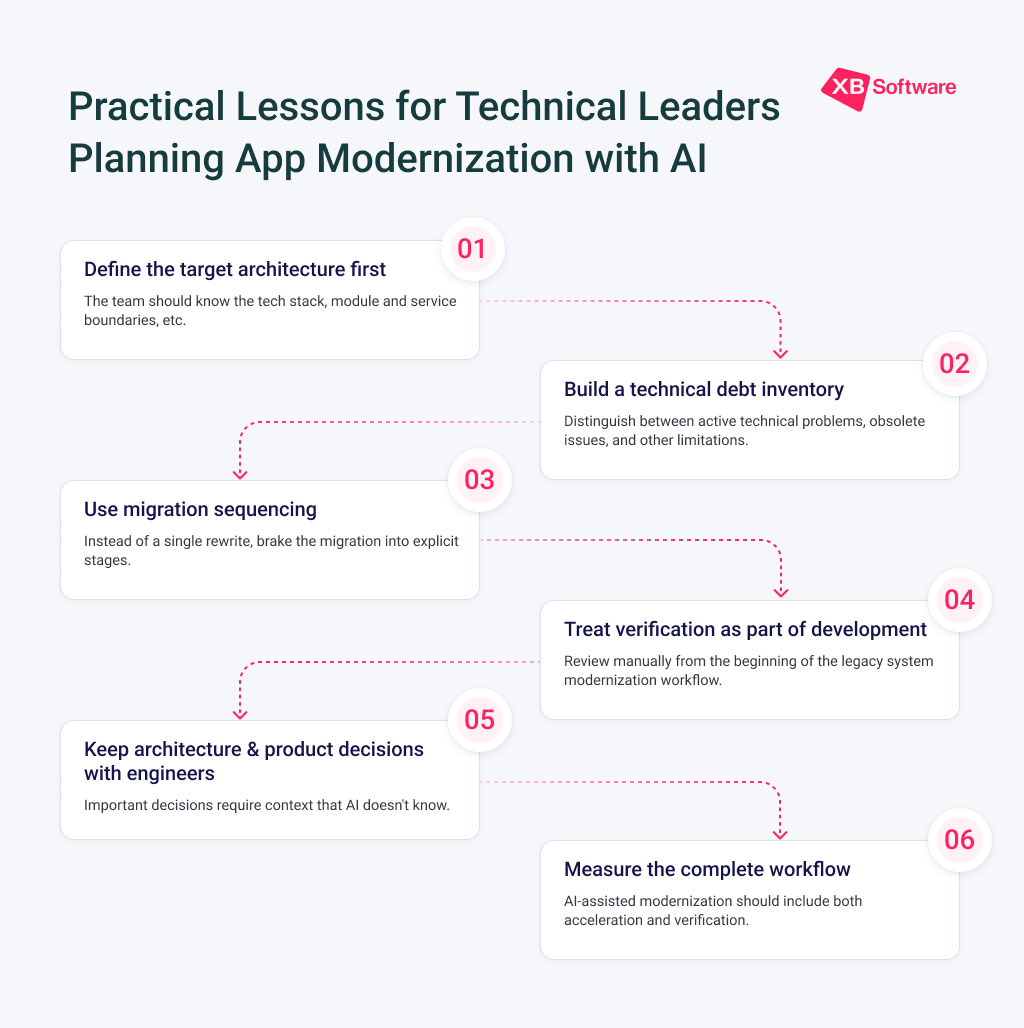
AI works much better when the team knows what the destination looks like.
“Modernize the application” is too broad. A target architecture should specify the intended technologies, module boundaries, service boundaries, build process, API contracts, and other architectural decisions that matter.
A modernization effort should distinguish between active technical problems, obsolete issues, architectural limitations, and behavior that must be preserved.
The existing issue tracker is not necessarily a reliable technical debt inventory. Some open issues may no longer apply after the architecture changes.
Incremental refactoring makes it easier to identify regressions and understand which change caused them.
In this project, the migration was broken into explicit stages: build tooling, frontend language and APIs, rendering technology, backend architecture, and testing.
Manual review should not be something added at the end because AI-generated code “needs checking.” It should be part of the legacy system modernization workflow from the beginning.
Tests, code review, behavioral comparison, and production validation all belong inside the migration plan.
AI can suggest several technically valid solutions. It cannot determine which behavior is important to customers, which tradeoff fits the product, or which architecture will be easiest for the team to maintain.
Those decisions require context.
A realistic AI-assisted modernization experience includes both acceleration and verification. Teams should measure:
- implementation time;
- AI tooling overhead;
- manual review time;
- correction effort;
- regression testing;
- production validation;
- and, where possible, changes in maintenance effort after modernization.
This gives technical leaders a much more useful picture than simply counting generated code or comparing the number of developer hours spent typing.
Read Also Why AI-Generated Code Still Needs Production-Level Engineering
Conclusion: Modernization Should Make the Product Easier to Change
The goal of legacy application modernization is to create a system that the team can understand, maintain, test, and change with greater confidence. This project showed that AI can make parts of that process faster. But it did not eliminate the difficult parts of modernization.
That is the practical role of AI for legacy code modernization: accelerate well-defined engineering work while leaving architectural judgment, product context, and production validation in human hands.
For mature SaaS products, this approach can make modernization more manageable. So, if you need a helping hand from seasoned engineers that have experience using AI as a valuable asset, contact us.